
Summary of Tutorials for Arduino Getting Acquainted with Arduino
Arduino is an open-source electronics prototyping platform for artists, designers, hobbyists, and makers. It uses a programmable microcontroller and the Arduino language/IDE to read sensors and control actuators, enabling standalone projects or computer-connected interactive systems. The article lists a series of Jeremy Blum tutorial videos covering basics through advanced topics (buttons, PWM, motors, serial/I2C/SPI, wireless, interrupts, SD logging, RFID, LCDs, GPS), with parts lists, code, and schematics available on his website.
Parts used in theGetting Acquainted with Arduino:
- Arduino board (generic Arduino microcontroller board)
- Assorted sensors (analog and digital sensors)
- Buttons
- LEDs and other lights
- Motors and transistors
- Serial communication interface (USB cable)
- I2C devices
- SPI devices
- Wireless communication modules
- SD card module
- RFID reader and cards
- Liquid crystal display (LCD)
- GPS module
- Assorted wires, breadboard, and prototyping hardware
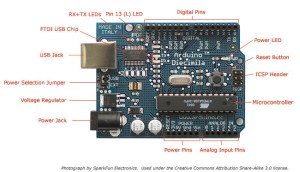
Arduino is an open-source electronics prototyping platform based on flexible, easy-to-use hardware and software. It’s intended for artists, designers, hobbyists, and anyone interested in creating interactive objects or environments.
Arduino can sense the environment by receiving input from a variety of sensors and can affect its surroundings by controlling lights, motors, and other actuators. The microcontroller on the board is programmed using the Arduino programming language (based on Wiring) and the Arduino development environment (based on Processing). Arduino projects can be stand-alone or they can communicate with software running on a computer (e.g. Flash, Processing, MaxMSP).
AttributesThanks to Jeremy , for this articles
Tutorial 01 for Arduino: Getting Acquainted with Arduino
You can download the parts list and the code from this episode on my website:
http://jeremyblum.com/2011/01/02/ardu…
Tutorial 02 for Arduino: Buttons, PWM, and Functions
You can download the parts list and the code from this episode on my website:
http://jeremyblum.com/2011/01/10/ardu…
Tutorial 03 for Arduino: Electrical Engineering Basics
You can download the parts list and the code from this episode on my website:
http://jeremyblum.com/2011/01/17/elec…
Tutorial 04 for Arduino: Analog Inputs
You can download the parts list, code, and schematics from this episode on my website:
http://jeremyblum.com/2011/01/24/ardu…
Tutorial 05 for Arduino: Motors and Transistors
You can download the parts list, code, and schematics from this episode on my website:
http://jeremyblum.com/2011/01/31/ardu…
Tutorial 06 for Arduino: Serial Communication and Processing
You can download the parts list, code, and schematics from this episode on my website:
http://jeremyblum.com/2011/02/07/ardu…
Tutorial 07 for Arduino: I2C Communication and Processing
You can download the parts list, code, and schematics from this episode on my website: http://jeremyblum.com/2011/02/13/ardu…
Tutorial 08 for Arduino: SPI Interfaces
You can download the parts list, code, and schematics from this episode on my website: http://jeremyblum.com/2011/02/20/ardu…
Tutorial 09 for Arduino: Wireless Communication
You can download the parts list, code, and schematics from this episode on my website: http://jeremyblum.com/2011/02/27/ardu…
Tutorial 10 for Arduino: Interrupts and Hardware Debouncing
You can download the parts list, code, and schematics from this episode on my website: http://jeremyblum.com/2011/03/07/ardu…
Tutorial 11 for Arduino: SD Cards and Datalogging
You can download the parts list, code, and schematics from this episode on my website: http://jeremyblum.com/2011/04/05/tuto…
Tutorial 12 for Arduino: RFID Card Reading
You can download the parts list, code, and schematics from this episode on my website: http://jeremyblum.com/2011/07/tutoria…
Tutorial 13 for Arduino: Liquid Crystal Displays (LCDs)
You can download the parts list, code, and schematics from this episode on my website: http://jeremyblum.com/2011/07/31/tuto…
Tutorial 14 for Arduino: Holiday Lights and Sounds Spectacular!
You can download the parts list, code, and schematics from this episode at element14: http://www.element14.com/community/do…
Tutorial 15 for Arduino: GPS Tracking
More info, including schematics, code, and sample data can be found on my website:
http://www.jeremyblum.com/2012/07/16/…
For more detail visit: Getting Acquainted with Arduino
- What is Arduino?
Arduino is an open-source electronics prototyping platform with flexible hardware and software for creating interactive objects or environments. - Can Arduino sense the environment?
Yes, Arduino can sense the environment by receiving input from a variety of sensors. - Can Arduino control motors and lights?
Yes, Arduino can affect its surroundings by controlling lights, motors, and other actuators. - What programming language and environment does Arduino use?
The Arduino programming language is based on Wiring and the development environment is based on Processing. - Are Arduino projects stand-alone or computer-connected?
Arduino projects can be stand-alone or communicate with software running on a computer such as Flash, Processing, or MaxMSP. - Where can I find parts lists, code, and schematics for the tutorials?
Parts lists, code, and schematics for the Jeremy Blum tutorials are available on his website as linked in each tutorial description. - Which topics do the Jeremy Blum tutorials cover?
The tutorials cover basics through topics like buttons, PWM, motors, analog inputs, serial/I2C/SPI communication, wireless, interrupts, SD logging, RFID, LCDs, and GPS. - Who is the intended audience for Arduino?
Arduino is intended for artists, designers, hobbyists, and anyone interested in creating interactive objects or environments.
