
Summary of Tyco RC Arduino Robot
This article outlines a DIY method to convert a Tyco RC Air Rebound car into an Arduino-controlled robot without expensive ICs or PCBs. The process involves disassembling the vehicle by removing batteries, wheels, and internal components like the arm and body casing. An Arduino Uno is then integrated with a soldering iron for modifications, utilizing the existing receiver module carefully. This approach offers a budget-friendly, rapid solution for building a wheeled robot with wireless control capabilities.
Parts used in the Tyco RC Arduino Robot:
- Tyco RC Air Rebound
- Philips Screw Drivers
- Arduino Uno
- Soldering Iron
- Plasticard
Wanted to make your own robot but couldn’t afford the fancy H-Bridge IC’s or etch your own PCB? Want a quick and dirty method of making your own wheeled robot? Then you’re in luck, but if you want to make your own wheeled robot AND have a quick and dirty wireless controller for anything then you’re REALLY in luck.
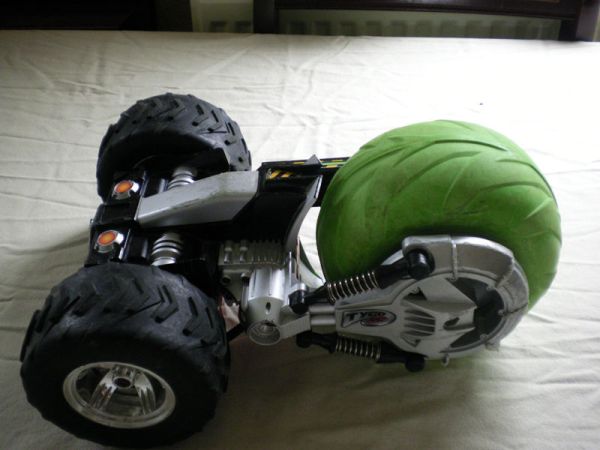
Required Items:
1 Tyco RC Air Rebound
2 Philips Screw Drivers one smaller than the other one, I don’t know the sizes of the ones I used.
1 Arduino Uno
1 Soldering Iron
Plasticard (Not used, but will be used in an update)
Step 1: : Removing Power
Switch the RC Car off and remove the battery by flipping it over (Switch facing down) and rotating the latches, and flipping the cover down. (If the car has already been switched off, or the battery removed, proceed straight to step 2)
Step 2: : Removing the drive wheels
Grip one of the two drive wheels with one hand (To keep them from moving) and with your free hand use a Philips head screwdriver to remove the wheel (Repeat for the other wheel)
Step 3: : Removing the big wheel
Grab the smaller of the two sides (if you have the battery compartment facing up and towards you, it’ll be on the left) Start unscrewing the front wheel (The green one). Once you’ve unscrewed that side flip it over and unscrew the other side.
Then flip it back over so the smaller of the two sides is facing you.
You should see five screws (Four in a square and one in a deep hole) remove all the screws then gently remove the side bar and the main wheel.
Step 4: : Pulling the arm off
If you wish to keep the receiver module in tact please be extremely careful on this step.
Look at the inside of the remaining bar and you should notice eight screws unscrew all of them then gently remove the shock absorbers and the small plastic shield or ‘hub cap’ to reveal the thin black wire.
Follow the wire gently pulling it free until you can’t pull anymore free then find the three screws holding it to the main body and remove those.
Once all the screws have been removed, gently remove the arm making sure you feed the wire into it so you can pull it free on the other side.
Step 5: : Undressing the body
Now you have the main body remaining.
There are six screws holding both halves of the body together.
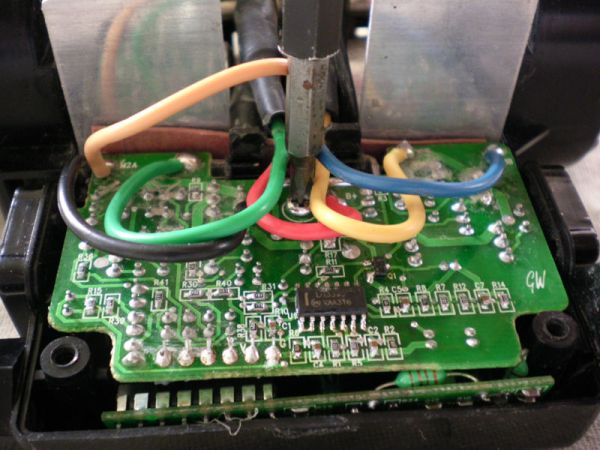
Four of the screws are the size we’ve been unscrewing through the previous steps, but two of the screws are slightly smaller, once all the screws have been removed the body just pops apart (Make sure you’ve unlatched the battery compartment)
1 Arduino Uno
1 Soldering Iron
For more detail: Tyco RC Arduino Robot
- How do I remove the battery from the RC car?
Switch the RC Car off, flip it over so the switch faces down, rotate the latches, and flip the cover down. - Can I keep the receiver module intact during disassembly?
Yes, but you must be extremely careful when pulling the arm off to avoid damaging the thin black wire connected to it. - What tools are required to remove the drive wheels?
You need a Philips head screwdriver and one hand to grip the wheel while using the other to unscrew it. - Which screws hold the main body halves together?
Six screws hold the body together; four are the standard size used previously, and two are slightly smaller. - Does this project require etching a PCB?
No, this guide provides a quick and dirty method specifically for those who cannot afford fancy H-Bridge ICs or want to avoid etching their own PCB. - What is the first step after switching the RC car off?
The first step is to remove the battery by flipping the car over and rotating the latches to open the cover. - How many screws are removed to take out the side bar and main wheel?
You need to remove five screws, which include four arranged in a square and one located in a deep hole. - Is Plasticard currently used in this version of the project?
No, Plasticard is listed as not used in the current steps but will be utilized in a future update.
