
Summary of Simple Wireless Sensor Network for Temperature Sensing
This article details a temperature sensing system developed by the author and Abhinav Gupta, upgrading from RF to Xbee communication. The project involves a sensor node transmitting data to a coordinator node, which displays the information graphically. Key components include Arduino boards with Xbee Series 2 shields and standalone Xbee radio modules configured via software like X-CTU for Windows or terminal emulators for Linux.
Parts used in the Simple Wireless Sensor Network for Temperature Sensing:
- Xbee Series 2 modules
- Arduino Board Shields
- Arduino Duemilanove board
- Arduino UNO board
- Standalone Xbee Radio Module
- X-CTU software (for Windows)
- Terminal software like HyperTerminal (for Linux)
This is one small project which I had done with Abhinav Gupta some months back. In this experiment, I graduate from using simple RF communication to Xbee!  Whoa!
Whoa! 
Ok, so here is the basic problem statement. I need to develop a temperature sensing system such that the temperature from the sensor node is relayed to a co-ordinator sensor and then the co-ordinator node shows the user in a simple graphical form.
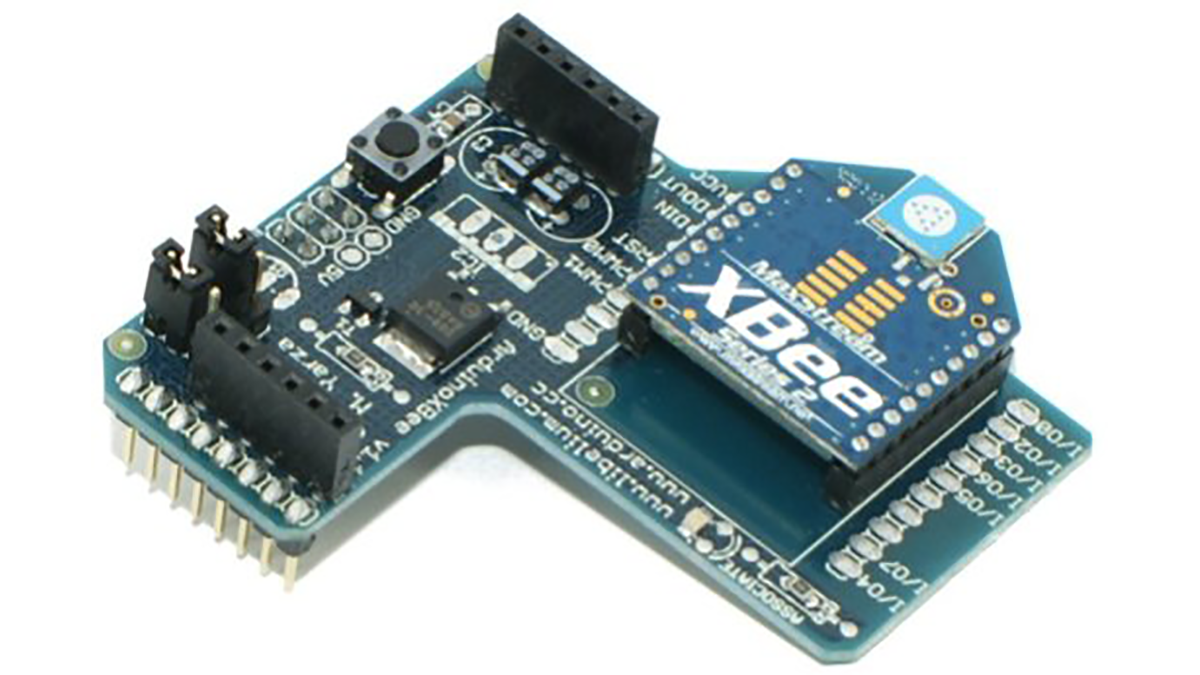
For the wireless communication, I used Xbee Series 2 modules with Arduino Board Shields. The shield looks like this :
The lower pins can be easily slided into an Arduino Duemilanove or even an Arduino UNO board. The shield is readily available on different portals selling electronics hardware related to Arduino boards. There are some XBee radios in the market which are almost the exact copy of the Xbee based radio modules (Open Source! ). Personally I wouldn’t recommend them for learning or experimental purposes because majority of the times, they are highly customised and they don’t give you freedom to work with the ones which are discussed in the community. This is a major backdrop of highly custom Zigbee protocol based shields. Buying the custom ones is always beneficial when they are going to be used for a specific operation. One more awesome thing about this shield is that you never lose out on the analog and digital pins of your micro-controller. There are female headers attached on the shield which basically allow you to easily connect the required circuitry to the arduino board. This shield doesn’t interfere with the working of the arduino board! Sweet!
Ok, now coming to the Xbee radio. The radio is available in three types, namely Xbee Series Pro, Series 1 and Series 2. For all experimental purposes, using Series 1 and Series 2 should be enough. Xbee Series Pro is basically used when you need to have a better range and your application is specific. I have worked with only Series 1 and Series 2 modules. Ok, once the radios are bought, we need to code them. We should understand that the radios usually don’t have memory to store “codes” as such. There is enough memory to store the values of many parameters but not specifically a “code”. How do we set those parameters to get the Xbee working? Well, windows users may use a free software named X-CTU , specifically developed to store the values of different parameters of your Xbee. For Linux users, they can use any terminal softwares like HyperTerminal. But some of the custom radios are such that we always need to use their prescribed software only! A standalone Xbee Radio Module looks like this:
For more detail: Simple Wireless Sensor Network for Temperature Sensing
- What is the main goal of this project?
To develop a temperature sensing system where data from a sensor node is relayed to a coordinator node for graphical display. - Which Xbee series are recommended for experimental purposes?
Xbee Series 1 and Series 2 should be enough for all experimental purposes. - Can the Xbee shield be used with an Arduino UNO?
Yes, the lower pins can be easily slided into an Arduino Duemilanove or even an Arduino UNO board. - Why does the author recommend against highly customized Zigbee protocol based shields?
They are often highly customised and do not give you freedom to work with the ones discussed in the community. - Does the Xbee shield interfere with the working of the Arduino board?
No, this shield doesn't interfere with the working of the arduino board. - What software do Windows users need to configure Xbee parameters?
Windows users may use a free software named X-CTU specifically developed to store the values of different parameters. - How do Linux users set Xbee parameters if they cannot use X-CTU?
Linux users can use any terminal softwares like HyperTerminal. - Where can the Xbee shield be obtained?
The shield is readily available on different portals selling electronics hardware related to Arduino boards.
