
Summary of DIY Arduino Wireless quadruped V2 crawling robot project
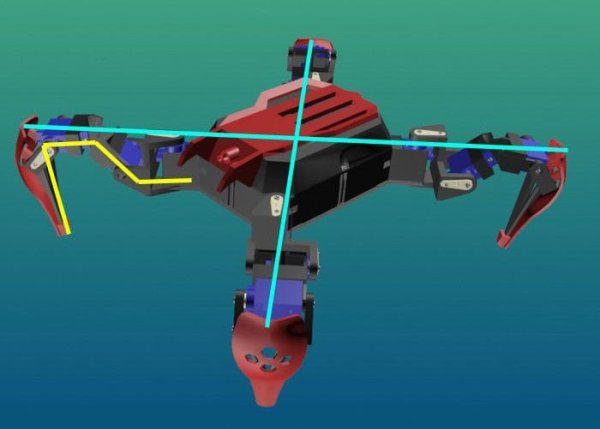
This article introduces a wireless, four-legged quadruped robot project by MusaW on Instructables. The 12 DOF crawling robot uses SG90 servos and is controlled via a WiFi web server through a smartphone browser. The creator selected the Wemos D1 Mini as the core controller to act as an Access Point for movement commands and potential future sensor dashboards.
Parts used in the Quadruped Robot:
- SG90 servo motors
- Wemos D1 Mini (NodeMCU variant)
- Smartphone with a browser
Makers, hobbyists and Arduino enthusiasts searching for a project to keep them busy this weekend may be interested in this awesome wirelessly controlled crawling robot project created by Instructables user MusaW. Check out the video below to learn more about the tutorial that provides all the instructions you need to make your own 12 DOF or four legged, quadruped robot using SG90 servo that can be controlled using a WIFI Web server via your smartphone browser.
“There is a lot of NodeMCU variant in the market and basically have the same functionality, for this project i choose Wemos D1 Mini. This part will be serve as a Web Servers for our quadruped as an Access Point. What u need is just connect to the Quadruped AP and control all the movement of your robot, and maybe for the future project it will displaying all the sensors dashboard you need..”
For more details on the Arduino crawling robot project jump over to the Instructables website by following the link below.
Source: Instructables
- What type of robot is described in the article?
A 12 DOF or four legged quadruped robot. - How can the robot be controlled?
It is wirelessly controlled using a WIFI Web server via a smartphone browser. - Which specific NodeMCU variant was chosen for this project?
The creator chose the Wemos D1 Mini. - What role does the Wemos D1 Mini play in the system?
It serves as a Web Server for the quadruped acting as an Access Point. - Do users need special software to control the robot?
No, users just need to connect to the Quadruped AP to control all movement. - What are the plans for future projects regarding sensors?
The creator plans to display a sensor dashboard on the web interface. - Where can readers find the full tutorial instructions?
The detailed instructions are available on the Instructables website.
