
Summary of Digispark DIY: The smallest USB Arduino
Digispark is a compact ATtiny85-based microcontroller board featuring USB connectivity and Arduino IDE compatibility. The article details the process of burning a Micronucleus bootloader using specific fuse bits, installing necessary USB drivers, and lists essential components for DIY projects.
Parts used in Digispark:
- AVRISP MKII In-System Programmer
- ATTINY85 Microcontroller
- 2 x 3.6V zener diode
- 2 x 68 ohm resistor
- 1 x 1.5K resistor
- USB cable
- Wires
Digispark is an ATtiny85 based microcontroller development board come with USB interface. Coding is similar to Arduino, and it use the familiar Arduino IDE for development.
Digispark is copyrighted by Digistump LLC (digistump.com) and the full license is here: http://digistump.com/wiki/digispark/policy
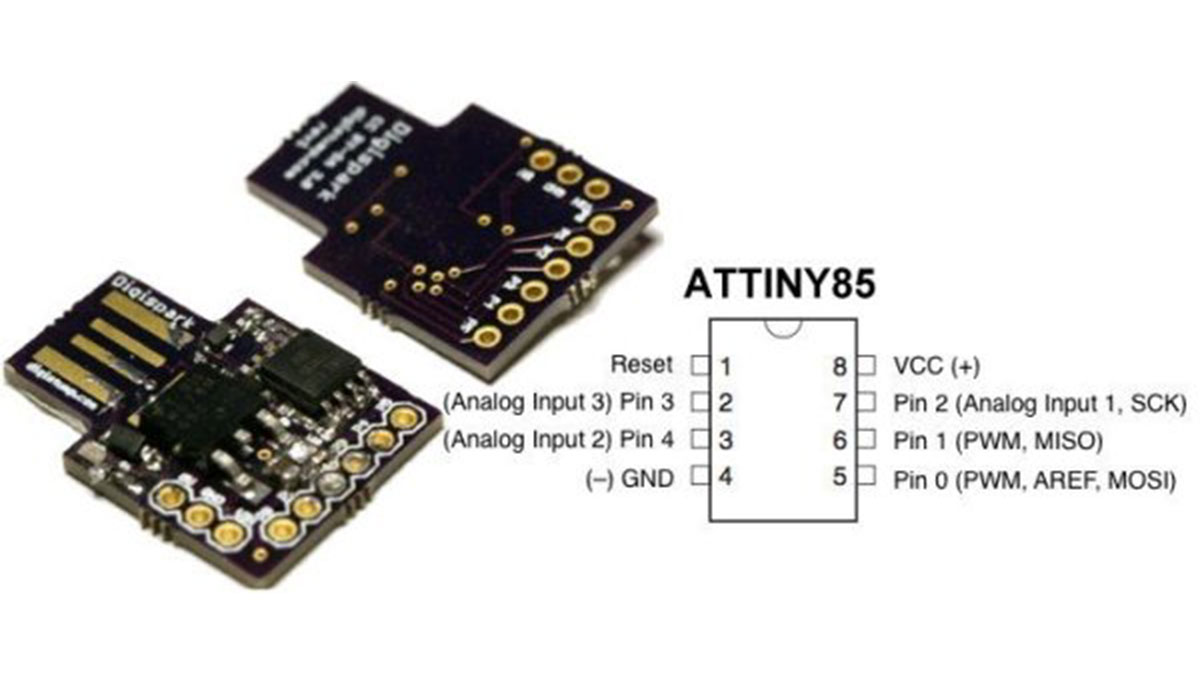
Specification:
Support for the Arduino IDE 1.0+ (OSX/Win/Linux)
Power via USB or External Source – 5v or 7-35v (automatic selection)
On-board 500ma 5V Regulator
Built-in USB (and serial debugging)
6 I/O Pins (2 are used for USB only if your program actively communicates over USB, otherwise you can use all 6 even if you are programming via USB)
8k Flash Memory (about 6k after bootloader)
I2C and SPI (vis USI)
PWM on 3 pins (more possible with Software PWM)
ADC on 4 pins
Power LED and Test/Status LED (on Pin0)
Step 2: Burning bootloader to ATTINY85
Like Arduino, Digispark require a bootloader to be running on ATTINY85. The bootloader will occupied 2KB flash memory.
Download bootloader
1. Download Micronucleus bootloader for ATTINY85
2. Extract the file (micronucleus-t85-master.zip) to any folder
3. You can find the bootloader file at micronucleus-t85-master\firmware\releases folder
4. Use micronucleus-1.06.hex for the bootloader
Burning bootloader to ATTINY85
You must use the correct fuses bit for the bootloader
Extended: 0xFE
High: 0xDD
Low: 0xE1
Note: The above fuse bit will not enable reset as I/O, so you can have only 5 I/O instead of 6 I/O. I’m still try to figure out on how to set it to 6 I/O
I’m using AVRISP MKII In System Programmer and AVR Studio software for burning bootloader.
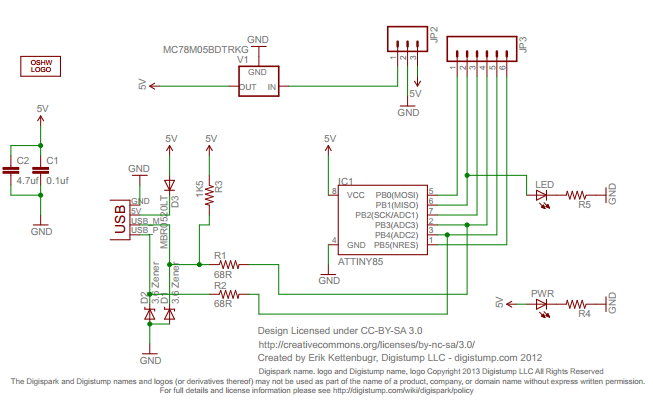
Step 3: Installing Digispark USB driver
Digispark use USB to communicate with computer, so your computer must install Digispark USB driver
1. Download Arduino for Digispark which come with USB driver
2. Extract the file (DigisparkArduino-Win32-1.0.4-March29.zip) to any folder
3. Execute DigisparkArduino-Win32\DigisparkWindowsDriver\InstallDriver.exe to start installing the USB driver
Prerequisite
AVRISP MKII In-System Programmer
ATTINY85 Microcontroller
2 x 3.6V zener diode
2 x 68 ohm resistor
1 x 1.5K resistor
USB cable (get from broken mouse or keyboard)
Some wires
For more detail: Digispark DIY: The smallest USB Arduino
-
What microcontroller does Digispark use?
Digispark is an ATtiny85 based microcontroller development board. -
How do you burn the bootloader to ATTINY85?
You must use the correct fuses bit: Extended 0xFE, High 0xDD, and Low 0xE1. -
Which software is required to install the Digispark USB driver?
You need to download Arduino for Digispark which comes with the USB driver. -
Can all 6 I/O pins be used during programming via USB?
Only 5 I/O pins are available if reset is not enabled as I/O; otherwise, all 6 can be used if the program does not actively communicate over USB. -
What is the power input range for Digispark?
It supports power via USB or External Source ranging from 5v or 7-35v with automatic selection. -
How much flash memory does the Digispark have after the bootloader?
It has about 6k flash memory remaining after the bootloader occupies 2KB of the 8k total. -
What tool is recommended for burning the bootloader?
The author uses AVRISP MKII In System Programmer and AVR Studio software.
