
Summary of Solderless Breadboard Layout Sheets (plug and play electronics) using arduino
This article introduces a system for creating custom, to-scale breadboard layout templates using vector graphics. Users can either utilize Inkscape software or print PDF versions of component and circuit libraries to assemble physical guides. By pinning these templates to a breadboard, users can quickly place components and wires, ensuring accurate layouts and easy rework if connections fail.
Parts used in the Breadboard Layout System:
- Vector drawing program (Inkscape)
- Solderless breadboard
- Component library files (.svg or .pdf)
- Circuit library files (.svg or .pdf)
- Printed templates
- Scissors
- Glue
- Pins
- Electronic components
- Wires
Here’s a fun system designed to take care of some of the headaches involved in breadboarding a circuit.
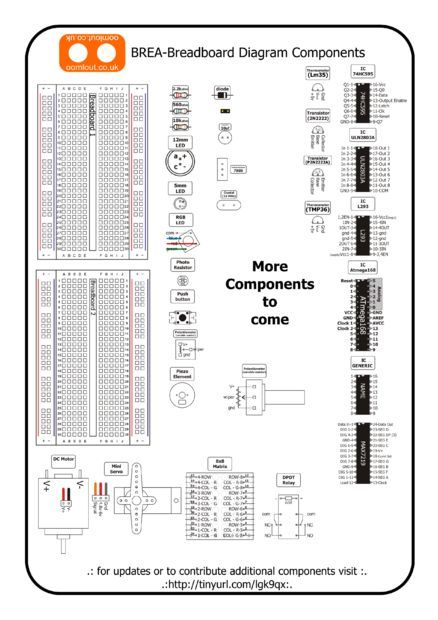
It is is a simple set of template files drawn to scale with real world electronic components.
Using a vector drawing program you simply move the components onto the breadboard template, draw a few wires and print the result (if you’re old school you can print the template and use scissors and glue).
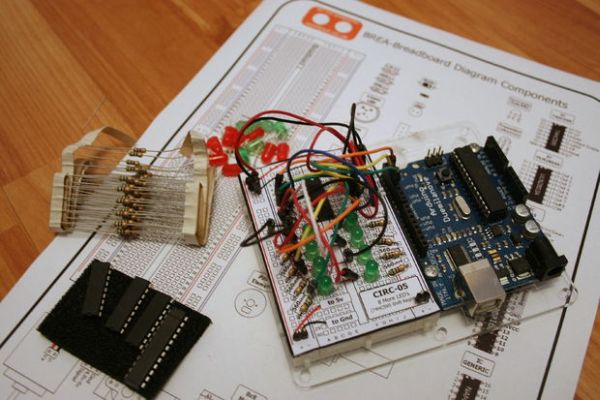
Pin the template to your breadboard, place the components and wires, and you’re good to go. Better yet if a wire later falls out its easy to pop it back into place.
Looking to skip ahead?
The Component Library can be found here
The Circuit Library can be found here
(shameless plug)
Like the breadboard layout sheet idea and looking to play around with an Arduino? we make a fun kit that combines the two. (in the UK it can be purchased here anywhere else in the world it can be purchased here)
(second shameless plug)
In the UK and looking for an online shop that sells delightfully fun open source products feel free to check out our web store here .:oo
Step 1: Software
There are two options for this step. One a little ahead of its time and the other a little past its time.
Option 1 – Inkscape (modern)
Inkscape is an Open Source vector drawing program. Its a little rough around the edges at the moment but it is only getting better, and when looked at in its entirety pretty impressive.
-
- Download Inkscape from inkscape.org
- Install
- Download the component library in Inkscape (.svg) format on the next step
- Copy and paste components and move them around (use the arrow keys the nudge is set to 0.1″ so you’re components will all stay alligned)
Option 2 – Cut & Paste (old school)
Along with the Inkscape format all the files in this instructable are also available as .pdf. What this means is you can download the PDF print it out and then use old fashioned glue, scissors and pen to make your templates. Or you can also download pre-drawn circuits from step 3.
For more detail: Solderless Breadboard Layout Sheets (plug and play electronics)
- How do I create a custom breadboard template?
You can use Inkscape to move scaled components onto a breadboard template and draw wires, or download PDFs to cut and paste with scissors and glue. - Can I use this system without a computer?
Yes, you can download the files as PDFs, print them out, and use old-fashioned scissors and pen to make your templates. - What software is recommended for modern users?
Inkscape is the recommended open-source vector drawing program for this project. - How do I ensure components stay aligned when moving them?
The nudge setting in Inkscape is set to 0.1 inches so that components will all stay aligned when using arrow keys. - Where can I find the component library files?
The Component Library is available for download in Inkscape (.svg) format. - What should I do if a wire falls out during assembly?
It is easy to pop the wire back into place since the template allows you to see the correct location. - Are there pre-drawn circuits available?
Yes, you can download pre-drawn circuits from step 3 along with the component files. - Is there a kit that combines this idea with an Arduino?
Yes, the authors offer a fun kit that combines the breadboard layout sheet idea with an Arduino.
