
Summary of Create Arduino projects using the Opla IoT Kit and Arduino Cloud
Robert John built an IoT room condition monitor using the Arduino Oplá Kit and Arduino Cloud. This device tracks temperature and humidity, logs data remotely, and controls air conditioning. It features a motion-activated display that shows real-time data when someone is near and turns off otherwise.
Parts used in the IoT Room Condition Monitor:
- Arduino Oplà IoT Kit
- MKR WiFi 1010
- MKR IoT Carrier with built-in screen and capacitive buttons
- PIR sensor for detecting motion
- Arduino Create Maker Plan subscription
Makers and electronic enthusiasts looking for inspiration for their next project maybe interest is in a new build created by Robert John. Using the Arduino Oplá IoT Kit and Arduino Cloud, Robert has created an Internet of Things room condition monitor capable of providing feedback on a number of different data points as well as being able to remotely turn on/off his air-conditioning.
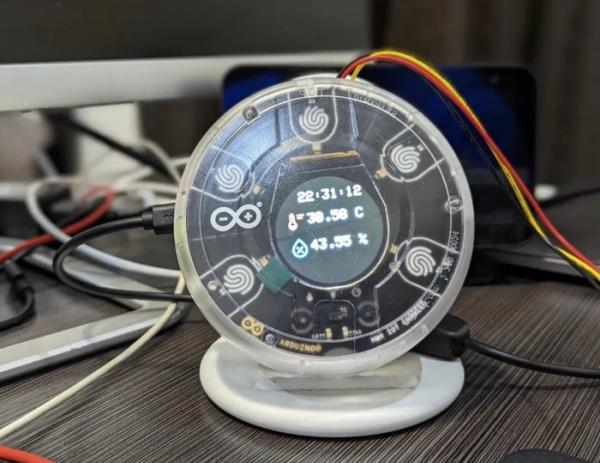
“Robert John likes to keep a constant eye on the current temperature and humidity of his room, as even small fluctuations can lead to uncomfortable conditions. And although he can remotely turn the air conditioning on or off, he still needed a way to track these values throughout the day and log them for future reference.”
The Oplà Kit contains all the necessary components to build eight connected applications and also includes a 12 month subscription to the Arduino Create Maker Plan.
Arduino Cloud IoT room monitor
“To create this smart device, Robert used an Arduino Oplà IoT Kit, as it contains a MKR WiFi 1010, a MKR IoT Carrier with a built-in screen and capacitive buttons, and a PIR sensor for detecting motion. Once connected together, he then configured a new dashboard in the Arduino IoT Cloud with two variables for the temperature and humidity, which are updated once every minute by the MKR WiFi 1010.”
“I can turn the air conditioning on and off remotely, but I need to know the room’s state. I have decided to write a program that will provide this information using the Arduino Opla IoT Kit. The device will display this information when I am close to it, and turn off the screen when I am not. It will also log the temperature and humidity to the Arduino IoT Cloud, and I can monitor this remotely. Follow along to recreate this project.”
Source: Create Arduino projects using the Opla IoT Kit and Arduino Cloud
- What components are included in the Oplà Kit?
The kit contains a MKR WiFi 1010, a MKR IoT Carrier with a built-in screen and capacitive buttons, and a PIR sensor. - How often does the device update temperature and humidity?
The variables are updated once every minute by the MKR WiFi 1010. - Can users control their air conditioning remotely?
Yes, the system allows users to turn the air conditioning on or off remotely. - What happens to the screen when no one is detected?
The device turns off the screen when the PIR sensor detects no motion. - Where is the environmental data logged?
Temperature and humidity values are logged to the Arduino IoT Cloud. - Does the kit include a cloud subscription?
Yes, it includes a 12 month subscription to the Arduino Create Maker Plan. - Why did Robert build this specific project?
He wanted to track room state fluctuations and log data since he could not see the current conditions while controlling the AC remotely. - How many applications can the Oplà Kit support?
The kit contains all necessary components to build eight connected applications.
