
Summary of Arduino GIGA Display Shield Has Microphone, IMU and Supports Multitouch
The Arduino GIGA Display Shield adds a 3.97” 480×800 RGB multitouch display (up to five touchpoints, gestures, 16.7M colors) to the Arduino GIGA R1 WiFi. It mounts to the board’s rear low black pin sockets so top-side connectors remain accessible, and includes a 20-pin Arducam camera connector, STMicroelectronics MP34DT06JTR digital microphone, Bosch BMI270 6-axis IMU, and an RGB LED. The shield has its own mounting holes and encloses the GIGA R1, enabling compact, powerful display-based projects like video intercoms or portable devices with motion sensing.
Parts used in the Arduino GIGA Display Shield:
- 3.97 inch RGB touch screen, 480 × 800 pixels, 16.7 million colors
- Multitouch controller (supports gestures and up to five simultaneous touchpoints)
- Arducam 20-pin camera connector (two-sided type)
- MP34DT06JTR omnidirectional digital microphone (STMicroelectronics)
- Bosch BMI270 6-axis Inertial Measurement Unit (IMU)
- RGB LED
- Mounting holes and enclosure hardware (integrated shield housing)
- Connector interface to GIGA R1 WiFi low black pin sockets (backside connection)
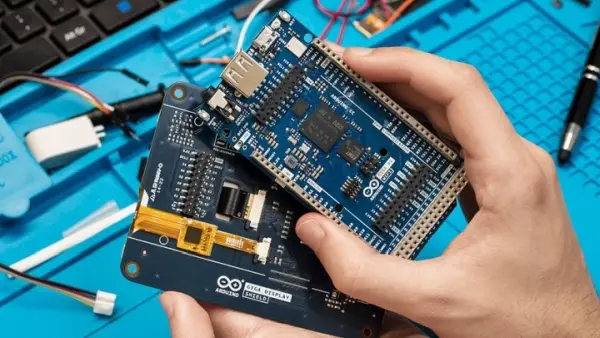
Good news for users of the The Arduino GIGA R1 WiFi board: you can now add a nice touch display to your board with minimum effort thanks to the brand-new Arduino GIGA Display Shield. It provides a 3.97” RGB touch screen with 480 × 800 pixels and capable of producing 16.7 million colors. The touch screen is multitouch enabled and supports gestures and up to five simultaneous touchpoints.
Not Just a Display
Besides the display, the shield also has an Arducam 20-pin camera connector, an MP34DT06JTR omnidirectional digital microphone from STMicroelectronics, a Bosch BMI270 6-axis Inertial Measurement Unit (IMU) and an RGB LED.
It Connects to the Back
The GIGA Display Shield connects to the two low, black pin sockets of GIGA R1 WiFi, but through the backside. This is possible because these sockets are accessible from both sides of the GIGA R1. This means that the extension connectors of the GIGA R1 on the top side remain accessible. Therefore, the display shield does not conflict with other extension shields.
Powerful Touch Display Unit
The GIGA Display Shield is larger (11.8 cm × 9 cm × 4 cm) than the GIGA R1 WiFi and completely hides it from view. As it has its own mounting holes, it turns the GIGA R1 into a nice, powerful display module that is easy to embed instead of a clumsy stack of Arduino shields. The GIGA R1 with its ARM Cortex-M7 and Cortex-M4 cores has plenty of processing power for creating high-quality graphics and animations.
The GIGA Display Shield Has a Camera Connector
As mentioned earlier, the shield also has a 20-pin camera connector. It is the same type of two-sided connector as on the GIGA R1 board. The RGB LED can indicate, for instance, if the camera or microphone are on. Building your own Wi-Fi video intercom or cloud dashboard has never been easier.
The IMU is suitable for portable and handheld devices, but can also be used in static applications for vibration or shock detection.
Source: Arduino GIGA Display Shield Has Microphone, IMU and Supports Multitouch
- What display does the Arduino GIGA Display Shield provide?
A 3.97 inch RGB touch screen with 480 × 800 pixels capable of 16.7 million colors. - Does the shield support multitouch?
Yes, it is multitouch enabled and supports gestures and up to five simultaneous touchpoints. - How does the shield connect to the GIGA R1 WiFi?
It connects to the two low, black pin sockets from the backside, using the sockets that are accessible from both sides of the GIGA R1. - Will the display shield block other extensions on the GIGA R1?
No, because it connects from the backside the top-side extension connectors remain accessible and it does not conflict with other shields. - What additional sensors and connectors are included on the shield?
It includes an Arducam 20-pin camera connector, an MP34DT06JTR digital microphone, a Bosch BMI270 6-axis IMU, and an RGB LED. - Can the RGB LED indicate device states?
Yes, the RGB LED can indicate states such as whether the camera or microphone are on. - Is the GIGA R1 powerful enough to drive the display?
Yes, the GIGA R1 has ARM Cortex-M7 and Cortex-M4 cores providing plenty of processing power for high-quality graphics and animations. - What size is the GIGA Display Shield and how does it affect the GIGA R1 appearance?
The shield is 11.8 cm × 9 cm × 4 cm and fully covers the GIGA R1, turning it into a compact display module with its own mounting holes. - Is the IMU suitable for portable devices?
Yes, the BMI270 IMU is suitable for portable and handheld devices and can also be used in static applications for vibration or shock detection.
