
Summary of Mobile Phone Controlled Robot Car using G-Sensor and Arduino
This project demonstrates how to control a robot car using a smartphone's G-sensor via the RemoteXY app and an Arduino UNO. By tilting the phone, users can move the car forward or backward, mimicking mobile racing games. The system also includes a virtual joystick in the app interface for manual control. Communication between the phone and the robot is established using an HC-06 Bluetooth module, while the L298N motor driver manages the wheels.
Parts used in the G-Sensor Controlled Robot Car:
- Two wheel robot car chassis
- Arduino UNO
- L298N Motor Controller
- HC-06 Bluetooth module
- Power supply or Cells
- Connecting wires
- RemoteXY app
In this article, we are going to Control the Robot Car through the G sensor of our mobile phone and you will be able to move the Robot just by tilting the Phone. We will also use Arduino and RemoteXY app for this G-Sensor Controlled Robot. RemoteXY app is used to create the interface in the Smart Phone for controlling the Robot. We will add the joystick in the interface so that Robot can also be controlled by Joystick as well as by tilting the phone.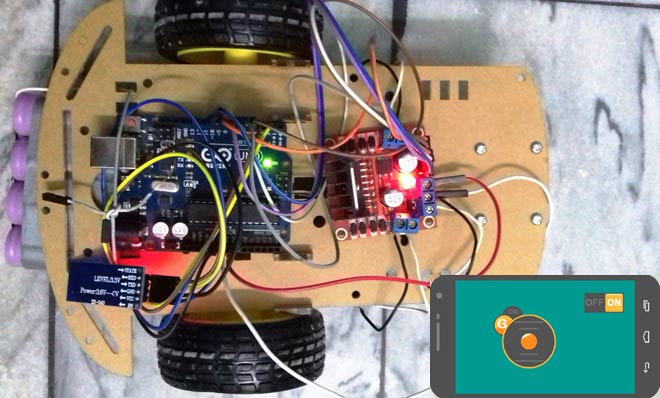 G-Sensor or Gravity sensor is basically Accelerometer in Smart phone which is used to control the screen orientation of the phone. Accelerometer senses the X,Y, Z directions of the Gravitational force and rotate the Screen according to alignment of the Phone. Now days, more sensitive and accurate Gyroscope sensor is used in mobiles for deciding the orientation of the Screen. In our Project, Robot car will move, according to the direction in which phone is being tilted, like when we tilt the phone forward, then car will move forward and we tilt it down then car will move backward. This is same like when we play some car games in Mobile, they also use G sensor to move the car accordingly. Check the Video at the end, also check our other Robotics Projects here.
Required Components:
- Two wheel robot car chassis
- Arduino UNO
- L298N Motor Controller
- HC-06 Bluetooth module (HC-05 will work too)
- Power supply or Cells
- Connecting wires
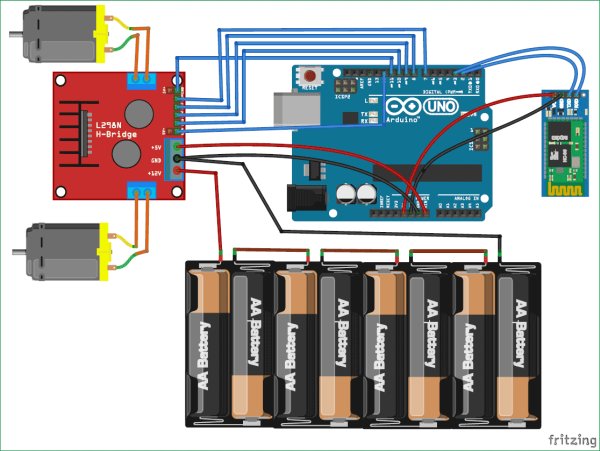
For More Detail:
- How can I control the robot car?
You can control the robot by tilting your phone or using a joystick added to the RemoteXY app interface. - What happens when I tilt the phone forward?
The robot car will move forward when you tilt the phone forward. - Does the project use a gyroscope sensor?
No, this project uses the G-sensor or Accelerometer which senses X, Y, Z directions of gravitational force. - Which app is used to create the interface?
The RemoteXY app is used to create the interface on the smartphone for controlling the robot. - Can I use an HC-05 module instead of HC-06?
Yes, the HC-05 Bluetooth module will work too in place of the HC-06. - What component drives the motors of the robot?
The L298N Motor Controller is used to drive the motors of the robot car. - What microcontroller is required for this project?
An Arduino UNO is required to process the signals and control the robot.
