
Summary of WiFi-enabled Color LED Matrix using ESP8266 and WS2812 LEDs
The author upgraded a 5×7 LED matrix design from an Arduino-based system to one controlled by an ESP8266 WiFi chip. This modification allows users to send animation frames via JavaScript and HTTP GET API commands, enabling real-time control without re-uploading code. The project supports mobile usage for wearable electronics and aims for future video streaming capabilities.
Parts used in the WiFi-enabled Color LED Matrix:
- 5×7 WS2812 (NeoPixel) LEDs
- ESP8266 WiFi chip
- Firmware with HTTP GET API
Last Thursday I had a lot of fun doing a workshop at my college (UMass Amherst) where I taught students to use a WiFi-enabled Color LED matrix combined with Javascript programs to create animations displayed onto the LED matrix. The matrix is made of 5×7 WS2812 (NeoPixel) LEDs. I’ve actually designed it two years ago and wrote a blog post about it. Back then I was using an Arduino-compatible SquareWear Mini to control the display patterns. It was fun to play with, but changing the display patterns require modifying the Arduino sketch and upload it over and over again, which took a lot of time.
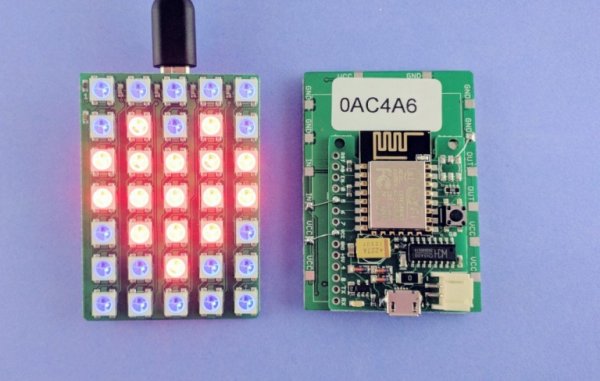
This time, I improved the design by simply using a ESP8266 WiFi chip mounted at the back of the LED matrix. I wrote a firmware with a minimal set of HTTP GET API, with which you can set all pixels colors, set the brightness, or tell it to scroll a line of text. What’s cool about it is that you can now use Javascripts to send animation frames to it on the fly, which is a lot easier compared to re-writing and uploading an Arduino sketch. In addition, you can take the LED matrix on the go and use your mobile phone to control it, which is nice for wearable electronics.
The video below goes through the details. Take a look at it first. Essentially, combining ESP8266 with the LED matrix makes a little wireless display. The next thing I should work on is to figure out how to stream video to it. It’s going to be very very low resolution for sure, but it’s gonna be fun, and I can always daisy chain multiple matrices to make a larger display.
Read more: WiFi-enabled Color LED Matrix using ESP8266 and WS2812 LEDs
- How can I change display patterns on this device?
You can use Javascript to send animation frames or utilize HTTP GET API commands to set colors and brightness. - What is the main improvement over the previous Arduino design?
The new design eliminates the need to constantly modify and upload sketches by using WiFi and JavaScript. - Can I control the matrix using a mobile phone?
Yes, you can take the matrix on the go and control it with your mobile phone due to its wireless capabilities. - What functions does the HTTP GET API support?
The API allows setting all pixel colors, adjusting brightness, and scrolling lines of text. - What type of LEDs are used in the matrix?
The matrix is constructed using 5×7 WS2812 or NeoPixel LEDs. - What is the next planned feature for this project?
The author plans to figure out how to stream low-resolution video to the display. - Can multiple matrices be connected together?
Yes, you can daisy chain multiple matrices to create a larger display.
