
Summary of TOG: The Ultra-Small Bluetooth and capacitive enabled Button
The Tog system features an ultra-small base module with a PCB, battery, and optical sensor in a transparent enclosure. It expands via magnetically attached modules like the Frame, IR, and Header TogMods, connected by six spring pins without screws. The IR module turns iPhones into remote controls, while the Header module offers a Bluetooth-to-serial converter for projects.
Parts used in the Tog System:
- Densely packed PCB assembly
- Battery
- Modular expansion bus
- Ultra-small plastic enclosure
- Internal LED
- Optical sensor
- Magnetically attached TogMod modules
- Polarized magnets
- Six spring pins
- Double sided tape
- 5-pin header
The Tog base module contains a densely packed PCB assembly, battery, and modular expansion bus in a ultra-small plastic enclosure. The base module can operate standalone with no additional components required. The front of the Tog enclosure is transparent to allow the internal LED to be visible and allow the optical sensor to detect button presses.
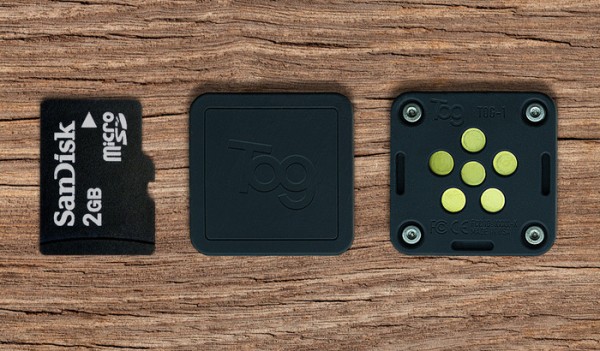
TogMod Expansion modules
TogMods are magnetically attached modules that extend the functionality of Tog. Simply click them together, no screws are necessary. Polarized magnets and alignment features ensure you can only assemble them right way. All connections are made between the modules with six spring pins to ensure long life and ease of use.
Frame TogMod
Simply stick the frame on any surface with the double sided tape and magnetically attach Tog to keep it in easy reach when its needed.
IR TogMod
Do you ever search for the remote to turn off the TV or other device? Tog enables your previously IR deficient iPhone to do just that. Replace those bulky remotes and step into the 21st century. We will have an example iOS infrared remote app upon shipping. Use the Frame Togmod to attach the Tog and IR TogMod over your TV’s IR port.
Header TogMod
Use Tog on your own projects with the Header TogMod. Just place the included 5-pin header into your breadboard and tinker away. Connect 1.8V-5V power and you will have a simple bluetooth to serial converter. Select between RX/TX, I2C SCL/SDA, or SWD/SWCLK using the SEL pin.
For More Details: TOG: The Ultra-Small Bluetooth and capacitive enabled Button
- How does the Tog base module operate?
The base module can operate standalone with no additional components required. - Can you assemble TogMods without screws?
Yes, simply click the magnetically attached modules together as no screws are necessary. - What ensures correct assembly of TogMods?
Polarized magnets and alignment features ensure you can only assemble them the right way. - How many spring pins connect the modules?
All connections are made between the modules with six spring pins. - What is the function of the IR TogMod?
It enables an iPhone to act as an infrared remote control for devices like TVs. - How do you attach the Frame TogMod?
Stick the frame on any surface with double sided tape and magnetically attach Tog. - What voltage range supports the Header TogMod?
You connect 1.8V-5V power to use it as a simple bluetooth to serial converter. - Which communication protocols can be selected using the SEL pin?
You can select between RX/TX, I2C SCL/SDA, or SWD/SWCLK.
