
Summary of Rock Paper Scissors Spock Lizard using Arduino
This Instructable details an Arduino-based Rock Paper Scissors Lizard Spock game using an 8x8 LED matrix. The project displays graphics for five game choices and outcomes, allowing a human player to compete against the computer. It utilizes a Max7219 driver to control the display and five push buttons for user input, following the specific winning rules established by Sam Kass and Karen Bryla.
Parts used in the Rock Paper Scissors Lizard Spock Game:
- Max7219 8x8 Matrix LED
- Anarduino An Arduino Compatible 24 DIP model kit
- BreadBoard with Power Supply
- Module Wiring Various Dupont Wire Connector Cables
- Push Button Switch (5 needed)
- 2.1mm DC Pwr Jack
- #2 hardware including ½ inch bolts
- 10K Ohm Resistor (5 needed, 1/8W or 1/4W)
- Molex Headers Item G18974
- Case enclosure MB-173
- Arduino UNO
Introduction:
Okay, I cheated. Any similarities between previous Instructables uploaded by me and the graphics, pictures, text and / or programming code is purely intentional. It certainly made putting this one together a whole lot easier.
This Instructable is my Arduino version of the Rock Paper Scissors Lizard Spock game devised by Sam Kass and Karen Bryla.
I followed their rules so it has the same game play as they came up with, and if you have played it before, you’ll know what I mean.
Here’s a video of it in action but it does not show every condition of wins or losses, just a representation of some of the possibilities.
Rock Paper Scissors Spock Lizard
Step 1: Explanation of graphics:
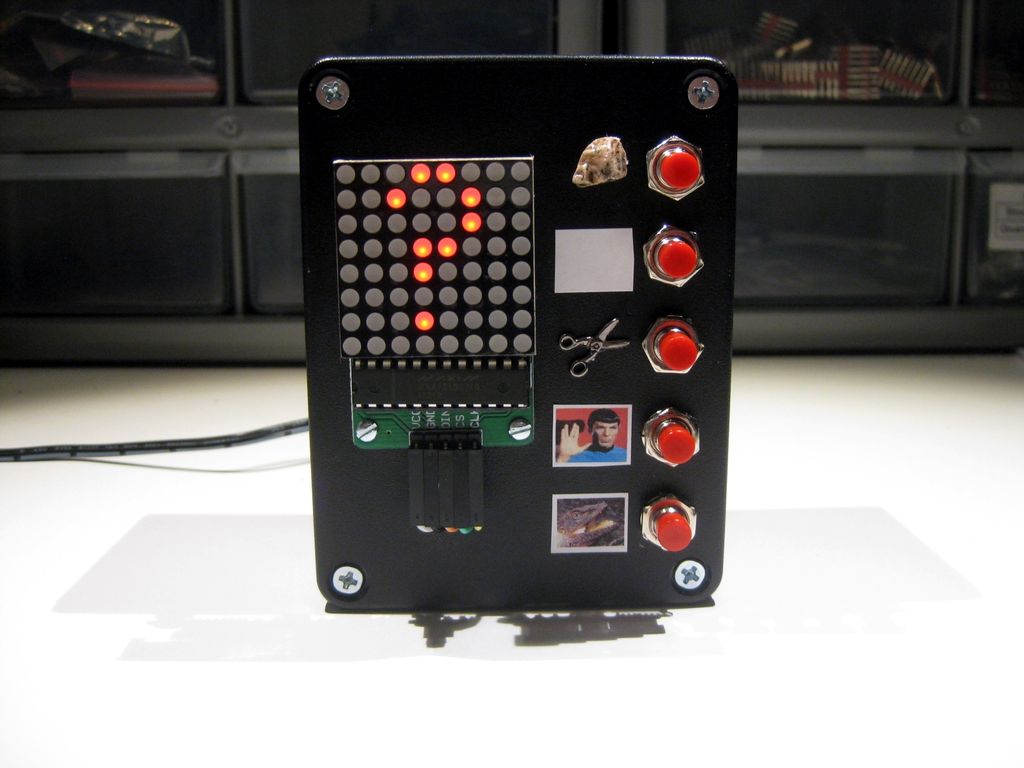
For those of you who want a detailed description of what you see on the 8×8 LED matrix, here’s a breakdown on the graphics:
The “?” is the challenge…ready for your input.
The “C” is the computer.
The “U” is you the human player.
The ball like object is the rock.
The straight horizontal line is the paper.
The broken “X” is the scissors.
The fancy “V” is Spock (Vulcan). It’s a cross between a fancy “V” and the opened fingers.
The thing that looks like a hand puppet is the Lizard.
Winning conditions:
Rock smashes Scissors… Rock Wins!
Rock smashes Lizard..Rock Wins!
Paper covers Rock… Paper Wins!
Paper disproves Spock… Paper Wins!
Scissor cuts paper… Scissors Win!
Scissors decapitates Lizard… Scissors Win!
Spock vaporizes Rock… Spock Wins!
Spock smashes Scissors…Spock Wins!
Lizard eats Paper… Lizard Wins!
Lizard poisons Spock… Lizard Wins!
Others:
The thing that sort of looks like a bow tie is a Tie!
Lastly, the “W” stands for Win.
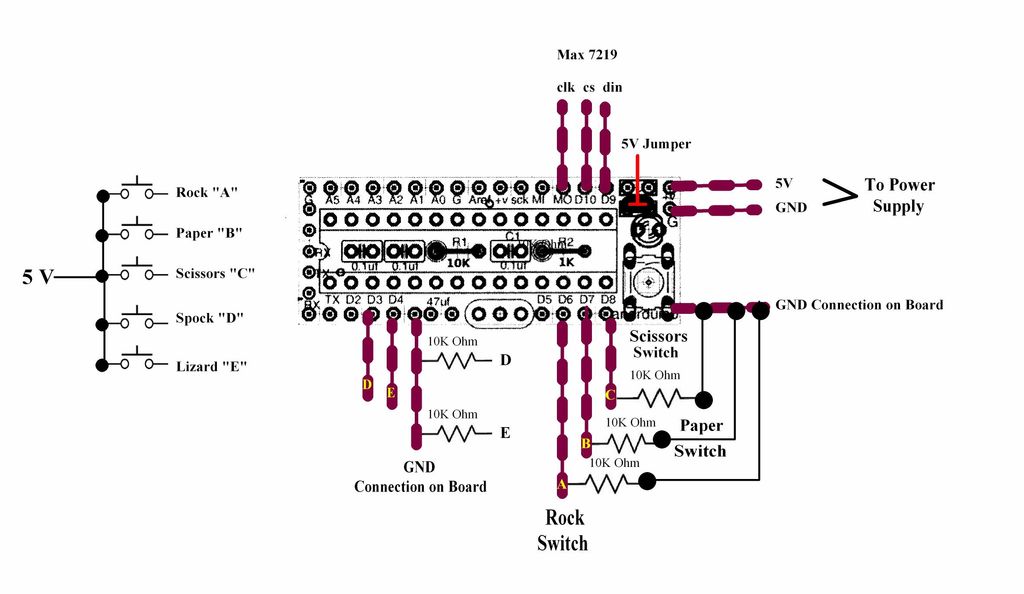
Step 2: Parts
Max7219 8×8 Matrix LED
Anarduino An Arduino Compatible 24 DIP model kit
BreadBoard P.S. Breadboard Power Supply
Module Wiring Various Dupont Wire Connector Cables
Push Button Switch 5 needed
2.1mm DC Pwr Jack
#2 hardware I use ½ inch bolts to mount parts on case. Check out jameco.com
10K Ohm Resistor 5 needed 1/8W or 1/4W
Molex Headers Item G18974 at Electronic Goldmine
Case enclosure MB-173 at allelectronics.com
Arduino UNO Used to program ATMEGA328P chip
For more detail: Rock Paper Scissors Spock Lizard using Arduino
- What is the purpose of the ? graphic?
The question mark represents the challenge ready for your input. - How does the computer indicate its choice?
The letter C on the display stands for the computer. - Which symbol represents Spock?
A fancy V that looks like a cross between a fancy V and opened fingers represents Spock. - Does paper win against rock?
Yes, paper covers rock so paper wins. - Can lizard poison spock?
Yes, lizard poisons spock so lizard wins. - What does the bow tie shape signify?
The bow tie shape indicates a Tie. - How many push button switches are required?
You need 5 push button switches for this project. - What resistor value is needed for the circuit?
You need five 10K Ohm resistors rated at 1/8W or 1/4W. - Where can I find the Molex Headers?
The Molex Headers are listed as Item G18974 at Electronic Goldmine. - What chip does the Arduino UNO use?
The Arduino UNO is used to program the ATMEGA328P chip.
