
Summary of Simple 3 Button On-off With 12f629 (mikroC)
This article details a MikroC project using a PIC12F629 microcontroller to create three independent on-off switches. The code implements a latching relay logic where a single button press toggles an LED state, utilizing internal variables to track the current status. The setup involves configuring GPIO pins as inputs for buttons and outputs for LEDs, with specific pin assignments defined in the TRISIO register.
Parts used in the 3 Button On-off With 12f629:
- PIC12F629 Microcontroller
- MikroC Compiler
- Three Push Buttons
- Three LEDs
- Resistors (implied for circuit protection)
- Power Supply
a simple 3 buttons on-off with pic12f629.
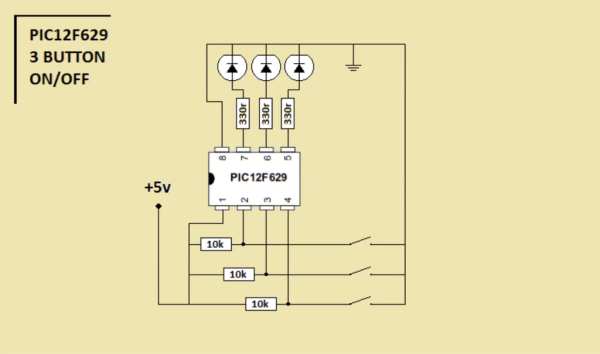
it’s written with MikroC
Step 1: The Code…
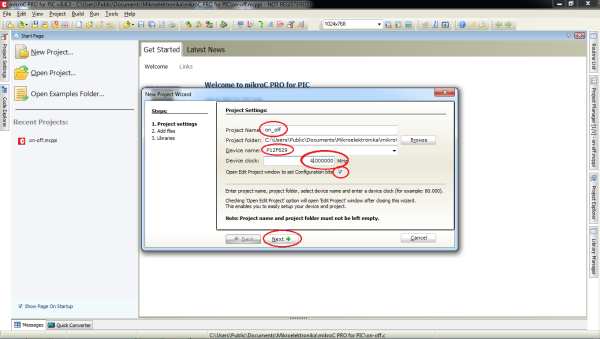
start the code with ”int”
———————————————————-
int x0,x1,y0,y1,z0,z1; ////// with this the GPIO outputs could stay on or off
void main() {
GPIO = 0x00; ////// all outputs are 0
CMCON = 0x07; ////// Disable CMCON PORT
TRISIO = 0b00111000; ////// inputs-outputs setup, 0=output 1=input (3 outputs/3 inputs)
x0=1;x1=0; ////// when the PIC starts x0=1,x1=0
y0=1;y1=0; ////// when the PIC starts y0=1,y1=0
z0=1;z1=0; ////// when the PIC starts z0=1,z1=0
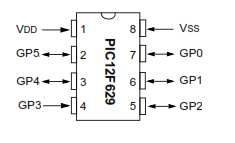
while (1)
{
if ((GPIO.GP5==0)&&(x0==1)) ////// if the GPIO.GP5 grounded (pressed button) and the same time x0=1 (from the
begining of program, you see this at the previous step)
This will happen
{
x0=0; ////// the x0=1 it will be 0
x1=1; ////// the x1=0 it will be 1
GPIO.GP0=1; ////// turn the led on ( the – of the led is connected to the Ground and the + at GP0, pin 7 ) . delay_ms(600);
}
if ((GPIO.GP5==0)&&(x1==1)) ////// if the GPIO.GP5 grounded again and x1=1(from previous pressed button)
This will happen
{
x1=0; ////// x1=1 go back to 0
x0=1; ////// x0=0 go back to 1
GPIO.GP0=0; ////// now the led is off and the program wait for ((GPIO.GP5==0)&&(x0==1)) to turn on again .
delay_ms(600);
}
———————————————————-
This is for the one button and led. You have two more. See the .txt file.
Step 3: Connection Diagram
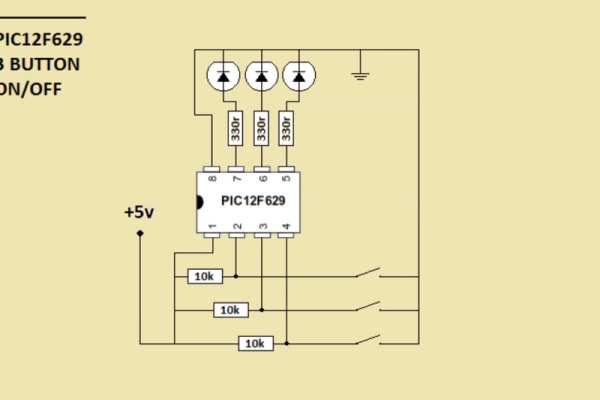
you can use this at many projects as Latching Relay..
turn on and off circuits or devices with relay or not.
Source: Simple 3 Button On-off With 12f629 (mikroC)
- What compiler is used for this project?
The code is written with MikroC. - How are the input and output pins configured?
TRISIO is set to 0b00111000, making bits 0-2 outputs and bits 3-5 inputs. - Which GPIO pin controls the first LED?
GPIO.GP0 (pin 7) is used to turn the LED on or off. - What happens when GPIO.GP5 is grounded while x0 equals 1?
The code sets x0 to 0, x1 to 1, and turns on the LED connected to GP0. - Why is CMCON set to 0x07?
This instruction disables the CMCON PORT to allow proper GPIO usage. - Can this logic be applied to other devices?
Yes, it can be used at many projects as a Latching Relay to control circuits with relays or without them. - How does the program prevent continuous triggering?
A delay_ms(600) is added after the action to stabilize the input reading.
