
Summary of RFID Computer login
This article details a DIY project to create a secure, password-free computer login system using an Arduino and RFID technology. The setup allows users to log in by tapping a specific RFID card, which triggers the Arduino to simulate keyboard input and type the stored password automatically.
Parts used in the RFID Computer Login Project:
- RC522 RFID tag reader (3.3v)
- Arduino Leonardo clone (based on Sparkfun Pro Micro)
- Arduino library for MFRC522
- SPI bus connection components
- Serial terminal software
I wanted a simple way of quickly logging on to my computer without having to typing my password in and did not want to have no security either.
There are various products on the market that would solve this problem from fingerprint readers to proximity dongles but I decided to see what I could knock up with parts I mainly already had.
Looking in my micro stuff I had a RC522 RFID tag reader 3.3v :
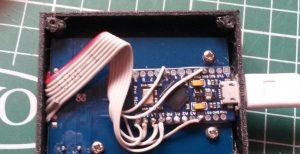
Also an 3.3v Arduino Leonardo clone as well based on a Sparkfun pro micro which also can act as a USB device such as a keyboard. This is useful as if a 5v Arduino was used a level shifter would be required due to the RC522 not being 5v torrent.
How it works
When the chosen cards is presented the Arduino will act as a keyboard and simply type the stored password in followed by a carriage return .
Wiring
As mentioned, both devices being the same voltage ,3.3v made wiring so easy !.
Code
I used the Arduino library for MFRC522 by Miguel Balboa , so you will need to add this library to Arduino.
Please note this is only a very basic example and the password is stored in plain text in your Arduino document , so this is very much proof of concept and has just been thrown together. It may also be a good idea after uploading to Arduino to and save your Arduino document with the password blank.
UPDATE! Please also see RFID Login software Update ! for the latest software example .
|
1
2
3
4
5
6
7
8
9
10
11
12
13
14
15
16
17
18
19
20
21
22
23
24
25
26
27
28
29
30
31
32
33
34
35
36
37
38
39
40
41
42
43
44
45
46
47
48
49
50
51
52
53
54
55
56
57
58
59
60
61
62
63
64
65
66
67
68
69
70
71
72
73
74
75
76
77
78
79
80
81
82
83
84
85
86
87
88
89
90
91
92
93
94
95
96
97
98
99
100
101
102
103
104
105
106
107
108
109
110
111
112
113
114
115
116
117
118
119
120
121
122
123
124
125
126
127
128
129
130
131
132
133
134
135
136
137
138
139
|
//
// Example By Luke (www.ls-homeprojects.co.uk)
// Free to use this code how you like but please link my site
// Modified example for Arduino library for MFRC522.
// Credit to Miguel Balboa for provided a great library and examples ! https://github.com/miguelbalboa/rfid.
// Please note this is just a proof of concept Example and should not be used for security applications !
#include “Keyboard.h”
#include “HID.h” // This is required for this to work with window 10
#include <SPI.h>
#include <MFRC522.h> // This can be
#define SS_PIN 10
#define RST_PIN 5
MFRC522 rfid(SS_PIN, RST_PIN); // Instance of the class
MFRC522::MIFARE_Key key;
//———– settings ————————————
#define enable_serial 0 // set this to “1” to enable serial port
unsigned long my_UID = 12345; // This is the id of your card displayed in serial terminal
////
// Init array that will store new NUID
byte nuidPICC[3];
void setup()
{
if (enable_serial == 1){ // Enable serial port for getting code
Serial.begin(9600);
while (!Serial) {
; // wait for serial port to connect. Needed for native USB port only
}
}
delay(500);
Keyboard.begin();
delay(500);
SPI.begin(); // Init SPI bus
rfid.PCD_Init(); // Init MFRC522
}
void loop() {
// Look for new cards
if ( ! rfid.PICC_IsNewCardPresent())
return;
// Verify if the NUID has been readed
if ( ! rfid.PICC_ReadCardSerial())
return;
// Serial.print(F(“PICC type: “));
MFRC522::PICC_Type piccType = rfid.PICC_GetType(rfid.uid.sak);
//Serial.println(rfid.PICC_GetTypeName(piccType));
if (rfid.uid.uidByte[0] != nuidPICC[0] ||
rfid.uid.uidByte[1] != nuidPICC[1] ||
rfid.uid.uidByte[2] != nuidPICC[2] ||
rfid.uid.uidByte[3] != nuidPICC[3] ) {
// Serial.println(F(“A new card has been detected.”));
// Store NUID into nuidPICC array
for (byte i = 0; i < 4; i++) {
nuidPICC[i] = rfid.uid.uidByte[i];
}
// CONVERT UID into Unsigned int as easier to match up to a saved value.
unsigned long UID_unsigned;
UID_unsigned = rfid.uid.uidByte[0] << 24;
UID_unsigned += rfid.uid.uidByte[1] << 16;
UID_unsigned += rfid.uid.uidByte[2] << 8;
UID_unsigned += rfid.uid.uidByte[3];
long UID_LONG=(long)UID_unsigned;
if (enable_serial == 1){ // Enable serial port for getting code
Serial.println(“UID as a Long int , please make a note of this and :”);
Serial.println(UID_LONG);
}
if (UID_LONG == my_UID) { // IF Presented card = uid in settings then… type password in !
delay(100);
Keyboard.write(KEY_RETURN); // modify key squence here for other logins other than windows 8/10 !
delay(1200);
Keyboard.print(“my_password”); //As this is plain text may be a good idea to delete after compiled .
delay(400);
Keyboard.write(KEY_RETURN);
delay(400);
nuidPICC[0] = 0; // Simple fix to allow the same card to work with this rc522 Example
}
}
else //Serial.println(F(“Card read previously.”));
// Halt PICC
rfid.PICC_HaltA();
// Stop encryption on PCD
rfid.PCD_StopCrypto1();
}
|
How to use
1) First Set “#define enable_serial” = 1 to enable serial output.
2) Open a serial terminal with 9600 baud
3) Swipe a card and make a note of UIDs .
4) Add recorded card UID to line 27.
5) Add login information to the keyboard section line 113 , modify the key squence for other OS’s and applications .
Read more: RFID Computer login
-
How does the Arduino act during the login process?
The Arduino acts as a keyboard, typing the stored password followed by a carriage return when the chosen card is presented. -
Why was an Arduino Leonardo clone chosen over a standard 5v Arduino?
A 5v Arduino would require a level shifter because the RC522 reader operates at 3.3v, whereas the Leonardo clone matches this voltage directly. -
What library is required to make this code work?
You need to add the Arduino library for MFRC522 by Miguel Balboa to your Arduino environment. -
Is the password stored securely in the provided example?
No, the password is stored in plain text within the Arduino document, making it a proof of concept rather than a secure solution. -
How do you identify the unique ID of your RFID card?
You must set enable_serial to 1, open a serial terminal at 9600 baud, swipe the card, and note the UID displayed. -
Can this code be used for operating systems other than Windows?
Yes, you can modify the key sequence in the code section to accommodate different OSs or applications. -
What pins are defined for the SS and RST connections?
The code defines SS_PIN as 10 and RST_PIN as 5.
