
Summary of Power Supply unit for arduino power and breadboard using arduino
This article explains how to repurpose an old computer power supply unit (PSU) to provide stable 3.3V, 5V, and 12V outputs for Arduino projects, LEDs, fans, and breadboards. It details identifying useful voltage wires (red, yellow, black), shorting the green wire to a black wire to turn the PSU on, and adding a resistor load if necessary. The project requires basic soldering tools and connectors to create a versatile power source.
Parts used in the Computer Power Supply Unit Repurposing Project:
- Computer Power Supply Unit
- Soldering Iron + Solder
- Male Headers
- DC adapter power jack 2.1mm
how you can take a computer u hv old (power supply unit) and turn it into a power supply that will power your Arduino and give you all the amperage you need as well as your standard 3.3 volts, 5 volts, and 12 volts for any accessories/electronics used on your breadboard And arduino power ,led 5v,12v power, fan cooling
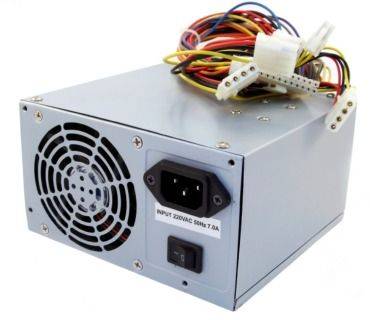
MATERIALS :
1.Computer Power Supply Unit
2.Soldering Iron + Solder
3.Male Headers
4.dc adapter power jack 2.1mm
The diagram at right shows the main output connector of the power supply when viewed from the end. The colors represent the different colored wires going into it. Common colors represent common functions, ie all red wires are +5 volts, all black wires are common and so on. The connections most useful to us as haunters are the +5V (red wires) , +12V (yellow wire) and the Common or ground (black wires). Both 5 and 12 volt lines normally deliver ample current for our needs.
Of the other voltages available, the +3.3V connection delivers ample current, it’s just not a very useful voltage. The +5VSB (5 volts, always on), -12V and -5V are normally very low current lines and are of little use to us.
The green wire, pin 14, is the on/off switching line. To turn the power supply on, the green line needs to be shorted to a Common line. An easy way to do this is to insert a jumper between pin 14 and pin 13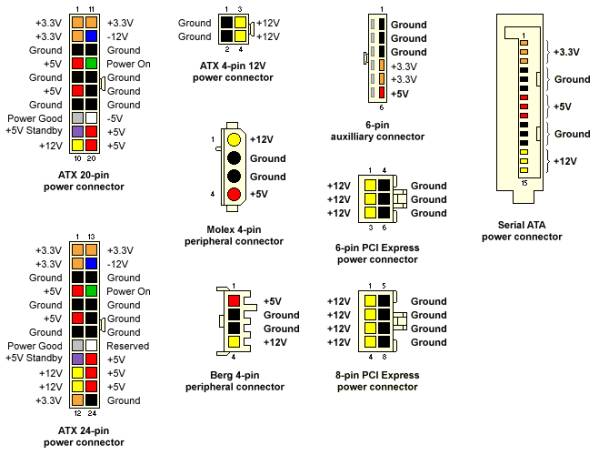
Most power supplies require a load across one or more of the outputs to operate. The link I give above shows how to add a resistor across the 5 volt side of the supply to act as a load.
For more detail: Power Supply unit for arduino power and breadboard
- How do I turn on the computer power supply?
Short the green wire (pin 14) to a common black wire by inserting a jumper between pin 14 and pin 13. - Which wire colors represent the most useful voltages?
Red wires are +5 volts, yellow wires are +12 volts, and black wires are common or ground. - Can this setup power an Arduino and accessories?
Yes, it provides standard 3.3 volts, 5 volts, and 12 volts for electronics, Arduino power, LEDs, and fan cooling. - What should I do if the power supply does not operate?
Add a resistor across the 5 volt side of the supply to act as a load, as many units require one to start. - Are the -12V and -5V lines useful for this project?
No, they normally deliver very low current and are of little use for powering Arduino accessories. - Does the +3.3V line deliver ample current?
Yes, the +3.3V connection delivers ample current, though it is noted as less useful than other lines. - What components are needed to connect the output?
You need male headers and a DC adapter power jack 2.1mm along with a soldering iron and solder.
