
Summary of Midi VU meter, LM3914, Arduino, PWM
This article details a project to build a MIDI VU meter using an Arduino, LM3914 driver, and 4N25 optocoupler. The author successfully reads MIDI input but struggles with latency when driving LEDs via PWM. A delay of one beat is observed, prompting a search for solutions in either the code or the RC circuit between the Arduino and LM3914.
Parts used in the Midi VU Meter:
- Arduino
- MIDI IN circuit with 4N25 optocoupler
- LM3914 IC
- LEDs (for VU meters)
- 4Kohm resistor
- 1uF capacitor
- PWM pins
Hello everybody,
I’ve been working on a midi controller for some time now, Midi OUT hasn’t been a problem, but for Midi IN i had to take some more time.
i’ve used this circuit for midi input but i’ve used a 4n25:
original thread @ http://www.arduino.cc/cgi-bin/yabb2/YaBB.pl?num=1187962258/
it works great!
but for my project i need VU meters, i thought this wouldn’t be a problem, because i could easily say to my arduino: if note = 1 and velocity = 80 then turn on LED A,B and C.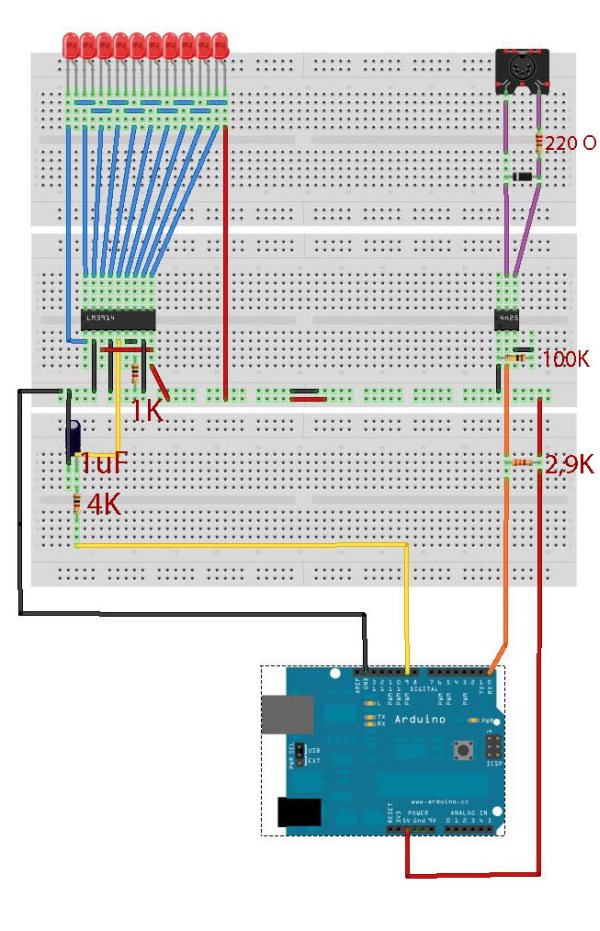 But i could’nt get this to work. while this easily could be a coding problem, i didn’t want to waste 10 pins per VU meter, so i searched some more and found a LM3914.
i thought to myself i could easily make this work through a single PWM pin, so this would save me about 36 pins. in total i need 4 (mono) VU meters, so i would have to use 4 pwm pins.
so i bought the LM3914 and then other problems turned up. luckily i found this forum! especialy Sgt Wookie answers on the LM3914, were very helpfull.
so i constructed this schematic
now i made a RC-circuit in between the Arduino and the LM3914. with a 4Kohm resistor and 1uF cap.
also this seems to work fine, for example i can output a value of 80 from the pwm pin and this will light up all leds, or i can output a value of 41 and this will light up 5 leds.
i also tried connecting the circuit to the line out of my computer, as expected the leds do not correspond with the actual db’s, but it light’s up at the same time as the VU meter of my mixer does, so i know it is fast enough to keep up.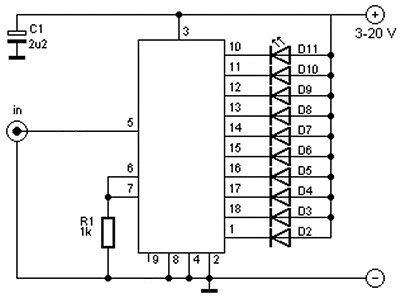
and here is the problem, when this circuit is connected to the PWM pin of the arduino, it’s always one beat behind, it kinda looks like a bad stop motion movie…
so i guess the problem could be in the coding, but just as good in the circuit.
hope this is enough information and i really hope anybody here can help me out, i’ve been trying to make this work for over three weeks now…asked at different forums, but haven’t found an answer so far.
here is the schematic and code i use now:
btw i’m reading the left master output channel, through midi with a single note, with a velocity range between 0 and 127.
For more dtail: Midi VU meter, LM3914, Arduino, PWM
- Why did the author switch from coding logic to using an LM3914?
The author wanted to avoid wasting 10 pins per VU meter and thought a single PWM pin could control the display. - What components are used in the RC-circuit between the Arduino and LM3914?
A 4Kohm resistor and a 1uF capacitor are used in the RC-circuit. - How many mono VU meters does the project require?
The project requires 4 mono VU meters. - What problem occurs when connecting the circuit to the PWM pin?
The circuit always appears one beat behind, resembling a bad stop motion movie. - Can the circuit keep up with audio levels from a computer line out?
Yes, the LEDs light up at the same time as the mixer's VU meter, proving it is fast enough. - What is the velocity range used for the MIDI signal?
The velocity range is between 0 and 127. - Which channel is being read for the left master output?
The left master output channel is read through MIDI with a single note.
