
Summary of MATH YOU CAN WEAR: FIBONACCI SPIRAL LED BADGE
HackerBox created a Fibonacci Spiral LED Badge using the Vogel model to place 64 addressable LEDs on a PCB. Coordinates were computed in a spreadsheet, converted to (x,y), centered and scaled to prevent LED overlap, then pasted into KiCad. The badge is driven by an RP2040 MCU, powered by USB or three AA batteries via a boost converter, includes two capacitive touch pads, and supports CircuitPython or C/C++ (Arduino IDE). KiCad files and firmware are published.
Parts used in the Fibonacci Spiral LED Badge:
- 64 addressable LEDs (5 mm)
- RP2040 microcontroller
- PCB (KiCad design)
- USB power connector
- Three AA battery holder
- DC/DC boost converter
- Power select switch (USB/batteries)
- Two capacitive touch pads
- Supporting passive components (resistors, capacitors)
- Mounting hardware or enclosure (badge)
Fibonacci numbers are seen in the natural structures of various plants, such as the florets in sunflower heads, areoles on cacti stems, and scales in pine cones. [HackerBox] has developed a Fibonacci Spiral LED Badge to bring this natural phenomenon to your electronics.
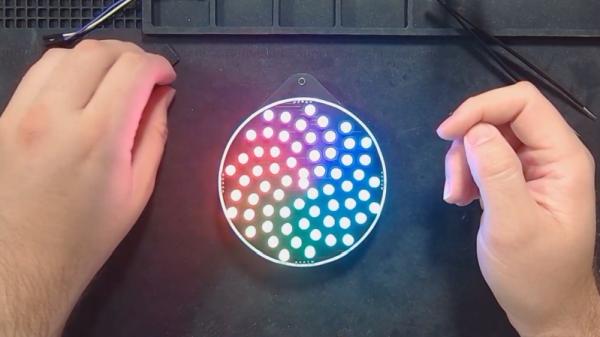
To position each of the 64 addressable LEDs within the PCB layout, [HackerBox] computed the polar (r,θ) coordinates in a spreadsheet according to the Vogel model and then converted them to rectangular (x,y) coordinates. A little more math translates the points “off origin” into the center of the PCB space and scale them out to keep the first two 5 mm LEDs from overlapping. Finally, the LED coordinates were pasted into the KiCad PCB design file.
An RP2040 microcontroller controls the show, and a switch on the badge selects power between USB and three AA batteries and a DC/DC boost converter. The PCB also features two capacitive touch pads. [HackerBox] has published the KiCad files for the badge, and the CircuitPython firmware is shared with the project. If C/C++ is more your preference, the RP2040 MCU can also be programmed using the Arduino IDE.
For more details on beautiful RGB lights, we’ve previously presented Everything You Might Have Missed About Addressable LEDs, and for more details on why they can be so fun to wear, check out our Hackaday Badgelife Documentary.
(Editor’s note: HackerBox makes and sells kits, is run by Hackaday Contributor [Joseph Long] IRL.)
Source: MATH YOU CAN WEAR: FIBONACCI SPIRAL LED BADGE
- How are the LED positions calculated?
They computed polar (r, θ) coordinates using the Vogel model in a spreadsheet, then converted them to rectangular (x, y) coordinates and scaled/translated for the PCB. - How many LEDs does the badge use?
The badge uses 64 addressable LEDs. - What microcontroller is used to control the LEDs?
An RP2040 microcontroller controls the LED show. - What power options are available for the badge?
Power can be selected between USB and three AA batteries with a DC/DC boost converter via a switch. - Are touch controls available on the badge?
Yes, the PCB features two capacitive touch pads. - Are design files and firmware available?
Yes, HackerBox published the KiCad files and the CircuitPython firmware for the project. - Can the RP2040 be programmed in languages other than CircuitPython?
Yes, the RP2040 can also be programmed using C/C++ via the Arduino IDE. - How did they prevent the first two LEDs from overlapping?
They scaled the points so the first two 5 mm LEDs would not overlap when placed on the PCB.
