
Summary of Make an Arduino Temperature Sensor (Thermistor Tutorial)
The article introduces the DHT11 humidity and temperature sensor, describing its use in projects like weather stations and home monitoring. It lists specifications (humidity 20–90% ±5% RH, temperature 0–50 °C ±2 °C, 3–5.5V). It explains relative humidity and how the DHT11 measures it: a moisture-holding substrate between electrodes changes resistance as humidity varies. The guide promises Arduino wiring and example code plus a downloadable quick start guide.
Parts used in the DHT11 humidity and temperature sensor project:
- DHT11 humidity and temperature sensor module
- Arduino (any compatible board)
- Jumper wires
- Breadboard
- Power source (3V to 5.5V, e.g., USB or battery)
- Pull-up resistor (typically 4.7k–10k) for data line
The DHT11 humidity and temperature sensor makes it really easy to add humidity and temperature data to your DIY electronics projects. It’s perfect for remote weather stations, home environmental control systems, and farm or garden monitoring systems.
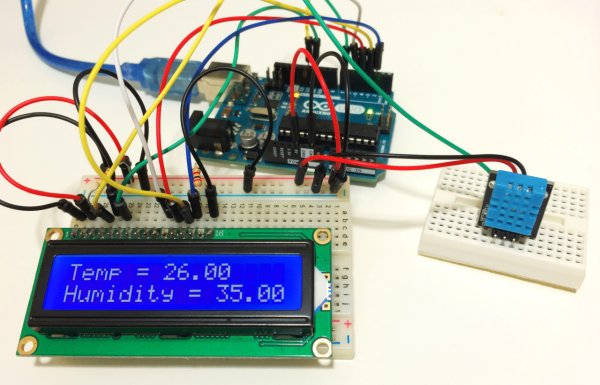
In this tutorial, I’ll first go into a little background about humidity, then I’ll explain how the DHT11 measures humidity. After that, I’ll show you how to connect the DHT11 to an Arduino and give you some example code so you can use the DHT11 in your own projects.
Here are the ranges and accuracy of the DHT11:
- Humidity Range: 20-90% RH
- Humidity Accuracy: ±5% RH
- Temperature Range: 0-50 °C
- Temperature Accuracy: ±2% °C
- Operating Voltage: 3V to 5.5V
The DHT11 Datasheet:
What is Relative Humidity?
The DHT11 measures relative humidity. Relative humidity is the amount of water vapor in air vs. the saturation point of water vapor in air. At the saturation point, water vapor starts to condense and accumulate on surfaces forming dew.
The saturation point changes with air temperature. Cold air can hold less water vapor before it becomes saturated, and hot air can hold more water vapor before it becomes saturated.
The formula to calculate relative humidity is:
Relative humidity is expressed as a percentage. At 100% RH, condensation occurs, and at 0% RH, the air is completely dry.
How the DHT11 Measures Humidity and Temperature
The DHT11 detects water vapor by measuring the electrical resistance between two electrodes. The humidity sensing component is a moisture holding substrate with electrodes applied to the surface. When water vapor is absorbed by the substrate, ions are released by the substrate which increases the conductivity between the electrodes. The change in resistance between the two electrodes is proportional to the relative humidity. Higher relative humidity decreases the resistance between the electrodes, while lower relative humidity increases the resistance between the electrodes.
Read more: Make an Arduino Temperature Sensor (Thermistor Tutorial)
- What are the humidity and temperature ranges and accuracies of the DHT11?
Humidity range 20-90% RH with ±5% RH accuracy; temperature range 0-50 °C with ±2 °C accuracy. - What operating voltage does the DHT11 require?
Operating voltage is 3V to 5.5V. - What does the DHT11 measure?
It measures relative humidity and temperature. - How does the DHT11 detect humidity?
It measures electrical resistance between two electrodes on a moisture-holding substrate; conductivity increases as humidity increases. - What is relative humidity?
Relative humidity is the amount of water vapor in air compared to the saturation point at that temperature, expressed as a percentage. - Why does saturation point change with temperature?
Because cold air holds less water vapor before saturation and hot air holds more, so the saturation point varies with temperature. - Can the DHT11 be used in weather station or home monitoring projects?
Yes, it is suitable for remote weather stations, home environmental control, and farm or garden monitoring. - Does the article provide Arduino wiring and example code?
Yes, the tutorial includes how to connect the DHT11 to an Arduino and gives example code.
