
Summary of Make A Tiny Message Board Using Arduino
This article details building a tiny connected message board using a Particle Photon microcontroller and a 0.96" OLED display. Controlled via the IFTTT "DO" app, the device displays custom reminders, daily weather forecasts, and surf reports without extra hardware. The project utilizes the Particle web IDE for software development and requires basic wiring between the microcontroller and the monochrome display to function.
Parts used in the Tiny Connected Message Board:
- Particle photon microcontroller
- 0.96" I2C Monochrome OLED display
- Small Breadboard
- Breadboard wiring
- Enclosure for the project (a mint box)
We will make a tiny connected message board with a 0.96″ OLED display that can be controlled from your phone. We will use the IFTTT “DO” app to set and clear the reminder so that no extra hardware will be required besides the OLED display. In addition to the reminder, our tiny message board can display 3 other lines, which we will use to display the daily weather temperature forecast and a surf report, which will be pushed via a couple of IFTTT recipes.
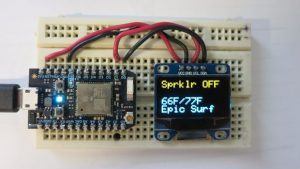
The message board uses a Particle photon (Arduino compatible) for the brain and internet connectivity and a 128×64 monochrome OLED display.
Let’s get started.
- A Particle photon microcontroller $20
- A 0.96″ I2C Monochrome OLED display $10. Also available on the ADAFRUIT web store.
- A small Breadboard $3
- Breadboard wiring
- An enclosure for the project (a mint box will work)
Step 2: Wiring
The I2C display requires only 4 connections:
- GND and VCC, which we can conveniently get from the Photon’s pins 3V3 and GND, and
- SDA and SCL which we will connect to the Photon’s D0 and and D1 respectively.
The display consists of 128×64 pixels, which corresponds to 8 rows of 8 pixels (font size 1) or 4 lines of 16 pixels if we use a font size of 2. Our display is “monochrome”, but the first line of text is yellow and the rest is blue, so we will use the first line for our reminder and the other 3 lines for other information such as surf report and weather for the day (or whatever else is important to you).
Step 3: Software
We will use the Particle web IDE to write and upload the software to the Photon. I will assume that you have already successfully gone through the registration steps outlined here: getting started.
Read more: Make A Tiny Message Board Using Arduino
- How is the message board controlled?
The device is controlled from your phone using the IFTTT DO app. - What components are needed for internet connectivity?
A Particle Photon microcontroller provides both the brain and internet connectivity. - Can the display show multiple types of information?
Yes, it can display a reminder plus three other lines like weather temperature and surf reports. - How many connections does the I2C display require?
The display requires only four connections: GND, VCC, SDA, and SCL. - Which pins on the Photon connect to SDA and SCL?
SDA connects to D0 and SCL connects to D1 on the Photon. - What font sizes are supported on the 128x64 pixel display?
Font size 1 allows 8 rows of 8 pixels, while font size 2 allows 4 lines of 16 pixels. - Is any extra hardware required besides the display?
No, no extra hardware is required beyond the OLED display to set and clear reminders. - Where should the software be written and uploaded?
You will use the Particle web IDE to write and upload the software to the Photon.
