
Summary of Make a 24X6 LED matrix using an Arduino
This article details the construction of a 24x6 LED matrix controlled by an Arduino. The project utilizes multiplexing with shift registers and a decade counter to manage data efficiently while minimizing pin usage. The guide covers necessary tools, component selection, resistor calculations based on LED specs, and specific soldering techniques for arranging LEDs in rows and columns.
Parts used in the 24X6 LED Matrix:
- Soldering iron
- Solder wire
- Cutter
- Needle nosed plier
- Wire
- Wire stripper
- Desoldering tools
- 144 LEDs
- 24 resistors (91 ohm)
- 4017 decade counter
- 6 1KOhm resistors
- 6 2N3904 transistors
- A long Perfboard
- Arduino
- 3 x 74HC595 shift register
- Pin headers
After making a 8X10 matrix a lot of people asked me about expanding the matrix to some thing bigger, and some wanted to write stuff to the matrix via a PC, so one day I looked at a pile of LEDs that I had leftover from a LED cube projected and I decided to make a bigger matrix with all the things people wanted.
So what are you waiting for? Get those LEDs out and heat up your soldering iron because we are about to make a 24X6 LED matrix!
Step 1: Getting All The Right Things
So you will need the basic set of tools for this project : a soldering iron, some solder wire, a cutter, a needle nosed plier,some wire, wire striper, and some desoldering tools if you need them.
For the matrix you will:
1. 144 LEDs
2. 24 resistors( The value is determent by the type of LEDs, in my case 91 ohm)
3. 4017 decade counter
4. 6 1KOhm resistors
5. 6 2N3904 transistors
6. A long Perfboard
7. Arduino
8. 3 x 74HC595 shift register
10. some pin headers
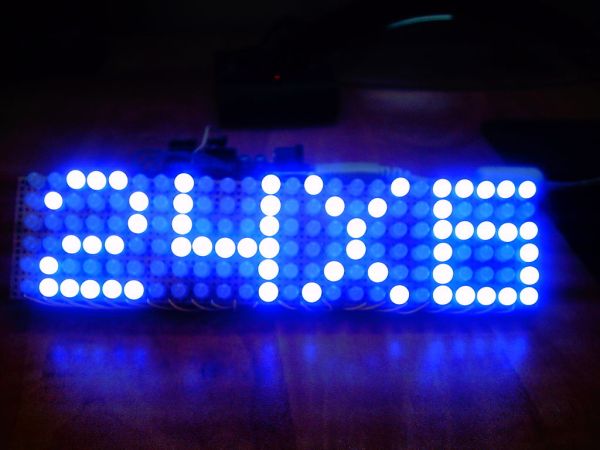
Step 2: How it works?
The tricky behind the display is multiplexing and the idea is the same as withe the 8×10 LED matrix: It is basically a way to split information in to little peaces and send it one by one.
this way you can save a lot of pins on the Arduino and keep your program quite simple.
Now this time we have 3 shift registers which multiply the number of outputs and save lots of arduino pins.
Each shift register has 8 outputs and you only need 3 arduino pins to control almost an limited numbers of shift registers.
We also use the 4017 decade counter to scan the rows, and you can scan up to 10 rows with it because you have only 10 outputs but to control it you need only 2 pins.
The 4017 is a very useful chip and it’s a good idea to know how to work with it(http://www.doctronics.co.uk/4017.htm)
Like I said the scanning is done with the 4017, by connecting one row at a time to ground and sending the right data via the shift registers to the columns.
Step 3: Schematics
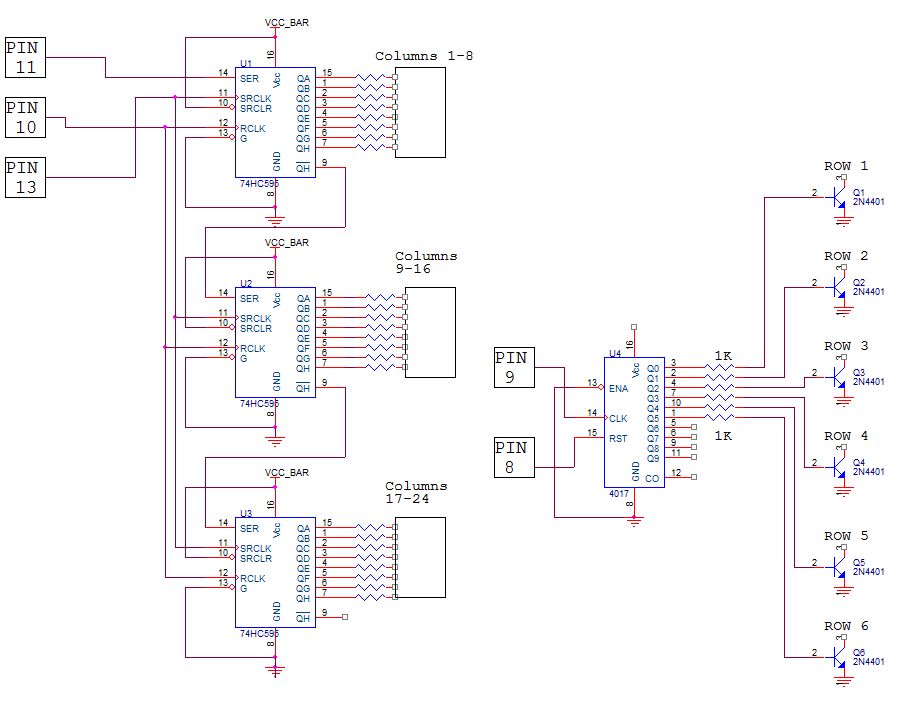
The only thing I didn’t specified in the schematics is the value of the current limiting resistors because they change from each type of LEDs, so you will need to calculate them by your self.
Now to calculate the value of the 24 resistors you can use this site :
http://led.linear1.org/1led.wiz
You should first get some specs on your LEDs, you should know their forward voltage and forward current, you can get this info from the seller. The circuit operates on 5V so your Source voltage is 5V.
Download the original file to see the schematics better.(press the “i” icon in the top left corner of the picture)
I have added a PCB layout of the control board, and i want to thanks Willard2.0 who made this layout and let me use it so thanks a lot mate!
Step 4: Soldering The LEDs
Soldering 144 LEDs in a matrix formation can be a little tricky if you don’t have a general idea how.
The last time I soldered a matrix I used lots of little wire jumpers which was a pain to solder, so this time I was a little more creative and came up with this way.
You need to bend the positive lead of the LED down towards the other ones and make a column, and snip off the leads you didn’t use and try to make the connections as low as you can get, and you do this to all of the positive leads.
Now the negative leads are connected in a column and thats make soldering tricky because the positive rows are in the way, so you will need to make a 90 degrees bend with the negative lead and make a bridge over the positive row to the next negative lead, and so on to the next LEDs.
Now I will not explain how to solder the shift registers and all the parts because every one has hes own style and methods.
144 LEDs
4017 decade counter
A long Perfboard
For more detail: Make a 24X6 LED matrix using an Arduino
- How does the display work?
The display uses multiplexing to split information into small pieces and send them one by one, saving Arduino pins. - What components multiply the number of outputs?
Three shift registers are used to multiply the number of outputs and save many Arduino pins. - How many pins are needed to control the shift registers?
You only need 3 Arduino pins to control almost an unlimited number of shift registers. - What chip is used to scan the rows?
The 4017 decade counter is used to scan the rows, requiring only 2 pins for control. - Can the 4017 scan more than 10 rows?
No, you can scan up to 10 rows because the 4017 has only 10 outputs. - How is the scanning process performed?
Scanning connects one row at a time to ground while sending the correct data via shift registers to the columns. - How do you calculate the value of current limiting resistors?
You must calculate the value yourself using online calculators based on your LED's forward voltage and forward current. - What voltage does the circuit operate on?
The circuit operates on 5V, so the source voltage is set to 5V. - What creative method was used for soldering the LEDs?
The author bent positive leads down to form columns and made 90-degree bends on negative leads to bridge over positive rows.
