
Summary of Inkplate 6 Wi-Fi-enabled e-paper display 3D printed case
The e-Radionica team has developed a 3D-printed case to protect the Inkplate 6, a Wi-Fi-enabled e-paper display built on an ESP32 microcontroller. The design aims to safeguard the fragile screen and connector while providing a finished look. Technical drawings for the board have also been updated in the hardware repository. Although the design files are not yet downloadable due to ongoing tweaks, the project supports various applications like information panels, task trackers, and minimalist typewriters using Arduino IDE or MicroPython.
Parts used in the Inkplate 6 Project:
- 3D printed case
- Inkplate 6 Wi-Fi-enabled e-paper display
- ESP32 microcontroller
- Six-inch e-paper display (recycled from a Kindle e-reader)
- USB cable
- Arduino IDE or MicroPython software environment
- SD card
- PCB (Printed Circuit Board)
- Connector
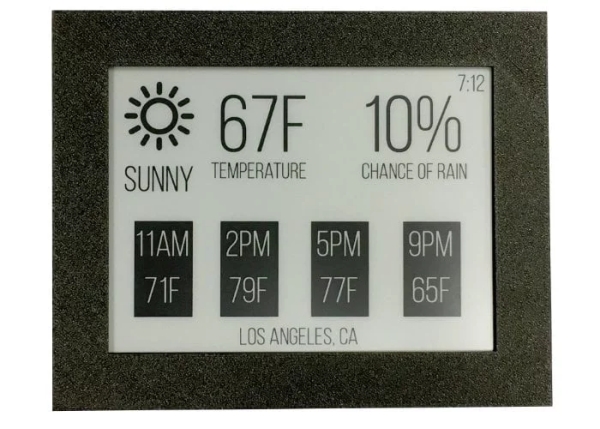
The development team at e-Radionica responsible for the awesome Inkplate 6 Wi-Fi-enabled e-paper display, have unveiled a new 3D printed case designed to provide a little extra protection and finish to the screen. The design files are not available for download quite yet, as the team wanted to make a few more tweaks before they are released, however as you can see from the image above the addition of an enclosure finishes the Inkplate 6 screen.
“For the past few days, we have been working on a 3D-printable case for Inkplate 6. Many of you have asked for one, as a way to keep the fragile e-paper display safe. We will talk more about that before we ship, as there are other steps you can take: securing the display to the PCB, gluing a particularly sensitive connector in place, etc. But a case is probably the ultimate way to protect your new gadget. We have also improved our technical drawings of the board, which we have added to the Inkplate 6 hardware repo.”
Inkplate 6 has been built on the ESP32 and programmable with Arduino IDE or MicroPython offering a powerful, Wi-Fi enabled ESP32 microcontroller with a six-inch e-paper display, recycled from a Kindle e-reader. Just plug in a USB cable, open Arduino IDE, and change the contents of the screen with few lines of code.
Applications for the screen inlcude:
– High Latency Information Panel – Show calendar, temperature, weather, and air quality data. Track your stocks, learn a new word each day, display information about whatever song is playing, or tally up your likes on social media (if you must). Download updates, and only hit the battery when you do.
– Collaborative Task Tracker – Maintain shared lists of groceries to buy, chores to do, and birthdays to remember. Or replace the power-hungry wall monitor in your office with an e-paper kanban on each desk. Give away your dry-erase markers.
– Minimalist E-Paper Typewriter – Get those words out. Sync them to the cloud or store them on an SD card. And keep distractions like social media and email away from your line-of-sight.
– Open Hardware E-Reader – Sweep aside the barriers put in place by restrictive, centralized platforms and e-read whatever you want.
– Art – Frame photographs pulled from an SD card or an online cameraroll, sure, but why not generate abstract art from sensor data? Or torment your house guests with a modern take on the classic, four shot, black-and-white photobooth?
Source: Inkplate 6 Wi-Fi-enabled e-paper display 3D printed case
- What is the purpose of the new 3D printed case?
The case provides extra protection and a finished look to the fragile e-paper display. - Are the design files currently available for download?
No, the files are not available yet as the team is making final tweaks before release. - How can users program the Inkplate 6 device?
The device can be programmed using the Arduino IDE or MicroPython. - What component powers the Inkplate 6?
The device is built on a powerful Wi-Fi enabled ESP32 microcontroller. - Can the screen be used for collaborative task tracking?
Yes, it can maintain shared lists of groceries, chores, and birthdays or replace wall monitors. - How does the device handle data updates regarding battery usage?
Updates are downloaded only when needed, allowing the device to hit the battery sparingly. - What kind of art projects can this display support?
It can frame photographs from an SD card or generate abstract art from sensor data. - Where are the improved technical drawings located?
The updated drawings have been added to the Inkplate 6 hardware repo.
