
Summary of I Let Everyone on the Internet Control My X-Mas Decoration
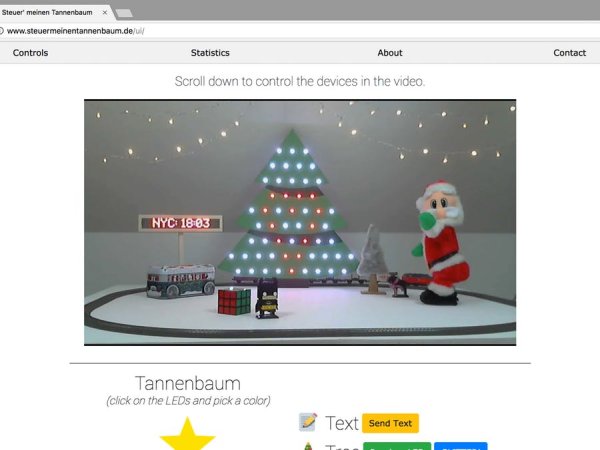
This project enables global internet control of a Christmas tree, allowing users to manipulate 55 RGB LEDs, trigger Santa animations, manage model railroads, or display custom text on an LED matrix. The system utilizes a web interface sending requests to a Node.js API hosted on a Raspberry Pi, which communicates via serial port with an Arduino Mega equipped with a custom shield to drive the actuators and lights.
Parts used in the Control My Xmas Tree:
- 55 RGB LEDs
- Santa animation mechanism
- Model railroad
- LED dot matrix
- Webpage interface
- Node.js API
- Raspberry Pi
- Arduino Mega
- Custom shield
- P9823 / WS2812 LEDs
Control any of the 55 RGB LEDs on the tree, let Santa twerk for you, control a model railroad, or display custom text on a LED dot matrix.
Story
Ooooops.. I think I made a mistake and accidentally posted the project twice, on “Arduino Create” AND “Hackster.io”. Please visit: this site to read about our crazy idea. Sorry!
———————————————————————————-
Have you always wanted anyone in the world to be able to control your X-mas decoration in your living room? – No? – We neither, but we built it anyway.
We proudly present: www.controlmyxmastree.com
The idea
I had the idea quite a while ago, since I always loved projects where you could control somebody’s X-mas lighting, a robot arm or generally anything over the web and watching it live on stream. But I was never really sure, if there’s anyone else in the world who would dig it and I had no idea how to get requests from anyone on the internet to my Arduino.
Then one day – a few weeks ago – I told a friend what I had in mind and surprisingly he was immediately into it. He’s a computer scientist and said he could program an API on node.js, which would run on a Raspberry Pi. The concept was born.
Diagram
I made a quick, professional and definitely not shitty looking diagram to describe our basic setup:
To sum it up briefly:
We made a simple webpage, which uses ajax to send http POST requests to our API.
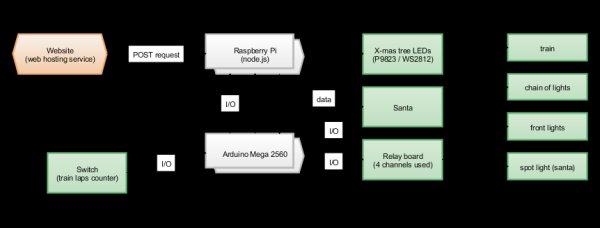
The api is a Node application which runs on a Raspberry Pi with a fix and from the web available IP. It sends two bytes over a serial port to an Arduino Mega with a custom shield (Why Mega? I had one laying around and its multiple serial ports come in very handy for debugging). The first byte we call: “status byte” the second one: “data byte” (in dependence on Midi).
The Mega then runs code which interprets the serial data and controls all the actuators plus LEDs (P9823 / WS2812).
Read more: I Let Everyone on the Internet Control My X-Mas Decoration
- What functions can be controlled over the internet?
Users can control 55 RGB LEDs, make Santa twerk, operate a model railroad, or display custom text on an LED dot matrix. - How does the webpage communicate with the hardware?
The webpage uses ajax to send http POST requests to the API. - What software runs on the Raspberry Pi?
A Node application runs as the API on the Raspberry Pi. - Why was an Arduino Mega selected for this project?
The creator chose the Mega because they had one available and its multiple serial ports are useful for debugging. - How many bytes are sent from the API to the Arduino?
The API sends two bytes over a serial port to the Arduino. - What are the names of the two bytes sent to the Arduino?
The bytes are called the status byte and the data byte. - Which specific LED types are used in the setup?
The system controls P9823 and WS2812 LEDs.
