
Summary of Halloween Scary Reactive Mask
This Halloween project features a reactive mask that activates scary sounds and LED lights when the wearer waves their hands. Using an Arduino Pro Mini, an MP3 module with an SD card, and an infrared sensor, the creator built a fun interactive prop for children. The system detects hand movements to trigger specific audio files and visual effects, all housed within a small box attached to a standard Halloween mask.
Parts used in the Halloween Scary Reactive Mask:
- Arduino Pro Mini 5V
- Module Mp3 DY-SV5W with SD card
- 5W 4Ohm Speaker
- LED WS2812
- Infrared Sensor Module
- A Halloween Mask
- DC Power Jack with 5V DC Adapter
This is year halloween project of me for my kid. This mask can react with scary sound and led when they wave their hands.
Step 1: Preparing Stuffs

1. Arduino Pro Mini 5V
2. Module Mp3 DY-SV5W with SD card
3. 5W 4Ohm Speaker
4. LED WS2812
5. Infrared Sensor Module
6. A Halloween Mask
7. DC Power Jack with 5V DC Adapter
Step 2: Preparing Sounds Component
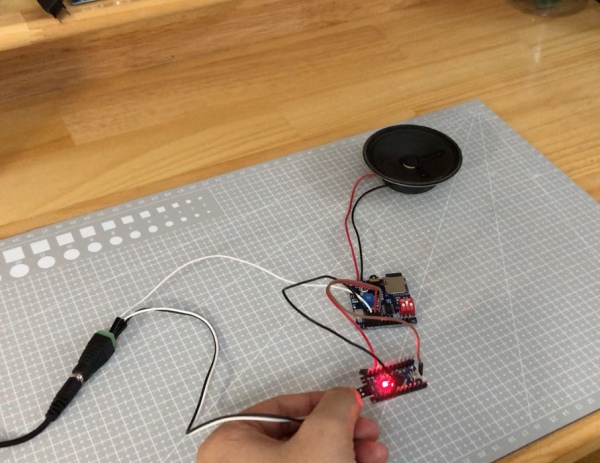
The mp3 module that i use is DY-SV5W.
You guys can check this module DataSheet here DataSheet
And for this project i choose the “I/O Independent mode 0” with value of CON1-CON2-CON3 is 0-1-0
I also searching for halloween scary sound effect audio and found 2 audio file that i can use in:
1. Normal mode: Scary ghost sound 00001.mp3 file
2. React mode: Scary Roar 00002.mp3 file
And download them into the SD card with SD card reader.
You guys can check where i test this module in the video at 1:58
Step 3: Fix the Infrared Sensor Module to the Mask
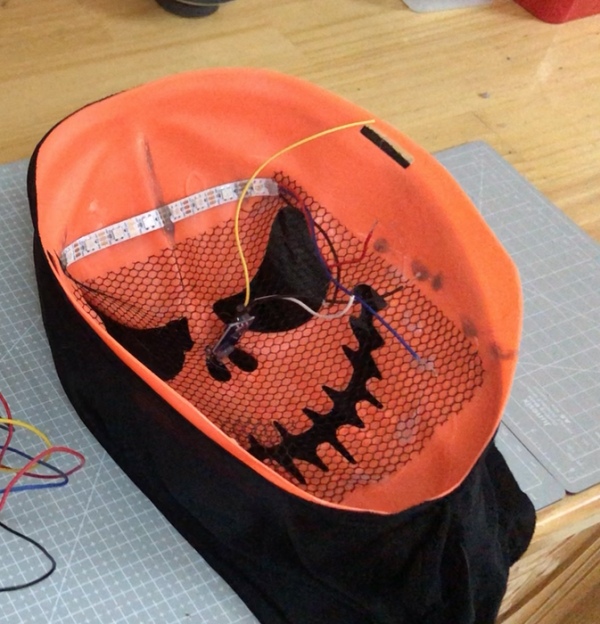
You should check and adjust the Infrared Sensor module first. Then you can use hot glue gun to fix it to the mask.
This photo was taken after fixing the led after the step 4.
Step 4: Combine All Components and Test
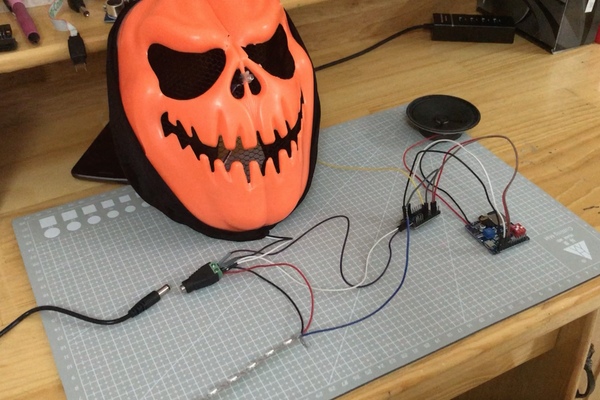
Connect all components with this schematic
Checkout the code here: Code (and give me a star :D)
Before wrapping stuffs into the mask. We should test them and make sure every thing was right.
You can check at 2:50 of the video.
Step 5: Completed It!
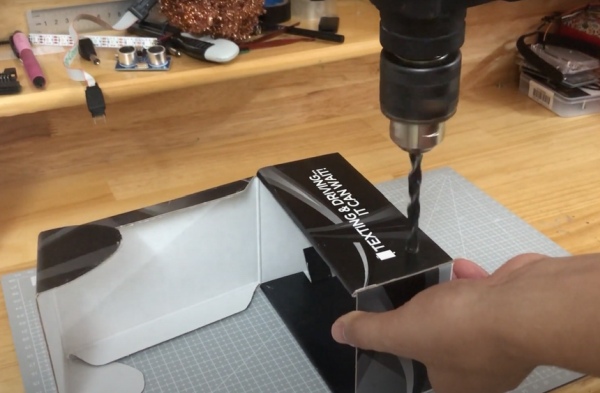
Find a small box to contain and put all stuffs in to that.
And yeah we made it!
Step 6: Result

Checkout this video and please give me a like, subscribe or a comment 😀
Source: Halloween Scary Reactive Mask
- How does the mask react to movement?
The mask reacts by playing scary sounds and lighting up LEDs when the user waves their hands, detected by the Infrared Sensor Module. - What MP3 module is used in this project?
The project uses the DY-SV5W module configured in I/O Independent mode 0 with CON1-CON2-CON3 set to 0-1-0. - Which audio files are required for the SD card?
You need two files: 00001.mp3 for normal mode ghost sounds and 00002.mp3 for the scary roar in react mode. - How do you secure the sensor to the mask?
You should adjust the Infrared Sensor module first and then use a hot glue gun to fix it to the mask. - Where should all the electronic components be stored?
All components should be placed inside a small box before being wrapped into or attached to the mask. - Can I change the sound effects used?
Yes, you can search for other Halloween scary sound effect audio files and download them onto the SD card reader. - What power source is needed for the circuit?
The project requires a DC Power Jack connected to a 5V DC Adapter. - When should testing be performed before final assembly?
Testing should be done before wrapping the stuffs into the mask to ensure everything works correctly.
