
Summary of Gesture based Intelligent Appliance Control
This project creates a gesture-controlled smart home system inspired by Iron Man's JARVIS, using AI to detect hand movements via webcam and control appliances like lights, fans, and door stoppers. It combines computer vision with microcontrollers for real-time interaction, offering accessibility for users with limited mobility.
Parts used in Gesture based Intelligent Appliance Control:
- Arduino Uno or Nano
- LEDs
- Micro-Servo Motor
- Webcam
- 330-ohm resistors
- Raspberry Pi (optional for final stage)
- Relays (for AC appliance integration)
With Artificial Intelligence, the science fiction is turning into reality and automation is taking…
Description
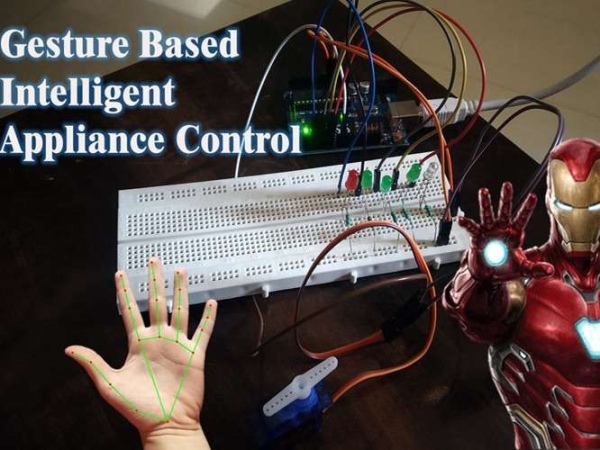
With Artificial Intelligence, the science fiction is turning into reality and automation is taking over the world. Inspired by the Iron man and Jarvis we decided to build something similar which can be controlled just by hand gestures. This system detects the hand and identifies the gesture with the help of artificial intelligence and based on that, it controls the appliances. It can be programmed to recognize different gestures and control the appliances accordingly. It can be used in a smart home to control AC appliances with just hand gestures, control the speed of the fan, control volume, control brightness of the lights, or even open/close the door stopper through gestures (with the use of servo motor), this can be very helpful for old age people who have limited mobility.
Project Used Hardware
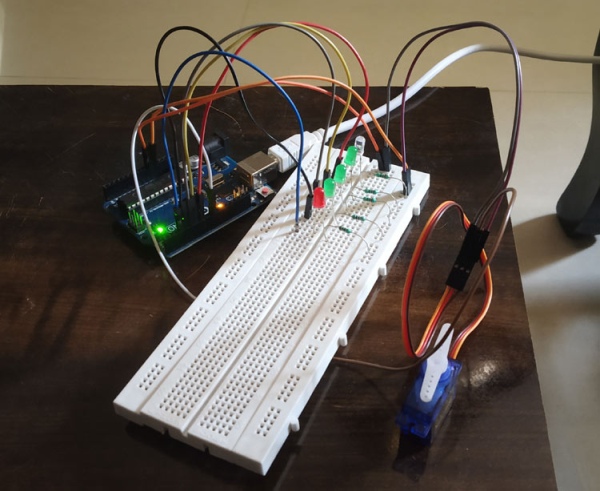
Arduino Uno/Nano, LEDs, Micro-Servo Motor, Webcam (For prototype), 330-ohm resistors, Raspberry Pi (For prototype, Internal processor of PC is used)
Project Used Software
Pycharm (OpenCV library, Mediapipe library, PySerial library), Python, Arduino IDE
Project Hardware Software Selection
For prototype we have used LEDs and Servo Motor to demonstrate how it works, Arduino is selected because it is easily available and is open-source. It uses OpenCV and mediapipe library for real-time hand land mark detection from the webcam and based on that it returns the co-ordinates of the hand landmarks. Once the co-ordinates are obtained, some mathematical algorithms are applied to check how many fingers are raised (by that gesture is detected) and that number is stored in a variable. With the help of pyserial library it is passed to the Arduino serially, now with this information Arduino is programmed to perform certain tasks based on the information got from the python script. We used small LEDs for the demonstration, but AC appliances can also be controlled by the use of relay (electro-mechanical switches). For prototype version inbuilt micro-processor of laptop and webcam is used for real time tracking and gesture recognition, which can be replaced with a raspberry pi and a piCam at the final stage.
Circuit Diagram
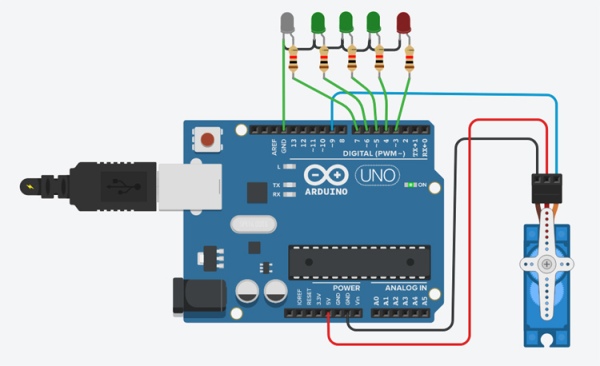
For this prototype, LEDs are connected to the pin number 3,4,5,6 and 7 respectively and a servo motor is connected to pin number 9. Relays can be connected in place of LEDs to control AC appliances. You can connect as many appliances as you want till you run out of pins or gestures.
Source: Gesture based Intelligent Appliance Control
-
How does the system detect gestures?
The system uses OpenCV and Mediapipe libraries to perform real-time hand landmark detection from a webcam and applies mathematical algorithms to count raised fingers. -
Can this system control AC appliances?
Yes, relays can be connected in place of LEDs to control AC appliances, though the prototype currently uses LEDs and a servo motor. -
What is the role of the PySerial library?
The PySerial library transfers the detected gesture information from the Python script to the Arduino serially. -
Which software libraries are required for hand tracking?
The project requires the OpenCV library and the Mediapipe library within the Pycharm environment to identify hand landmarks. -
How many pins are used for LEDs in the circuit diagram?
LEDs are connected to pin numbers 3, 4, 5, 6, and 7 respectively on the Arduino. -
What component controls the door stopper?
A micro-servo motor connected to pin number 9 is used to open or close the door stopper through gestures. -
Is the Raspberry Pi mandatory for the prototype?
No, the prototype version uses the internal microprocessor of a laptop and a webcam, while the Raspberry Pi is an option for the final stage. -
How does the code determine which gesture is performed?
Mathematical algorithms check the coordinates of hand landmarks returned by the libraries to count how many fingers are raised.
