
Summary of FUMIK: AN ARDUINO WALL DRAWING ROBOT JELLYFISH
Fumik is a compact wall-mounted drawing robot designed for users lacking floor space. It features an Arduino Mega controller and stepper motors with a CNC shield, all housed within the device itself rather than on the wall. Capable of drawing up to 5 meters wide by 3 meters tall, it uses a single pen that requires manual color changes. The project utilizes off-the-shelf hardware, making it accessible despite some mechanical details needing visual clarification from provided videos.
Parts used in the Fumik Wall Drawing Robot:
- Arduino Mega
- Stepper motors
- CNC shield
- Jellyfish motion base
- Pens
If you’ve ever wanted to build a large format plotter but didn’t have the floor space, maybe put it up against the wall and make it cute. That’s the idea behind Fumik, the wall-drawing robot. As you might expect, the little device is just a motion base with a pen. We hope there’s paper against the wall since not everyone wants computer-generated art on their drywall.
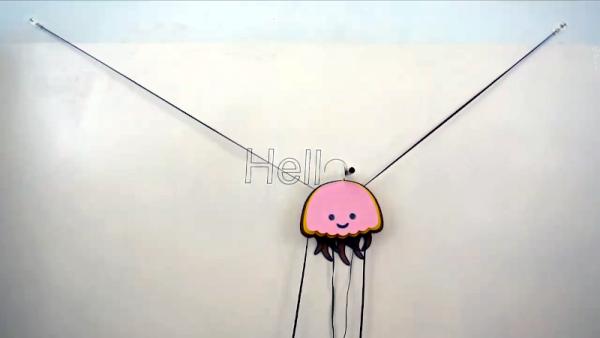
The maximum size is apparently 5 m wide by 3 m tall, plenty of room to express yourself. The controller is an Arduino Mega, and stepper motors with a CNC shield drive the whole assembly. Interestingly, the motor and electronics are all onboard the jellyfish itself, rather than the wall.
The device only holds one pen at a time, but you can draw with one color and then manually change the pen. The files on GitHub are good, but you’ll need to intuit some of the mechanics from the videos. However, since it uses off-the-shelf hardware, it should be pretty easy to figure it out. This looks like a cheap and cheerful wall plotter, and the results speak for themselves.
We have seen similar wall plotters. More than once, even.
Source: FUMIK: AN ARDUINO WALL DRAWING ROBOT JELLYFISH
- How large can Fumik draw?
The maximum size is 5 m wide by 3 m tall. - Where are the motor and electronics located?
The motor and electronics are onboard the jellyfish device, not on the wall. - Can Fumik hold multiple pens at once?
No, the device only holds one pen at a time. - How do I change colors on Fumik?
You must manually change the pen between colors. - What controller does Fumik use?
The controller is an Arduino Mega. - Is the hardware easy to source?
Yes, it uses off-the-shelf hardware which makes it easy to figure out. - Do I need special software files?
Files are available on GitHub, though you may need to intuit mechanics from videos.
