
Summary of ESP32 LORA SENSOR MONITORING WITH WEB SERVER (LONG RANGE COMMUNICATION)
This article details a LoRa Sensor Monitor project using two TTGO LoRa32 boards. One board acts as a transmitter, connecting to a BME280 sensor to capture temperature and humidity data via LoRa. The second board serves as a receiver, hosting a web server that displays the transmitted data on a webpage accessible over WiFi. The tutorial explains how to wire the components and utilize both communication protocols simultaneously for long-range environmental monitoring.
Parts used in the LoRa Sensor Monitor:
- TTGO LoRa32 Development Board
- BME280 Sensor
- Jumper Wires
- Breadboard
- Power Bank or 3.7v LiPo Battery
I’m a big fan of the ESP32 boards because of the number of communication options they managed to squeeze on the board, but I became more impressed recently when I came across the TTGO LoRa32 development boards which adds LoRa to the onboard communication features of the ESP32.
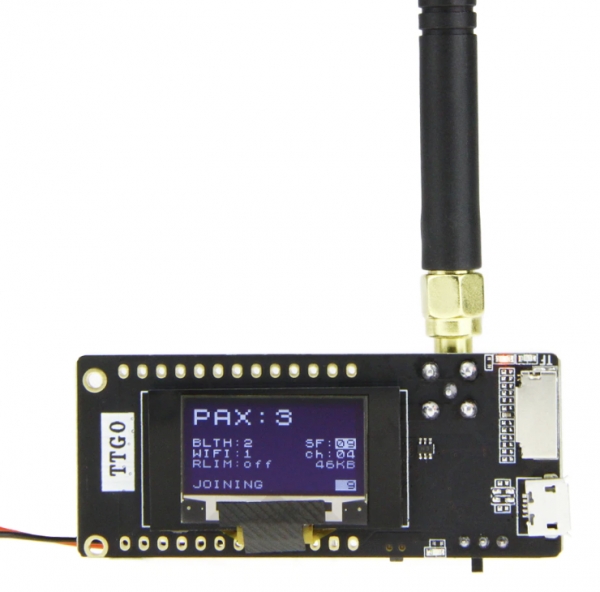
The LoRa communication capacity of the board opens up a web of possibilities and as a demonstration of how the board works, for today’s tutorial, we are going to build a LoRa Sensor Monitor with a webserver.
The idea behind the project is simple and not so different from the “Introduction to LoRa communication” project we built recently. It comprises two parts; a Transmitter and a Receiver. The transmitter comprises of a TTGO LoRa32 development board along with a BME280 sensor which is used to obtain temperature and humidity parameters from the environment. The data obtained are sent using the LoRa Communication features of the TTGO LoRa32, to the receiver which receives the data and displays it on a webpage via a webserver hosted on the board. By visiting the IP address of the server on any device on the same network as the receiver’s LoRa32 board, users will be able to see the data displayed on a webpage.
At the end of today’s project, you would know how to use both the WiFi and LoRa features of the TTGO LoRa32 board.
REQUIRED COMPONENTS
The following components are required to build this project;
- 2 x TTGO LoRa32 Development Board
- BME280
- Jumper Wires
- BreadBoard
- Power Bank or 3.7v LiPo Battery (optional)
All components can be bought via the attached links. The battery is useful if you plan to use the project without being tethered to your PC by USB Cables.
SCHEMATICS
Even though the project involves two devices (transmitter and receiver), we will create schematics for just the transmitter since the TTGO LoRa32 board has everything we need for the receiver, onboard. For the transmitter, the BME280 communicates with connected microcontrollers over I2C, as such, all we need do is connect it to the I2C pins of the TTGO LoRa32 as shown in the image below:
Read more: ESP32 LORA SENSOR MONITORING WITH WEB SERVER (LONG RANGE COMMUNICATION)
- What is the main purpose of this project?
The project builds a LoRa Sensor Monitor with a webserver to transmit temperature and humidity data. - How does the transmitter send data to the receiver?
The transmitter uses the LoRa communication features of the TTGO LoRa32 to send data. - What sensors are used to obtain environmental parameters?
A BME280 sensor is used to obtain temperature and humidity parameters. - How can users view the received data?
Users visit the IP address of the server on any device connected to the same network as the receiver. - Does the receiver require external sensors?
No, the TTGO LoRa32 board has everything needed for the receiver onboard. - What communication protocol connects the sensor to the microcontroller?
The BME280 communicates with the microcontrollers over I2C. - Can this project run without being tethered to a PC?
Yes, a Power Bank or 3.7v LiPo Battery allows the project to run without USB cables. - What two main features of the TTGO LoRa32 will be learned?
You will learn how to use both the WiFi and LoRa features of the board.
