
Summary of ESM – External Serial Monitor Using Arduino
The author designed an External Serial Monitor (ESM) using an Atmel ATmega328 microcontroller with 2KB SRAM to handle large data processing. This device features a menu system allowing users to set baud rates and control serial reading start/pause functions, displayed on a DOGS-102 screen. The project includes custom C++ libraries for display management, button handling, and SPI communication, powered by a 9V battery.
Parts used in the ESM:
- Atmel Atmega328 (DIL28S)
- EA_DOG-S102-6 Display
- L7805 5V Voltage Converter
- 16MHz Crystal Oscillator
- Female Connector
- JTP-1230 Buttons
- Slide Switch
- OSRAM TOPLED Green LEDs
- Battery (9V)
- Ceramic Capacitors (100nF, 22pF)
- Tantalum/Aluminum Capacitors (1µF, 47µF)
- Resistors (100KOhm, 100 Ohm, 3.3KOhm, 1KOhm)
The first picture shows an example how could be it designed.
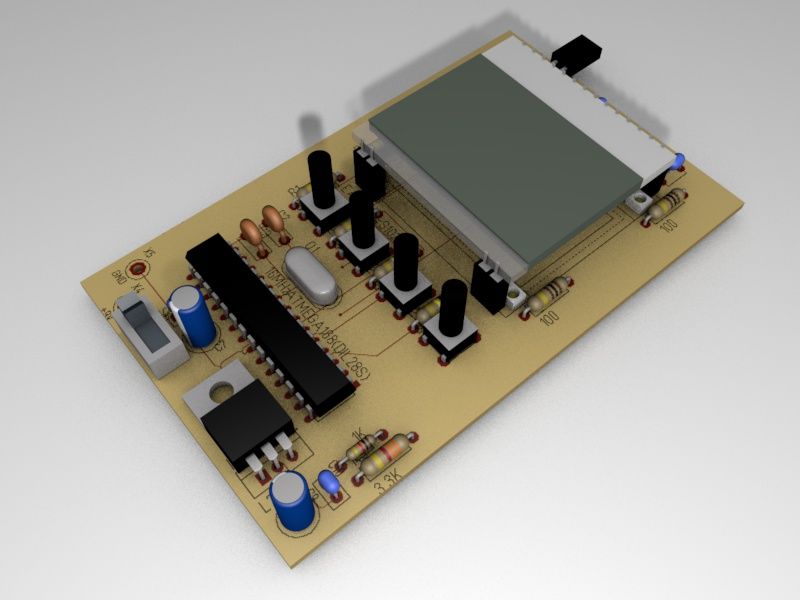
For the ESM I used an Atmel Atmega328 (based on the Arduino-Board) because it have an internal SRAM with 2KBytes. It’s necessary for the big data processing.
So you need more than 1KByte SRAM.
With the menu in the ESM you can do…
… setting the baud rate
… start and pause the reading
Step 1: Circuit
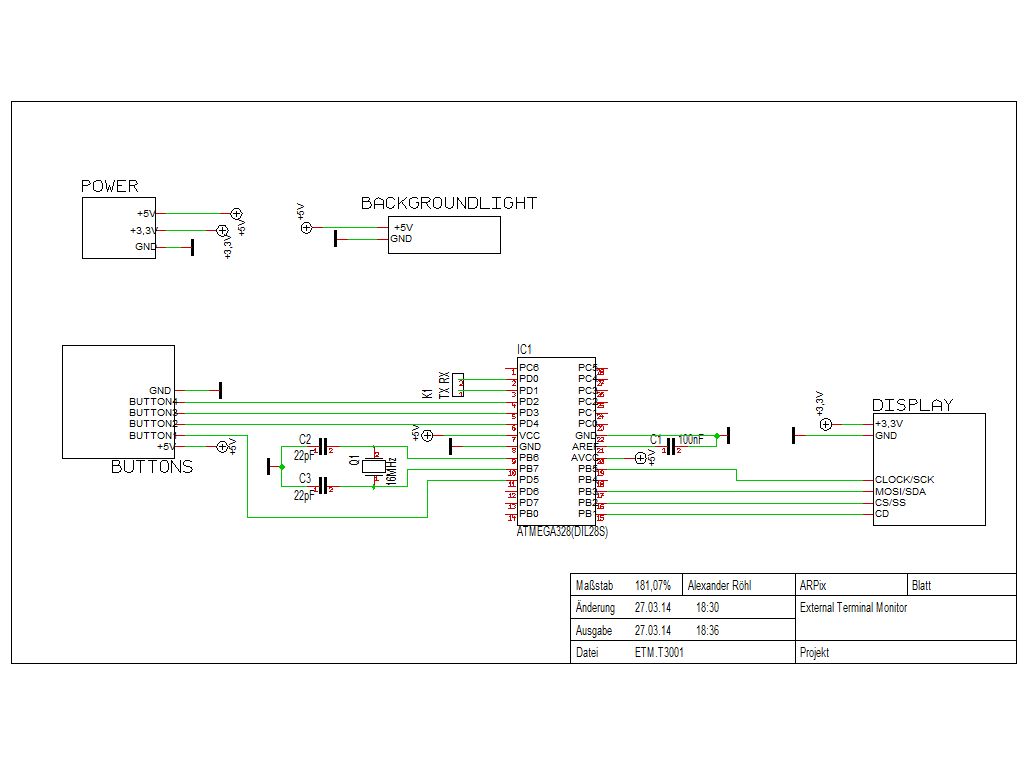
Step 2: Parts list
C2,C3 22pF/50V
C4,C5,C6 1µF
C7,C9 47µF/16V
D1,D2,D3,D4 LED-SMD OSRAM TOPLED, 9 mcd, green
Display1 EA_DOG-S102-6
IC1 ATMEGA328(DIL28S)
IC3 L7805 5V VOLTAGE CONVERTER
K1 FEMALE CONNECTOR
Q1 16MHz
R1,R2,R3,R4 100KOhm
R5,R6,R7,R8 100 Ohm
R9 3,3KOhm
R10 1KOhm
S2,S3,S4,S5 JTP-1230 BUTTON
S6 SLIDE SWITCH
9V Battery
Step 3: Arduino sketch
esm.ino
The main sketch.
vars.h
Global variables are defined here.
menu.h
The menu-functions.
buttons.h
The buttons are here defined.
programs.h
The functions behind the menu.
menu()
startSerial()
settings()
mode()
myDOG.h
Functions for the DOGS-102 display.
static void setChipSelectPin(PIN No. as const int)
static void writeByte(unsigned int)
static void Init()
static void begin()
static void drawPic(byte[8][102])
static void displayClear()
static void print(Text as char*)
static void print(Text as char*, Row as int)**
static void print(Text as char*, Col as int, Row as int)**
static void print(Number long, Col as int, Row as int)**
** Col = 0 to 102 pix, Row 0 – 7
myfont.h
Font definitions and functions.
myPic.h
The start image.
mySPI.h
The SPI function.
 esm.zip8 KB
- Why was the Atmel Atmega328 chosen for the ESM?
It has an internal SRAM of 2KBytes which is necessary for big data processing. - What functions can be performed using the ESM menu?
You can set the baud rate and start or pause the reading. - What power source is required for the circuit?
A 9V Battery is used. - Which specific display model is utilized in this project?
The EA_DOG-S102-6 display is used. - How many buttons are included in the parts list?
There are five buttons labeled S2 through S6 (four JTP-1230 buttons and one slide switch). - What voltage converter is used in the design?
An L7805 5V Voltage Converter is used. - What is the purpose of the vars.h file?
Global variables are defined in this file. - Can the baud rate be changed via the interface?
Yes, setting the baud rate is a feature available in the menu. - What frequency does the oscillator Q1 operate at?
The oscillator Q1 operates at 16MHz.
