
Summary of DIY CNC for 60$ (Large Work Area)
This article details a budget-friendly DIY CNC machine project costing approximately $60, featuring a 250mm x 300mm work area. The author shares a journey of trial and error, noting that an initial larger version suffered from wobbling and insufficient motor torque. Consequently, a refined smaller version with a 25cm x 30cm workspace was created, which successfully drew accurate straight lines and rectangles using G-code generated via MakerCam or Inkscape. The build utilizes standard electronics like Arduino UNO R3 and Nema 17 motors alongside mechanical parts such as screw rods and plywood.
Parts used in the DIY CNC for 60$ (Large Work Area):
- Nema 17 stepper motors (1.8 degrees, 4.4 kg cm torque)
- 228BYJ-48 5V stepper motor
- A4988 stepper motor drivers X 3
- Rainbow wire and connecting wire
- DC Port
- 12V 5A DC power supply
- Arduino UNO R3
- Copper clad board
- Printer with gloss sheets
- 0.8 mm drill bit
- Drill machine
- 100 uf capacitors X 3
- 2 component adhesive
- Male headers and Female headers
- Plywood
- Thin nails
- Multimeter
- Soldering iron and solder
- Scissors
- Screwdrivers
- 3 mm drill bit
- Ferric Chloride
- Containers
- M3 screws
- 500 mm screw rods X 2 (or 300 mm for successful version)
- Smooth rods X 4 (Required for fail version)
- Flange nuts 8 mm X 2
- Flexible shaft couplers X 2
- Nipper
- Electric iron
- Hot glue gun with glue sticks
- Sand paper
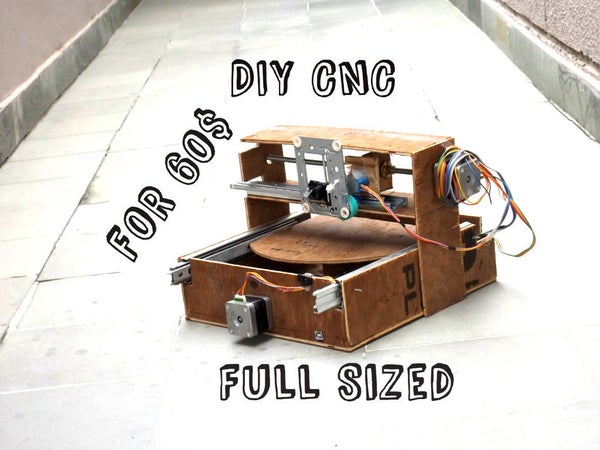
Hi there I’ve been here after a long time, and this time I’ve made a huge project as compared to my earlier ones. This is a full-sized 250 mm X 300 mm work area CNC machine and more interesting things is that it was made in 60$ only. I got some time in my summer vacations and this time I thought to make something apart from my daily work,I can say that it is a fully functional prototype. It is a full version of a CNC. I failed many times during this build but at the end I got precise CNC machine. In the following steps you may notice two different versions of it actually the larger one doesn’t work properly so I made smaller one with work area of 25 cm X 30 cm. This is my longest instructable ever I am going to mention each and every thing I faced and did during the building time. I can easily see many mini CNC’s on this website made from old floppy drives and CD ROMs. First of all I thought to make a mini version of this CNC but due to a little difference between the cost of mini and full versions I decided to go with this one. I really need a 3D printer to keep making projects in future, if you like this tutorial please don’t forget to vote!
Update :- I just recorded a video of it drawing a circle.
See this video of my CNC working with all axes moving :-
Step 1: Failure and Success
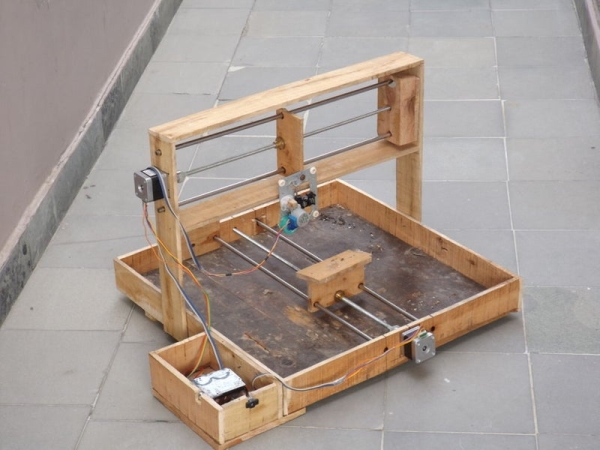
As I mentioned in the introduction that I failed many times. To give you a clear picture of making your own CNC mill I will write every success and fail during my build. The larger one worked fine but it wobbled around which annoyed me and the nema 17 motors sometimes weren’t enough to move heavy load. The first picture is of the fail version and the second one is of the final successful version. The smaller one drew straight lines with full accuracy I ran rectangle g-code in the video,possibilities are unlimited.
NOTE :- You can make your own g codes using makercam or inkscape. Please consider this.
The whole making process :-
Step 2: Things Required
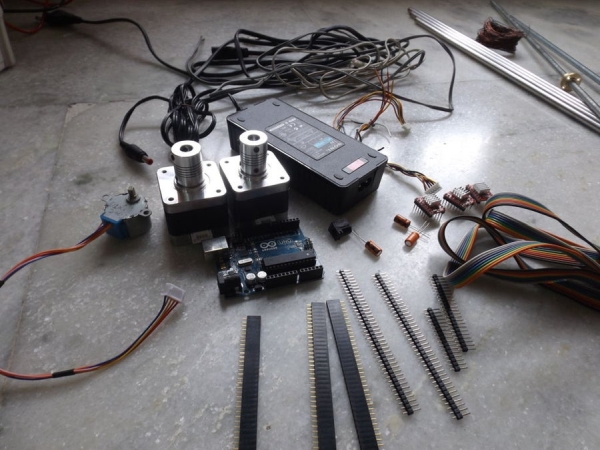
The list is a bit long :-
- Nema 17 stepper motors (1.8 degrees.4.4 kg cm torque) X 2
- 28BYJ-48 5V stepper motor
- A4988 stepper motor drivers X 3
- Rainbow wire,connecting wire
- DC Port
- 12V 5A DC power supply
- Arduino UNO R3
- Copper clad board
- Printer with gloss sheets
- 0.8 mm drill bit
- Drill machine
- 100 uf capacitors X 3
- 2 component adhesive
- Male headers
- Female headers
- Plywood
- Thin nails
- Multi-meter
- Soldering iron and solder
- Scissors
- Screwdrivers
- 3 mm drill bit
- Ferric Chloride
- Containers
- M3 screws
- 500 mm screw rods X 2 (300 mm would be OK if you want a successful version)
- Smooth rods X 4 (Required for fail version)
- Flange nuts 8 mm X 2
- Flexible shaft couplers X 2
- Nipper
- Electric iron
- Hot glue gun with glue sticks
- Sand paper
Read more: DIY CNC for 60$ (Large Work Area)
- How much did the entire CNC project cost?
The project was built for only 60 dollars. - What are the dimensions of the final successful work area?
The final successful version has a work area of 25 cm by 30 cm. - Why was a smaller version created instead of the larger one?
The larger version wobbled around and the Nema 17 motors were sometimes not enough to move heavy loads. - Can you make your own g codes for this machine?
Yes, you can make your own g codes using Makercam or Inkscape. - What type of stepper motors were used in the build?
The build uses Nema 17 stepper motors with 1.8 degrees and 4.4 kg cm torque, along with a 228BYJ-48 5V stepper motor. - Does the smaller version draw accurately?
Yes, the smaller version drew straight lines with full accuracy and ran rectangle g-code successfully. - What software is recommended for generating g-codes?
Makercam or Inkscape are recommended for making your own g codes. - Which microcontroller board was used for control?
An Arduino UNO R3 was used as the controller. - What length of screw rods is required for a successful version?
While 500 mm screw rods were listed, 300 mm would be okay if you want a successful version.
