
Summary of Create a Motion-Sensing Alarm with an Arduino and IR Sensors
This article describes building an intruder alarm using two long-range IR sensors connected to an Arduino Mega2560. The system detects objects by measuring reflected infrared pulses; if the sensor output exceeds 400, indicating someone passing through a door, the Arduino triggers a buzzer. A pushbutton allows users to reset the alarm.
Parts used in the Infrared Intruder Alarm:
- 2 x long-range IR sensors
- 1 x Arduino Mega2560
- 1 x buzzer
- 1 x pushbutton
- 1 x 470 ohm resistor
- 1 x NPN transistor
- jumper wires
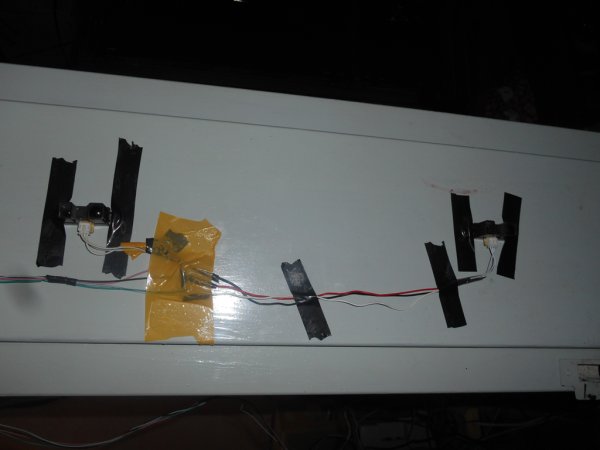
Overview
Infrared (IR) sensors are normally used to estimate the distance of an object, but you can also use them to detect the presence of objects. IR sensors consist of an IR transmitter and and IR receiver. The transmitter outputs pulses of infrared radiation, while at the same time, the receiver detects any reflections. If the receiver does detect a reflection, it means that there is an object at some distance in front of the sensor. If there is no reflection, then there is no object.
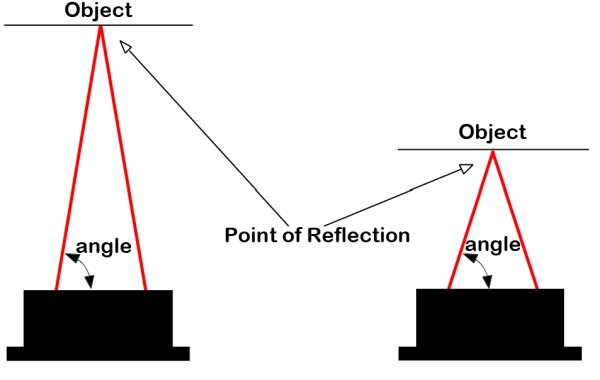
The IR sensor that we are using in this project is a sharp infrared IR ranger. These sensors have a small linear charge-coupled device (CCD) array that detects the angle at which the IR radiation returns to the sensor. As shown in the figure below, the sensor transmits an infrared pulse into the field, and when there is an object in front of the sensor, the pulse is reflected back to the sensor at an angle proportional to the distance that the object is away from the sensor. The sensor’s receiver detects and outputs the angle, and using this value, you can calculate the distance.
By connecting a couple of IR sensors to an Arduino, we can make a simple intruder alarm. We will connect the sensors to a door jamb, and by properly aligning the sensors, we can detect when someone passes through the door. When this happens, the output of the IR sensor will change, and we will detect this change by continually reading the output of the IR sensors with an Arduino. In this example, we know that an object is passing through the door when the IR sensor’s output exceeds 400. When this occurs, the Arduino will set the alarm to ON. To reset the alarm, a user can press a pushbutton.
Hardware Required
- 2 x long-range IR sensors
- 1 x Arduino Mega2560
- 1 x buzzer
- 1 x pushbutton
- 1 x 470 ohm resistor
- 1 x NPN transistor
- jumper wires
Wiring Diagram
The circuit for this project is shown in the diagram below. The outputs of the two IR sensors connect to A0 and A1. The other two wires are connected to 5V and GND. A 12V buzzer is connected to pin 3 through a transistor and the pushbutton used to shut the alarm OFF connects to pin 4.
Read More: Motion-Sensing Alarm with an Arduino and IR Sensors
- How do IR sensors detect objects?
The transmitter outputs pulses of infrared radiation while the receiver detects reflections; if a reflection is detected, an object is present. - What type of IR sensor is used in this project?
A sharp infrared IR ranger with a small linear charge-coupled device (CCD) array is used. - How does the system know an object is passing through the door?
The system detects an object when the IR sensor's output exceeds 400. - Can you use IR sensors for distance measurement?
Yes, IR sensors are normally used to measure distances or estimate the distance of an object. - What happens when the alarm is triggered?
The Arduino sets the alarm to ON and activates the buzzer. - How can you reset the alarm?
A user can press a pushbutton to reset the alarm. - Which pins connect the IR sensors to the Arduino?
The outputs of the two IR sensors connect to A0 and A1. - Does the buzzer connect directly to the Arduino pin?
No, the 12V buzzer is connected to pin 3 through a transistor.
