
Summary of Connecting Anduino to IFTTT
This project shows how to connect an Anduino WiFi shield-equipped Arduino to IFTTT via Adafruit IO using MQTT, enabling sensor data logging and remote control through IFTTT applets (for example logging temperature to Google Sheets or sending push notifications). It outlines the motivation, setup steps, and an example applet linking an Adafruit IO Temperature feed to Google Drive, and mentions available Arduino libraries for Anduino and Adafruit MQTT.
Parts used in the Connecting Anduino to IFTTT:
- Arduino Due
- Arduino Zero & Genuino Zero
- Andium Anduino WiFi
- Arduino IDE (software)
- Adafruit IO (online service)
- IFTTT Adafruit (IFTTT service integration)
Connect your anduinoWiFi to IFTTT. Control everything around you, or ‘let go’ and let random events in cyberspace control your surroundings!

Things used in this project
Hardware components |
||||||
 |
|
× | 1 | |||
 |
|
× | 1 | |||
 |
|
× | 1 | |||
Software apps and online services |
||||||
 |
|
|||||
|
||||||
|
||||||
Story
Motivation
The Arduino, and most popular DIY embedded solutions for that matter are usually great at one of two things; Communicating with sensors and discrete pieces of hardware, or running complex or interpreted code and connecting to third party services (APIs). Balancing power consumption, processing capabilities, and storage will always offer tradeoffs. This usually lands us choosing between Raspberry Pi or Arduino.

Raspberry Pi and embedded Linux grants you the opportunity to easily integrate third party libraries and implementations to utilize, say a Java SDK to connect to AWS. Although things can get tricky when it comes time to speak to the DHT22 temperature sensor that’s pushing readings to your S3 bucket.
With Arduino, instead of having to wrap Python, on top of C, and having no real great way to guarantee consistent timing for readings; You can easily communicate to the sensor on the Arduino using the “bit-banged” proprietary protocol and less than 200 lines of code. Not to mention you’ll be hard pressed to get your Arduino MKR1000 to draw 750ma of current to get the job done.
In an ideal world you’d have:
- Low power consumption
- Simple/close to the hardware, real time sensor integration
- 3rd party API connectivity and TLS security
Finding a single hardware device that fulfills all these requirements is inevitably going to initiate some compromises. I might argue that a true, complete solution, would actually include both an Arduino style embedded device and an embedded Linux machine working together. But when you’ve only got your Arduino Due and anduinoWiFi shield there’s still a great way to get connected to the wonderfully diverse world of open API’s out in the wild.

Enter, IFTTT (If This… Then That). This write up is all about getting your anduinoWiFi speaking to any of the services (applets) available. Imagine:
- Logging sensor data to a Google Docs spreadsheet
- Sending a push notification to your phone when your laundry is done
- Illuminating your umbrella handle with an led if there’s rain in the forecast
- Opening your garage door when you pull into the driveway
All of these ideas are totally possible with only a WiFi101 connected Arduino. In a recent project write up we saw how easy it is to connect Arduino to Adafruit IO using anduinoWiFi. Adafruit IO is going to be our gateway to IFTTT. So essentially, by publishing/subscribing to feeds using MQTT (just like we did here) we’ll be able to communicate with any applet on IFTTT.
Getting Started
We’re going to jump right into IFTTT and assume that you’ve already tried the ‘Anduino Speaks Adafruit‘ project and are completely fluent in Adafruit IO, Adafruit MQTT, feeds, etc. If not, take a quick detour and come back in 20 minutes. Assuming you’ve just confirmed your sensor readings in the Adafruit IO dashboard what’s next? Let’s hop on over to IFTTT and get these sensor readings streaming to Google Docs.

So you’ve signed up for IFTTT and your ready to create your first applet. Applets are what IFTTT calls the little logic widgets that control what happens ‘if this’ event occurs. Click ‘+ this’:
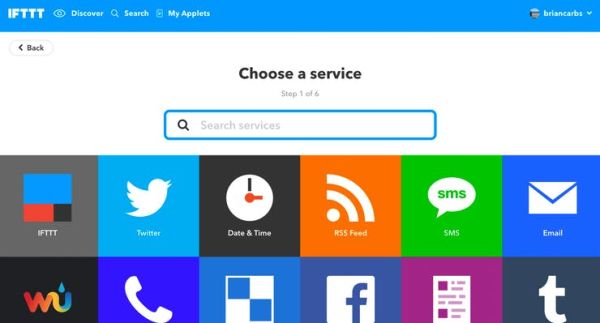
And you’re greeted with a long list possibilities! In this first applet we’re going to send data from our Arduino to Google Docs. So:
IF our Arduino has a ‘temperature reading’ log that reading in a google spreadsheet’.
Using MQTT we’ve already published our latest reading in a feed on Adafruit IO, so next we need to get that feed speaking to Google. Search for Adafruit and select:
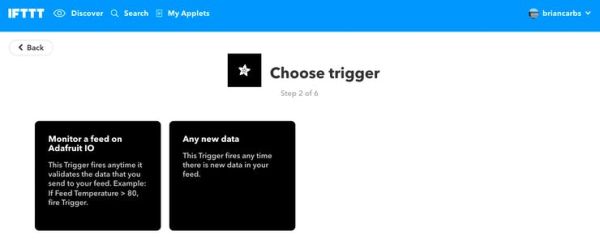
‘Any new data’. This way, anytime our ‘Temperature’ feed receives new data, we’ll send it over to Google.
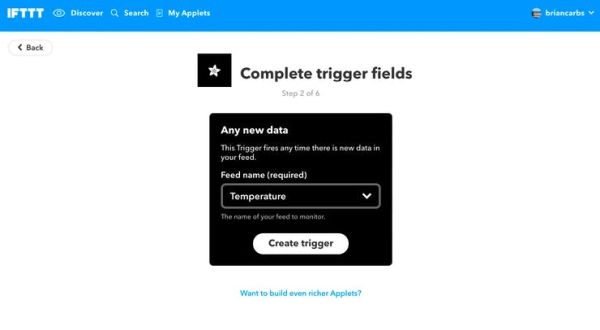
Now we get to select our ‘trigger’ and complete the ‘that’ portion of our logic.

Search for Google, select Google Drive, and then, ‘Add row to spreadsheet’. (If this is your first time using the Google Drive applets you’ll be prompted to authenticate using your google account):
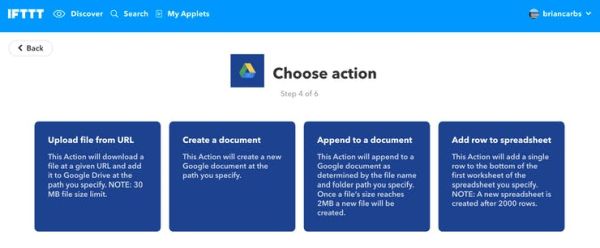
The applet pre-populates with variables representing our feed, values, etc…
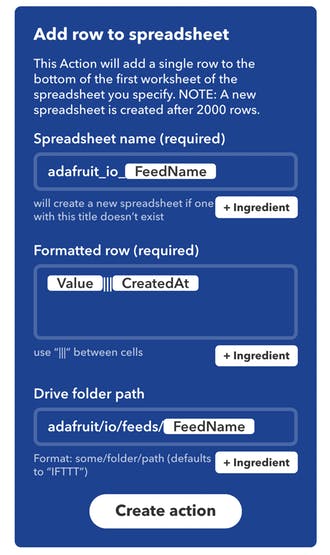
Don’t worry about creating the spreadsheet first, this applet will create one for you named ‘adafruit_io_Temperature’. (Or whatever you type in the first field.) Each row in our spreadsheet will contain our temperature value and the timestamp it was created.
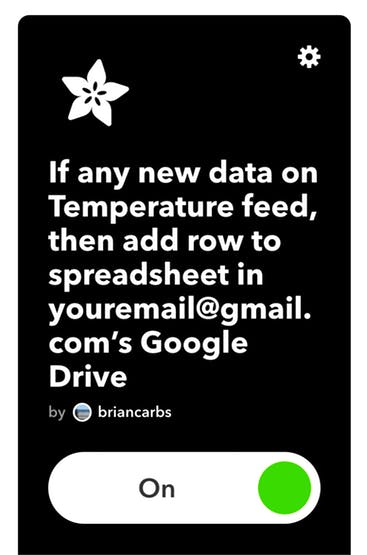
That’s it! Just like we had planned earlier…
IF our Arduino has a ‘temperature reading’ log that reading in a google spreadsheet’.
Let’s see it in action!
Anduino –> IFTTT!
We’ve just received our first temperature reading from our Arduino on /bcarbon1/feeds/Temperature:
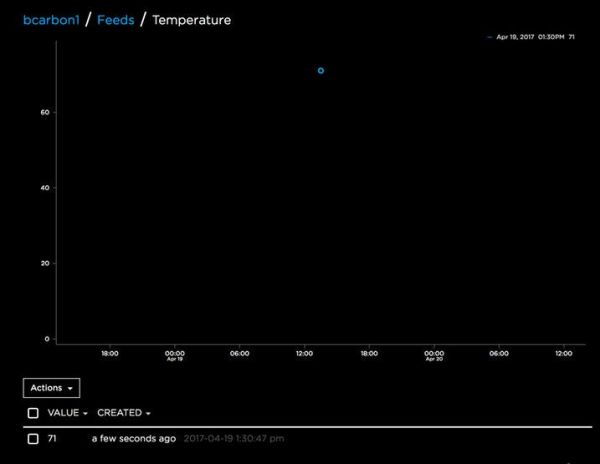
At the same time if we check our Google Drive:
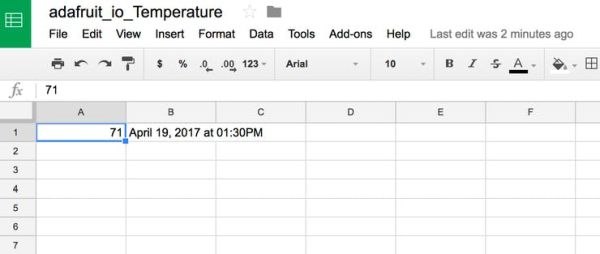
We even received a push notification (requires d/l of the IFTTT app on your iOS/Android phone) to let us know the new published reading.
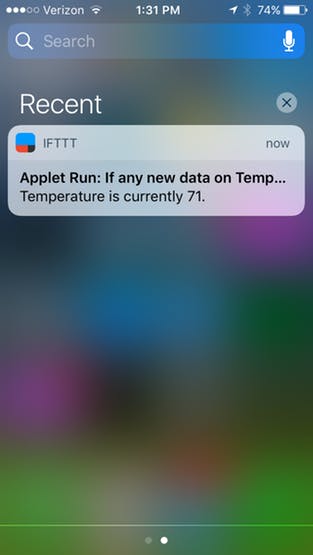
That’s it! We’ve just laid the groundwork for easily connecting your Arduino to just about any API out there.
What’s next?
What about using a third party app as a ‘trigger’ to control something on our Arduino? Bi-directional communication is totally possible. Keep an eye out for more anduino projects where we’ll show just how easy it is to subscribe to feed data using MQTT and actuate something in your environment using the Arduino. Can’t wait to see what you create using IFTTT, Adafruit IO, and anduinoWiFi!
Code
Source : Connecting Anduino to IFTTT
- What is the main goal of this project?
To connect an Anduino WiFi equipped Arduino to IFTTT via Adafruit IO using MQTT so you can log data and control devices through IFTTT applets. - Which online service is used as a gateway to IFTTT?
Adafruit IO is used as the gateway to IFTTT. - How do you trigger an IFTTT applet from the Arduino?
Publish sensor data to an Adafruit IO feed via MQTT and use the Adafruit service on IFTTT with a trigger like Any new data on that feed. - What example applet is demonstrated in the article?
Logging temperature readings from an Adafruit IO Temperature feed to a Google Sheets spreadsheet via Google Drive Add row to spreadsheet applet. - Do you need to pre-create the Google spreadsheet for the example?
No, the applet will create a spreadsheet automatically (named adafruit_io_Temperature or as specified). - Can the system send push notifications to a phone?
Yes, the example shows receiving a push notification when new data is published (requires the IFTTT mobile app). - Is bi-directional communication possible with this setup?
Yes, the article states bi-directional communication is possible by subscribing to feed data using MQTT to actuate the Arduino. - Which libraries are referenced for code support?
The Anduino Arduino library and the Adafruit_MQTT_Library are referenced.
