
Summary of Arduino Tutorial: Temperature Sensor
This tutorial guides users in building a networked temperature-monitoring station using an Arduino microcontroller. The project enables iPhone connectivity to query multiple temperature probes placed in various locations, offering precise local readings beyond standard weather apps. It is ideal for monitoring specific environments like aquariums or indoor greenhouses and assumes prior knowledge of basic Arduino electronics.
Parts used in the Networked Temperature-Monitoring Station:
- SparkFun Inventor’s Kit for Arduino KIT-11227
- Arduino Uno Board DEV-11021
- Arduino Ethernet Wiz Shield DEV-09026
- Breadboard
- USB cables
- Resistors
- LEDs
- Temperature probes
If you’re like me, every morning before you leave for work you wonder whether you should wear a jacket before heading outside. You might not have time to check outside your front door, but you always have time to check your iPhone! :]
The problem is, standard weather apps tell you about the temperature in a nearby city or suburb – but not necessarily about extremely local conditions. And what about that aquarium you would like to monitor, or your mini indoor greenhouse?
This is a job for the latest open source microcontroller – the Arduino.
In this tutorial, you’ll build an Arduino project for the iPhone that lets you connect multiple temperature probes you can place in different locations and query for their readings.
Keep reading to learn more about the Arduino, find out what materials you’ll need for this tutorial, and finally – build your own networked temperature-monitoring station!
This tutorial assumes you have been through some of the earlier tutorials on the Arduino. If not, you may want to check out our beginner Electronics for iPhone Developers tutorial series before starting.
What You’ll Need
This tutorial requires some specific hardware components to interface with the temperature probes. You’ll be making use of a microcontroller (the Arduino), an Ethernet interface, and connecting status and temperature probes. If you’ve completed other Arduino tutorials on the site, you should have some of these parts – and as a budding electronics hobbyist, now is your chance to begin a collection of reusable modules!
The full parts list of required components is below, with URLs to purchase them. The total cost of all the parts is approximately $160 USD. If this seems like a lot of money, remember that you are stocking yourself with plenty of components that you can tinker with beyond this tutorial. If you’ve done previous tutorials, then you already have an Inventor’s Kit and maybe the Ethernet Shield, which drops the total price to $38.00.
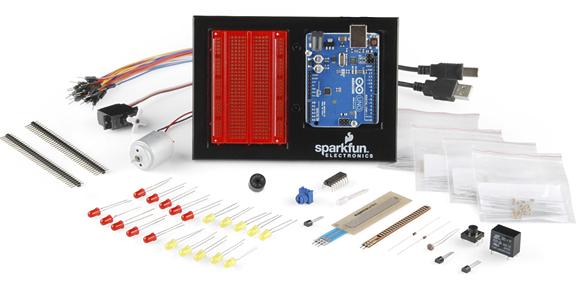
SparkFun Inventor’s Kit for Arduino KIT-11227 at $94.95 (Quantity 1). This is the most expensive item but includes a lot of parts for later use, as well as a prototype breadboard. Remember from the Electronics for iPhone Developers tutorial series that a breadboard is just a simple way to connect wires together
If you already have various breadboards, USB cables, resistors and LEDs, then you can just buy the Arduino Uno Board DEV-11021 at $29.95 (Quantity 1). Though the inventor’s kit above is still a great buy, just to have a toolbox of spare parts!
Arduino Ethernet Wiz Shield DEV-09026 at $45.95 (Quantity 1).
For more detail: Arduino Tutorial: Temperature Sensor
- What problem does this Arduino project solve?
It provides extremely local temperature conditions rather than just data from nearby cities or suburbs. - Can I monitor multiple locations with this setup?
Yes, the project allows you to connect multiple temperature probes to different locations. - How much does the full parts list cost?
The total cost of all required parts is approximately 160 USD. - How can I reduce the cost if I have previous experience?
If you already own an Inventor’s Kit and Ethernet Shield, the price drops to 38.00 USD. - What hardware is required to interface with the probes?
You need a microcontroller, an Ethernet interface, status indicators, and temperature probes. - Does this work with an iPhone?
Yes, the tutorial builds a project specifically designed to connect with an iPhone. - Is this suitable for small spaces like aquariums?
Yes, it is designed to monitor specific areas such as aquariums or mini indoor greenhouses. - Do I need to be an expert to start this tutorial?
No, but you should complete beginner Electronics for iPhone Developers tutorials first. - What is included in the SparkFun Inventor’s Kit?
It includes many parts for later use and a prototype breadboard.
