
Summary of Arduino Based 3-Way Traffic Light Controller
Arduino Based 3-Way Traffic Light Controller simulates traffic signals for a three-way intersection using an Arduino Uno and nine LEDs. The circuit arranges three sets of red, yellow, and green LEDs, each with 220 ohm resistors, connected to Arduino pins 2–10. The program sets pins as outputs, then cycles each side: red for 5 seconds, yellow for 1 second, then green, coordinating overlaps so realistic intersections occur. The project runs on Arduino 5V/GND and uses simple digitalWrite and delay calls to control timing.
Parts used in the Arduino Based 3-Way Traffic Light Controller:
- 3 Red LED Lights
- 3 Green LED Lights
- 3 Yellow LED Lights
- 3 220ohm Resistors
- Breadboard
- Male To Male Connectors
- Arduino Uno With IDE Cable
We all know about Arduino. It is one of the most popular open source micro controller board which is highly useful for doing DIY projects. This Arduino based 3-Way Traffic Light Controller is a simple Arduino DIY project which is useful to understand the working of traffic lights which we see around us. We have covered a more simpler version of traffic lights in this traffic light circuit. Here have demonstrated it for 3 sides or ways. Now let’s get into the project…
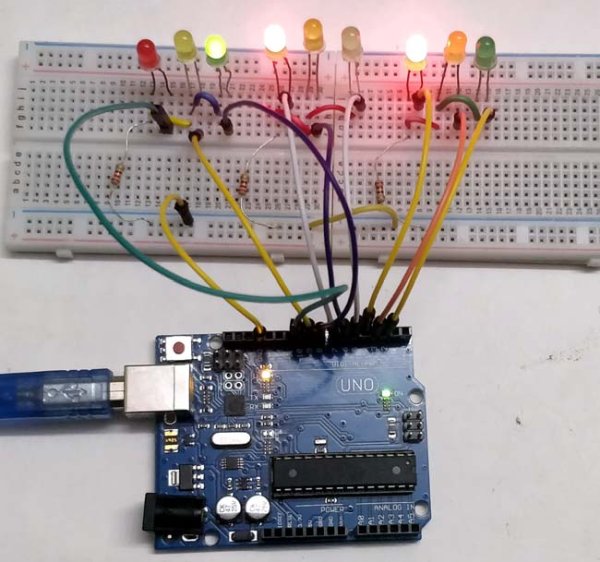
Components Required:
- 3*Red LED Lights
- 3*Green LED Lights
- 3*Yellow LED Lights
- 3*220ohm Resistors
- Breadboard
- Male To Male Connectors
- Arduino Uno With Ide Cable
Circuit Explanation:
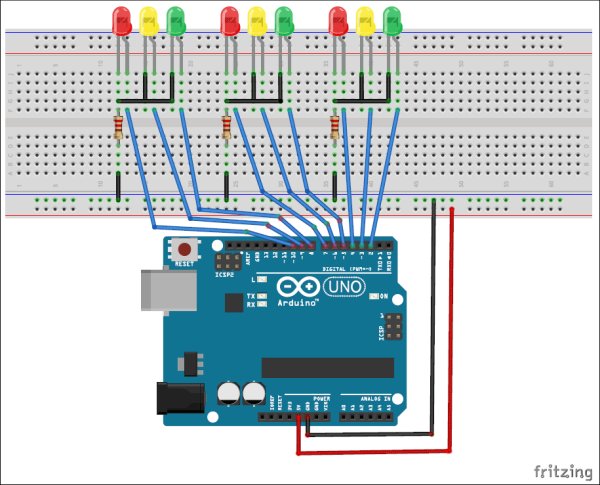
The circuit Diagram for Arduino Traffic Light Controller project is given below:
It’s pretty simple and can be easily built on bread board as explained in below steps:
- Connect the LEDs in the order as Red, Green, and Yellow in the breadboard.
- Place the negative terminal of the LEDs in common and connect the 220ohm resistor in series.
- Connect the connector wires accordingly.
- Connect the other end of the wire to the Arduino Uno in the consecutive pins(2,3,4…10)
- Power up the breadboard using the Arduino 5v and GND pin.
Program and Working Explanation:
The Arduino Traffic Light Controller Project code is not complex and is easily comprehensible. We have shown a demonstration of traffic lights for a three-way road, with LEDs lighting up on all three sides in a specific order, just like real traffic lights. At one point, there may be two Red lights on one of the sides and a Green light on the other side. Yellow light will glow for 1 second during the transition from the red light to the green light, with the red light glowing for 5 seconds, followed by the yellow light for 1 second before the green light comes on.
In the program, first we have declared pins (2,3…10) as output in void setup() for 9 LEDs (three on each side i.e. forward, right and left side).
   void setup() {
  // configure the output pins
  pinMode(2,OUTPUT);
  pinMode(3,OUTPUT);
  pinMode(4,OUTPUT);
  pinMode(5,OUTPUT);
  pinMode(6,OUTPUT);
  pinMode(7,OUTPUT);
  pinMode(8,OUTPUT);
  pinMode(9,OUTPUT);
  pinMode(10,OUTPUT);
}
Then in void loop() function we have written the code for traffic lights to be turned on and off in sequence as mentioned above.
void loop()
{

  digitalWrite(2,1); //enables the 1st set of signals
  digitalWrite(7,1);
  digitalWrite(10,1);
  digitalWrite(4,0);
  digitalWrite(3,0);
  digitalWrite(6,0);
  digitalWrite(8,0);
  digitalWrite(9,0);
  digitalWrite(5,0);
  delay(5000);
  ..... ....
  ..... ....
The Arduino Traffic Light Controller Project code is not complex and is easily comprehensible. We have shown a demonstration of traffic lights for a three-way road, with LEDs lighting up on all three sides in a specific order, just like real traffic lights. At one point, there may be two Red lights on one of the sides and a Green light on the other side. Yellow light will glow for 1 second during the transition from the red light to the green light, with the red light glowing for 5 seconds, followed by the yellow light for 1 second before the green light comes on.
The complete Arduino code and Video for this Arduino Traffic Light Project is given below.
Code
Video
Source: Arduino Based 3-Way Traffic Light Controller
- What microcontroller is used in this traffic light project?
Arduino Uno is used as the microcontroller for this project. - How many LEDs are required for the three-way traffic light?
Nine LEDs are required: three red, three yellow, and three green. - Which Arduino pins are used to connect the LEDs?
The LEDs are connected to consecutive Arduino pins 2 through 10. - How long does the red light stay on in the sequence?
The red light stays on for 5 seconds according to the program. - How long does the yellow light glow during transitions?
The yellow light glows for 1 second during transitions. - Do you need resistors for the LEDs and what value?
Yes, 220 ohm resistors are used in series with the LEDs. - How is the breadboard powered?
The breadboard is powered from the Arduino 5V and GND pins. - Are the Arduino pins declared as outputs in the code?
Yes, pins 2 through 10 are configured as OUTPUT in void setup(). - Does the code use analog functions or simple digital writes?
The code uses digitalWrite and delay functions to control LEDs. - Is there a demonstration video and code provided?
Yes, the article provides the complete Arduino code and a demo video link.
