
Summary of A POCKET QWERTY FOR ARDUINO AND MORE
This article introduces a custom 41-button Arduino-compatible keyboard designed by [ELECTRONOOBS]. It features a full QWERTY layout with shift, return, and send keys, replacing traditional clicky buttons with soft, silent ones. The device utilizes an onboard ATMega328P to scan the matrix and communicate via UART or I²C. While PCB files are currently on Patreon, the code is available online, with future plans for LED indicators and updated silkscreen labels.
Parts used in the Arduino Keyboard:
- 41-button keypad
- ATMega328P microcontroller
- UART communication interface
- I²C communication interface
- Silkscreen labels
If you want to add a keypad to your Arduino project, the options are pretty limited. There’s that red and blue 4×4 membrane we’ve all seen in password-protected door lock projects, and the phone layout version that does pretty much all the same tricks. Isn’t it time for a full Arduino-compatible keyboard? [ELECTRONOOBS] thinks so.
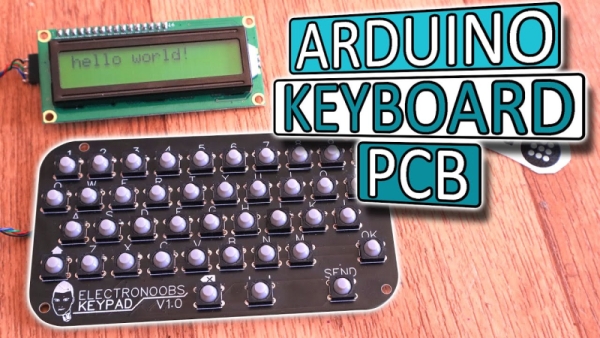
This 41-button Arduino keyboard PCB is a stepping stone to his next project, a pair of two-way texting machines. (Which is nice, because we were totally going to suggest that). It’s based on that ubiquitous red/blue keypad, but it has a full QWERTY layout. There’s also a shift button that opens up special characters and uppercase, and the addition of return, ok, and send keys puts it over the top. The best part of this keyboard, hands down, is the soft, soundless buttons. Though you trade clicky feedback for comfort, it will be well worth it after a few dozen presses.
The keypad uses an onboard ATMega328P to scan the matrix for button presses, decode them, and send them via UART or I²C to an Arduino. [ELECTRONOOBS] has the PCB files available via Patreon for now, though they will be open in the future. The code is already available for download on his website.
Future plans include an LED to indicate when shift is pressed, and adding the special characters next to the numbers on the silkscreen (whoops!). Be sure to check out the build video after the break.
Want an Arduino-driven keyboard for longer hauls across the alphabet? Saddle up and ride this candy-colored mechanical unicorn.
Source: A POCKET QWERTY FOR ARDUINO AND MORE
- What is the main feature of this Arduino keyboard?
The keyboard features a full QWERTY layout with 41 buttons including shift, return, ok, and send keys. - How does the keypad process button presses?
An onboard ATMega328P scans the matrix, decodes the inputs, and sends data via UART or I²C. - Can I get the PCB files for this project?
The PCB files are currently available via Patreon but will be open sourced in the future. - Where can I download the code for the keyboard?
The code is already available for download on the creator's website. - What are the future plans for this keyboard?
Future plans include adding an LED to indicate when shift is pressed and correcting the silkscreen labels. - Does this keyboard have clicky feedback?
No, the keyboard uses soft, soundless buttons instead of clicky feedback. - What is the next project planned by the creator?
The creator plans to build a pair of two-way texting machines using this keyboard as a stepping stone. - Is there a shift button on the keyboard?
Yes, the keyboard includes a shift button that opens up special characters and uppercase letters.
