
Summary of Gesture Controlled Robotic Arm Using Kinect & Arduino
This project demonstrates a Simulink model controlling a robotic arm via gestures captured by a Microsoft Kinect sensor. The system uses an Arduino Mega 2560 to process data and drive servo motors, replicating shoulder, elbow, and hand movements. Developed using MATLAB R2013a and the Kinect SDK, the setup converts 3D coordinates into servo angles, transmitting encrypted data from MATLAB to the Arduino for real-time execution.
Parts used in the Gesture Controlled Robotic Arm:
- Arduino Mega 2560
- Microsoft Kinect for Xbox 360
- Microsoft Xbox Kinect Adapter
- Adafruit Servo Motor
- SparkFun USB to Serial Breakout - FT232RL
- Gripper
- Solderless Breadboard Full Size
- Jumper wires (generic)
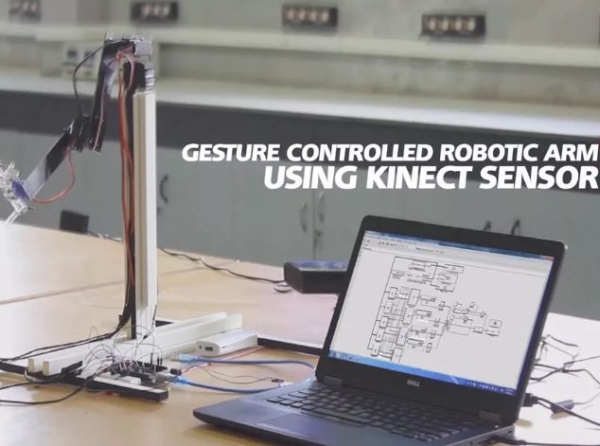
This is a Simulink Model to Control a Robotic Arm By Gestures that are captured using Kinect. A Robotic Arm is developed using Servo Motors.
Step 1: Things Used in This Project
Hardware components:
- Arduino Mega 2560
- Microsoft Kinect for Xbox 360
- Microsoft Xbox Kinect Adapter
- Adafruit Servo Motor
- SparkFun USB to Serial Breakout – FT232RL
- Gripper
- Solderless Breadboard Full Size
- Jumper wires (generic)
Software apps and online services:
- Arduino IDE
- Microsoft Kinect for Windows SDK v1.6
- Microsoft Windows SDK 7.1
- MATLAB 2013a
Step 2: Story
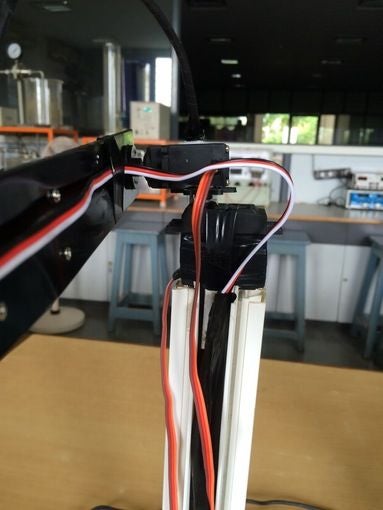
This is a Simulink Model to Control a Robotic Arm By Gestures that are captured using Kinect Sensor. A Robot Arm is developed using Servo Motors that replicates the Right Arm Shoulder, Elbow and Hand Movements.
My File at Mathworks File Exchange : https://in.mathworks.com/matlabcentral/fileexchan…
A Project By
The Zip file contains the Matlab Simulink Support for Kinect and the Simulink Model named “GestureControlledRoboticArm” that WE HAVE CREATED and also the Arduino Code/Wiring Diagram. The Simulink Support for Kinect was downloaded from Mathworks File Exchange and the full credits go to “Takashi Chikamasa” for providing it. We do not own the copyrights or have developed the Simulink Support For Kinect. Simulink
Support for Kinect consists of IMAQ, Image, IR, Depth, Motion and Skeleton blocks to achieve real-time image data acquisition from Kinect devices such as Microsoft Kinect or ASUS Xtion PRO under Simulink simulation environment. It works with 32bit/64bit version of MATLAB R2010b or later in Windows7 32bit/64bit and it requires the following 3rd party software:
[C MEX Compiler] – Microsoft Visual Studio 2010 Express Edition (VC++) – Microsoft Windows SDK 7.1
[To use OpenNI http://openni.ru/ ] – OpenNI – PrimeSense NITE – PrimeSensor Module [To use Microsoft Kinect SDK http://openni.ru/ ] – Microsoft Kinect for Windows SDK v1.6 For more detailed information, please refer to document in the zip file and help of the blocks.
[Optional MATLAB products] – Computer Vision System Toolbox (highly recommended) – DSP System Toolbox (to acquire Kinect Microphone Array data) – Simulink Coder (to generate *.exe file)
Acknowledgements : Kinect Matlab, Simulink Support For Kinect, and Kinect Microsoft Sdk inspired this Project.
Step 3: Custom Parts and Enclosures
Simulink Model
Open the GestureControlledRoboticArm.mdl using Matlab after installing the Simulink Support for Kinect.
Download : GestureControlledRoboticArm.mdl
Matlab Simulink Code & Library Files (Instructions included)
In the .ZIP, you can find the Simulink for Kinect Support developed by Takashi Chikamasa, Mathworks. Inside the “slkinect” folder, you can find the instruction on how to install the library file in Matlab.
Download : Gesture Controlled Robotic Arm Using Matlab Simulink Support For Kinect.zip
Step 4: Schematics – Arduino – Servo Connection
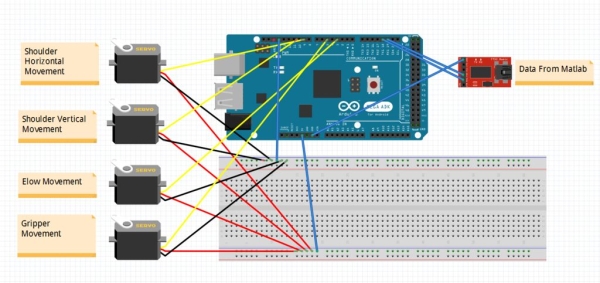
Arduino – Servo Connection
The data output (angle) from the matlab software is sent to the arduino via TTL device. The connection from the TTL – Arduino & Arduino – Servo motors are as shown in the diagram.
Step 5: Schematics – Simulink Model (Gesture Controlled Robotic Arm)

Simulink Model (Gesture Controlled Robotic Arm)
This is the simulink model we have developed to aquire the data from kinect, convert xyz co-ordinates to angle, decrypt the data and send it to Arduino via Serial Communication.
Step 6: Code – Arduino Program to Receive Angle Data From Matlab
Arduino Program to Receive Angle Data from Matlab – Arduino
The angle output from the Matlab Software is encypted. In the Arduino IDE, we have written a rogram to receive the angle data, decrypt it and send it to the servo motors.
Download : Arduino Code
Step 7: Awards and Recognitions
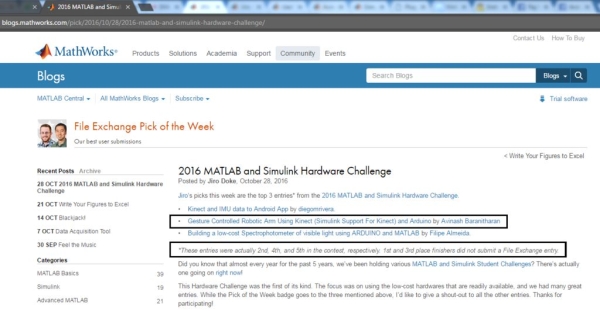
“Gesture Controlled Robotic Arm Using Kinect (Simulink Support For Kinect) and Arduino” has been chosen in the week’s ( 29/10/2016) Pick of the Week! – Matlab Simulink Hardware Challenge 2016
Won the 4th place in “MATLAB International Simulink Hardware Challenge 2016″
http://blogs.mathworks.com/pick/2016/10/28/2016-ma…
https://in.mathworks.com/matlabcentral/fileexchang…
Read more: Gesture Controlled Robotic Arm Using Kinect & Arduino
- How does the robotic arm replicate human movement?
The robot arm uses servo motors to replicate the Right Arm Shoulder, Elbow, and Hand Movements. - What software is required to run the Simulink model?
You need MATLAB 2013a with the Simulink Support for Kinect and Microsoft Visual Studio 2010 Express Edition. - Can this system work without the Computer Vision System Toolbox?
Yes, while highly recommended, the Computer Vision System Toolbox is listed as an optional MATLAB product. - How is data transmitted from MATLAB to the Arduino?
Data is sent via serial communication through a TTL device after being encrypted in the Matlab software. - Who developed the Simulink Support for Kinect used in this project?
The Simulink Support for Kinect was provided by Takashi Chikamasa and downloaded from Mathworks File Exchange. - Does the system require a specific version of Windows?
The support works on Windows7 32bit or 64bit versions. - What happens if the angle output from Matlab is not decrypted?
The Arduino program includes code specifically designed to receive and decrypt the encrypted angle data before sending it to the servos. - Is the Microsoft Kinect SDK v1.6 mandatory for this setup?
Yes, the documentation lists Microsoft Kinect for Windows SDK v1.6 as a required third-party software component.
