
Summary of RUIDENG DPS5020 – 50V 20A POWER SUPPLY MODULE REVIEW
The DPS5020 is a 0-50V/0-20A programmable power supply module integrating analog and digital control. It consists of a main controller board and a front panel featuring an OLED display, buttons, and a knob. The device supports Bluetooth and USB connectivity via included converters, allowing PC software control. It offers current limiting features, stores up to 10 preset groups, and ensures stable output voltage under varying loads.
Parts used in the DPS5020 Project:
- Main controller board
- Front panel module
- OLED display
- Control buttons
- Control knob
- FTDI UART to USB converter
- Bluetooth module
- User manual
- Cables
The DPS5020 is a constant voltage/current programmable control power supply module, that integrates analog and digital control in one device. Th e module is a 0-50V/0-20A Lab PSU module that comes in 2 parts, the main controller and a front panel. The main board has connections for input/output voltage as well as connection headers for Bluetooth and USB to Serial converter.
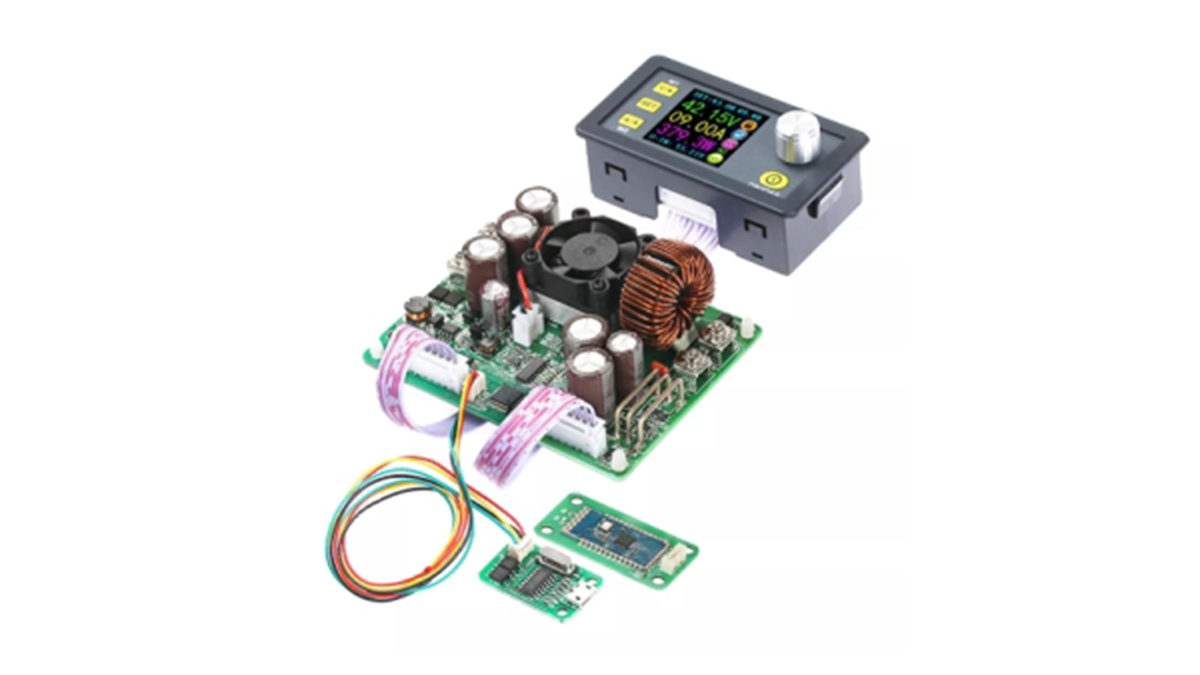
The front panel module has buttons and a control knob to set the desired voltage/current and an OLEDdisplay to show actual readings and set points. The DPS5020 can store up to 10 preset group values which are preserved during power off. You can also quickly set two stored group values. In comparison with traditional analog power supplies, it is more convenient to quickly set the voltage or current required. Using the provided instructions, assembling and switching on the device is straight forward. Along with the package, you will receive a small user manual, cables, and the two main modules.
USB And Bluetooth Connection
In the box, there’s is also a FTDI – i.e. UART to USB converter and a Bluetooth module (with pass: 1234, which just looks like a wireless UART COM port). You can use the available software to make a serial connection (wired or wireless) to the module, by downloading the PC software accordingly. Once the software is loaded, and the serial connector is connected to the board and PC, you are able to control the board from the onscreen menus. When the maximum current is set to 1A, voltage is set to 5V and connect a 2-ohm load, the voltage immediately drops to ensure no more than 1A flows through the load. This is the current limiting feature.
When the current limit is removed, the same load draws 2.4A and that’s a total of 12w of power, which follows Ohms Law. In this case the output voltage stays rock solid at 5v and the supply itself remains cold enough. To test another scenario, you can set the output to 20mA, attach a small LED to the output – and turn the unit on.
Read more: RUIDENG DPS5020 – 50V 20A POWER SUPPLY MODULE REVIEW
- What components are included in the DPS5020 package?
The package includes the main controller, front panel module, user manual, cables, FTDI UART to USB converter, and a Bluetooth module. - How does the current limiting feature work?
When maximum current is set, the voltage drops immediately to ensure no more than the set amperage flows through the load. - Can the DPS5020 connect to a computer wirelessly?
Yes, you can use the included Bluetooth module with passcode 1234 to establish a wireless serial connection via PC software. - How many preset values can the device store?
The module can store up to 10 preset group values which remain preserved even when the power is turned off. - What is the role of the front panel module?
The front panel contains buttons, a control knob for setting values, and an OLED display to show actual readings and set points. - Does the supply stay cool during high power operation?
Yes, testing showed that at 12 watts (5V and 2.4A), the supply remained cold enough while maintaining a solid 5V output. - Is it possible to test small loads like LEDs?
Yes, you can set the output to 20mA and attach a small LED to the output to turn the unit on safely. - How do you control the board from a PC?
You download the provided PC software, connect the serial connector to the board and PC, and control the board using onscreen menus.
