
Summary of Chicken Coop Automation
This project automates a chicken coop door using an Arduino MKR1000, a DC geared motor with encoder, a photoresistor for light-based automatic control, and a DHT22 for temperature/humidity monitoring, with remote control and telemetry via the Blynk dashboard. The system calibrates encoder positions, supports manual and automatic modes, and includes reconnection logic to Blynk. Future improvements mention reed switches, IR camera, and motion deterrents.
Parts used in the Chicken Coop Automation:
- Arduino MKR1000
- CHIHAI DC Motor - 12V 200rpm Encoder with Mounting Bracket
- Geekcreit L298N Dual H Bridge Stepper Motor Driver Board For Arduino
- Photo resistor
- DHT22 Temperature Sensor
- WiFi Access Point (installed in garden shed)
- Blynk (software/dashboard service)
- Nylon wire (for door pulley)
- Aluminium plate with guide rails (as door)
- Pulley and mounting hardware
Automating a chicken coop with sensors and actors, using an Arduino MKR1000 and the Blynk internet dashboard.
Things used in this project
Hardware components |
||||||
 |
|
× | 1 | |||
|
× | 1 | ||||
|
× | 1 | ||||
 |
|
× | 1 | |||
 |
|
× | 1 | |||
Software apps and online services |
||||||
 |
|
|||||
Story
Introduction
To protect our new chickens from the different predators, an automatic door is needed. We had a look on the available solutions on the market, but none could meet our requirements:
- Remote monitoring and control by using an app
- Possibility to add additional sensors and actors to measure temperature or buzzer alert
- Not too expensive
It would be way more fun to build it myself, so this is the start of my first microcontroller project.
Concept
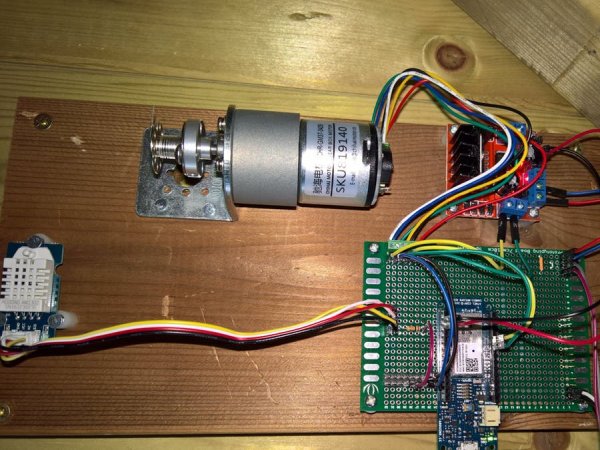
A simple aluminium plate with guide rails will serve as the door. It is attached to a DC motor by using nylon wire. The DC motor includes a gearbox, resulting in 200 rpm on 12V DC. The used motor has a hall sensor encoder built in. To keep the door in the “up” position, it is not needed to engage the motor. Resulting power consumption will therefore be very low.
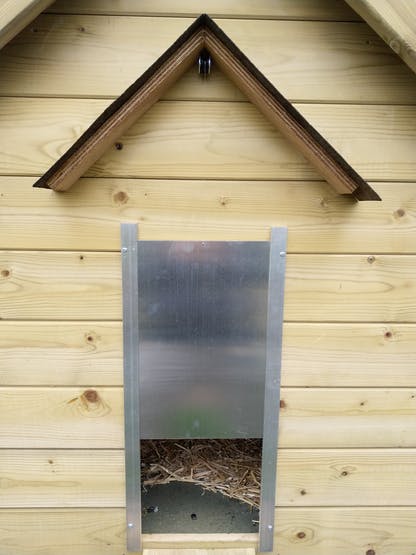 Alu door with pulley to guide nylon wire into the chicken coop. Can you spot the light sensor?
The control module I used is the Arduino MKR1000. It has WiFi built in and plenty of I/O. I have installed a WiFi Access Point in my garden shed, so WiFi reception is perfect within my chicken coop.
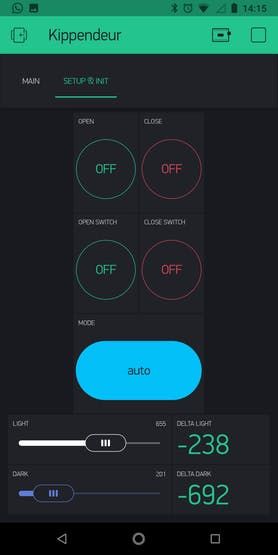
After booting or restarting the Arduino, the first step will be to “calibrate” the encoder values for its up and down positions. The app will ask to give the Up command or to confirm the door is already in the Up position. Once done, the encoder value is set to zero.
For the next step, the app will ask to give the Close command and Close confirmation. The encoder value at that moment will be stored in a variable. From now on, we can control the door between a zero encoder value and closed encoder value.
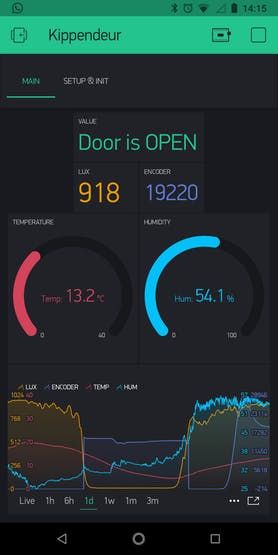
To control the door automatically, I’ve used a cheap photoresistor. Threshold value for daylight and sunset are preset within the Blynk dashboard as well as the operating mode: manual or automatic.
The DHT22 temperature & humidity sensor is only used to monitor both values.
Issues
1. The solution is not working very reliably. After some days, the door movement or sensor reading stops working. Browsing on the internet showed more people are having the same problem with the MKR1000 in combination with a web service – it is to be analysed if this can be solved.
*UPDATE V1*
New code includes a connection validation to Blynk. Only when the connection is in place, blynk.run will be executed. If the connection is down, it will try to reconnect first.
Data exchange to Blynk has been reduced to a 1 minute interval for slow changing values like Temperature, lux, humidity, etc. The encoder (= fast changing) will send it’s value every second in case it has changed (=door is moving). If the door is standing still, it’ll also send each minute to make sure the Supergraph in Blynk correctly displays historical values. Setup data is configured in PULL mode and will only be refreshed every 10s when the app is open on your smartphone.
==>> With those corrections, the setup is running for 3 weeks without a single interruption in functionality. I measured 4 reconnects with Blynk,with no impact on it’s reliability.
Future improvements
1. Install magnetic reed switches to serve as a reliable positioning measurement and to generate position alarms in case the door will not reach the requested position in time.
2. IR camera to be able to monitor if all chicken have entered in the coop before the door closes. Maybe also to keep an eye on the egg nest or to monitor the outside at night.
3. Motion sensor including buzzer or strobo light to scare away predators who are too close to the chicken coop.
Schematics
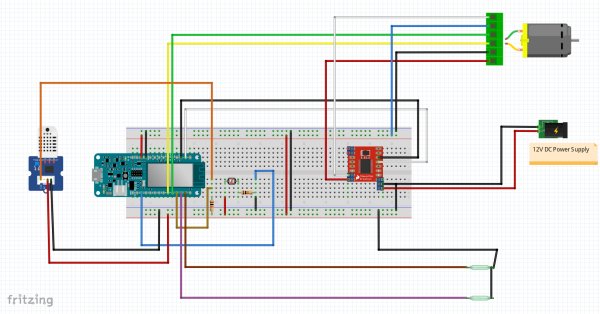
Source : Chicken Coop Automation
- What microcontroller is used in the project?
The project uses an Arduino MKR1000 with built-in WiFi. - How is the door position measured?
Door position is measured using the motor's encoder; encoder values are calibrated to open and closed positions. - Can the door operate automatically based on light?
Yes; a photoresistor provides light values and thresholds in the Blynk dashboard determine automatic open/close actions. - Does the system provide remote control and monitoring?
Yes; the Blynk dashboard is used for remote monitoring, control, and configuring thresholds and modes. - What environmental sensors are included?
A DHT22 sensor is used to monitor temperature and humidity, and a photoresistor measures light. - How does the project handle Blynk connectivity issues?
V1 added connection validation and reconnection logic; Blynk.run is only executed when connected and reconnect attempts are scheduled. - What safety or reliability features are suggested for future improvement?
The author suggests adding magnetic reed switches for reliable positioning and position alarms, and monitoring like IR camera or motion sensors for predator deterrence. - What motor driver is used to drive the door motor?
The project uses a Geekcreit L298N dual H-bridge motor driver board. - How often are sensor values sent to Blynk?
Slow-changing values (temperature, humidity, light) are sent at one-minute intervals; encoder updates are pushed every second when changing and every minute when stationary.

– Reduced data exchange interval