
Summary of Arduino SOS signal with 8ohms speaker and LED blinking
This article details a DIY project to generate an international Morse code SOS distress signal using an Arduino. The setup combines audio and visual outputs, where an 8-ohm speaker emits the tone while a red LED blinks in synchronization with the dots and dashes of the SOS pattern. The provided code defines specific durations for short (dots) and long (dashes) signals, looping continuously to repeat the distress message every three seconds.
Parts used in the Arduino SOS Signal Project:
- Arduino
- 8 Ω speaker
- 150 Ω or similar resistor
- 5mm RED LED
- Hook-up wires
- Breadboard
SOS is the commonly used description for the international Morse code distress signal (· · · — — — · · ·). [read more on wiki]
Requirements:
1) Arduino
2*) 8 Ω speaker
3*) 150 Ω or similar resistor
4) 5mm RED LED
5) Hook-up wires
6) Any breadboard
* Ω = Ohms
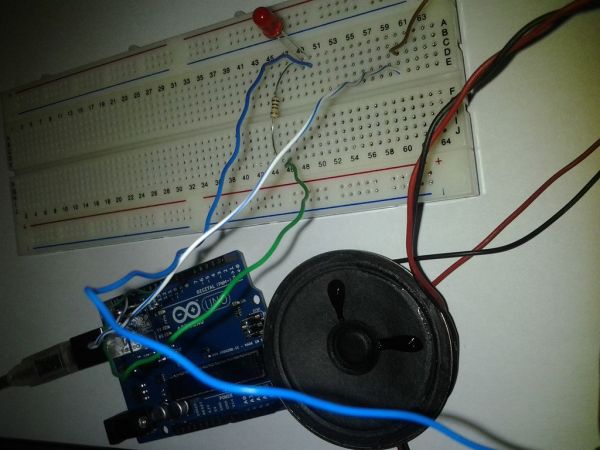
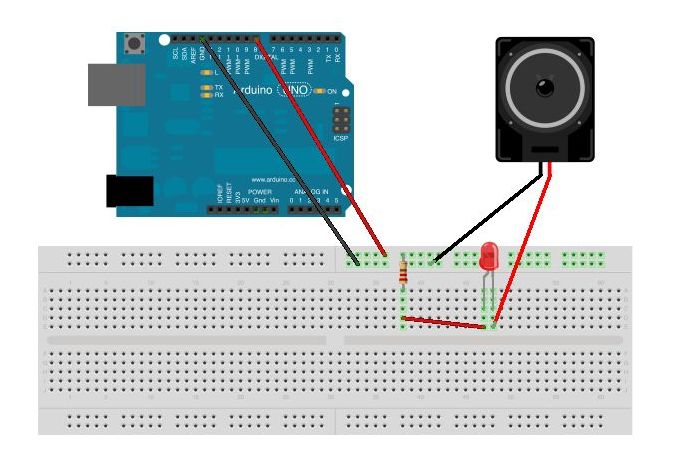
Step 1: Schematic
Hook-up wires as shown (original pic here). Make sure that LED’s anode and cathode correctly connected. [read more on wiki]
Step 2: Code
Lets start coding.
/*
  SOS signal

  Created by Vaidotas on 4/16/2012.
  Copyright (c) 2012 http://www.instructables.com/id/Arduino-SOS-signal-with-8ohms-speaker-LED-blinki/
*/

int pin = 8;
int pause = 100;
int note = 440; // music note A4

void setup()
{
  // no need
}

// SOS signal
void loop()
{
  threeDots();
  threeDashes();
  threeDots();
  delay(3000);
}

// three short signals
void threeDots()
{
  for (int i=0; i<3; i++){
    tone(pin, note, 100);
    delay(200);
    noTone(pin);
  }
  delay(200);
}

// three long signals8
void threeDashes()
{
  for (int i=0; i<3; i++){
    tone(pin, note, 300);
    delay(400);
    noTone(pin);
  }
  delay(200);
}
Upload and enjoy 😉
 SOS.ino602 bytes
Major Components in Project
1) Arduino
2*) 8 Ω speaker
3*) 150 Ω or similar resistore
2*) 8 Ω speaker
3*) 150 Ω or similar resistore
For more detail: Arduino SOS signal with 8ohms speaker and LED blinking
- What components are required to build this SOS signal project?
The project requires an Arduino, an 8 Ω speaker, a 150 Ω resistor, a 5mm RED LED, hook-up wires, and any breadboard. - How is the SOS signal structured in the code?
The loop executes three short signals followed by three long signals, then repeats the three short signals before pausing for 3000 milliseconds. - Does the speaker emit a continuous tone or pulses?
The speaker emits pulses; it plays a tone for a set duration, pauses via noTone, and repeats this pattern for dots and dashes. - What is the frequency of the note generated by the speaker?
The code sets the note variable to 440, which corresponds to the music note A4. - How long does a single dot signal last compared to a dash?
A dot signal uses a 100-millisecond tone duration, while a dash signal uses a 300-millisecond tone duration. - Can I use a resistor other than 150 Ω for this project?
Yes, the requirements list 150 Ω or a similar resistor as acceptable. - What happens after the full SOS sequence completes?
After completing the sequence of three dots, three dashes, and three dots, the program delays for 3000 milliseconds before restarting. - Is the LED connected to the same pin as the speaker?
The code assigns pin 8 to the variable pin, implying both the tone generation and LED control utilize this specific pin connection.

