
Summary of Wise Chameleon – Turn Anything Into a Smart Device!
Summary: The project turns everyday items into smart devices using a modular actuator head (servo/motor) with 3D-printed adapters, WiFi-enabled control, and app/Alexa integration. Initial build uses an Arduino MKR1000 connected to Adafruit.IO, an AWS Lambda Alexa Smart Home Skill, and 3D-printed mounts to retrofit blinds, doors, and feeders. The team continues to improve usability and add more attachments.
Parts used in the Turn Anything Into a Smart Device!:
- Arduino MKR1000 board
- Continuous servo / motor
- Power source (battery/solar/DC)
- Power management components
- WiFi communication stack (on MKR1000)
- 3D-printed or molded adapter attachments
- AWS Lambda for Alexa skill
- Adafruit.IO device cloud
- Amazon Developer account (for skill publishing)
- CloudWatch Logs (for debugging)
- iOS/Android website or app
- Echo or EchoSim virtual device for testing
We want to combine DIY electronics and 3D printing to turn anything into a smart device.
Story
Update: We are so excited to have won the competition, thanks to everybody who supported us and of course to the judges. 🙂 We are already continuing development on this project to make it more user-friendly, easier to adopt and of course add more attachments so it can do more cool stuff. Please check back frequently and let us know what you think of our progress.
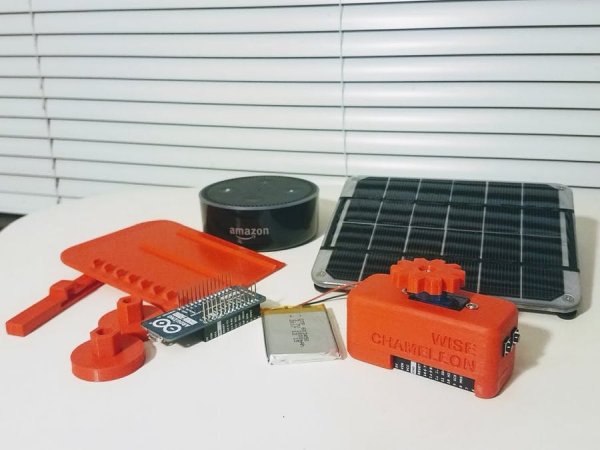
IoT for the WIN!
Let’s do something different in the smart home space! Something next level not just turning on lights. Let’s see if we can get it to a kick-startable level!
After some discussion on various topics, we pinned down our starting project definition to “smart device controlled modular actuators.”
We would like to produce a ready-to-use device which will have a servo/motor head that can accept adapters (3D-printed or molded) and triggered by an app or smart hub.
This will leverage on a couple of things, first the modularity that will be very exciting for growing makers community and 3D printer owners, and also the growing smart home DIY electronics. This will be helpful in transforming non-smart devices (blinds, etc) and also come up with new applications (watering plants) through various adapters.
Components
- A board capable of
- Running a motor/servo
- WiFi communication with Alexa/Google/Smart Hub
- Power management for handling battery/solar/dc Power
- Servo/motor
- Power source
- Use case defined attachments
- website – ios/android app
- Alexa skill integration
INITIAL IMPLEMENTATION
We use Arduino MKR1000 board connected to the Adafruit.IO device cloud. And Alexa skills is developed as an AWS Lambda function that implements amazons Smart Home Skill Kit Inteface. In particular it implements the PowerController and PowerLevelController as well as custom scenes.
Used components:
- AWS lambda –
- cloudwatch logs, to debug alexa req / resp mss
- Amazon Developer Account (where lambda definition and publish abilities lie) –
- Adafruit.io the device cloud to control our Arduinos
- Test echo virtual device (just sign in as chameleon wise developer account) – https://echosim.io/
Here be the AWS lambda code that Implements the Alexa Smart Home Skill API needed for integration of Chameleon Wise’s /dev device (alexa controlled servo).
Detailed info on the Smart Home Skill API is here: https://developer.amazon.com/docs/smarthome/understand-the-smart-home-skill-api.html
Deployment:
$ cd AlexaSmarthomeAPI_Chameleon$ pip install requests -t .$ pip install nodb -t .
Now since our alexa skill is python3 and nodb doesn’t support python3 make the following changes to AlexaSmartHomeAPI_Chameleon/nodb/__init__.py
line 69 -> bytesIO.write(bytes(serialized, ‘utf-8’)) line 241 -> if index in obj: line 264 -> return self.hash_function(bytes(index_value, ‘utf-8’)).hexdigest()
once the file is modified you are read to deploy to lambda from AlexaSmarthomeAPI_Chameleon directory do:
$ zip -r python.zip .
This will zip everything up, then navigate to the lambda page
Under Function Code select Upload a Zip File then select the python.zip file upload it and click save. Now you can test it out.
There are three things to test
- Discovery… navigate to
https://alexa.amazon.com/spa/index.html#applianceslogin with the chameleonwise user
- Forget all device
- Click discover A device called moto should appear (if you are using the smart phone app, you will get a device controler for this guy that looks like a power switch). Your now setup and ready to go
To test out the functionality use the following uterance
Alexa turn moto on alexa turn moto off alexa setup power level to 100 on moto
Debugging:
To check whats happening with the lambda, check out the CloudWatch Logs
Use Cases
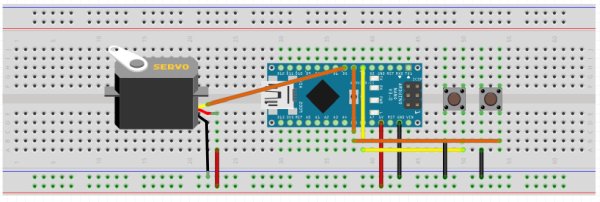
After testing the system on breadboard, we made a case for MKR1000 and continuous servo (check our thingiverse page for the 3D models https://www.thingiverse.com/wise_chameleon/designs). Soldering was a bit tedious, but eventually worked.
Designed an adapter for the blind wand, and also one with a gear that can be used on a sliding door, which we used for a pet feeder.
Read more: Wise Chameleon – Turn Anything Into a Smart Device!
- What microcontroller board is used in the initial implementation?
The Arduino MKR1000 is used in the initial implementation. - How does the device communicate with cloud services?
It uses the MKR1000 WiFi capabilities to connect to Adafruit.IO device cloud. - How is Alexa integration implemented?
Alexa integration is implemented as an AWS Lambda function that implements the Alexa Smart Home Skill API. - What cloud service is used to control the Arduinos?
Adafruit.IO is used as the device cloud to control the Arduinos. - What attachments are used to convert devices like blinds or feeders?
3D-printed or molded adapter attachments designed for the servo/motor head are used. - How can I test the Alexa device without a physical Echo?
Use the EchoSim virtual device by signing in as the chameleon wise developer account (https://echosim.io/). - What debugging tool is recommended for the AWS Lambda function?
CloudWatch Logs is used to debug Alexa request and response messages. - What utterances can be used to control the device via Alexa?
Examples include: Alexa turn moto on, Alexa turn moto off, and Alexa set power level to 100 on moto. - Where can I find 3D models for the device case and adapters?
3D models are available on the project's Thingiverse page: https://www.thingiverse.com/wise_chameleon/designs.
