
Summary of Universal Remote Control with Alexa and IR
Summary (under 100 words) I built an Alexa-controlled IR remote using an Alexa smart home skill, AWS Lambda, Adafruit IO MQTT broker, and an ESP8266-based Arduino (Adafruit Feather HUZZAH) running IRremoteESP8266. Voice commands go from Alexa to Lambda, which publishes MQTT messages to Adafruit IO; the ESP8266 subscribes, decodes the commands, and emits IR signals to the TV. Currently includes Samsung codes, with plans to fetch wider device codes from online databases.
Parts used in the Universal Remote Control with Alexa and IR:
- Amazon Alexa (Smart Home Skill)
- AWS Lambda (back-end for the skill)
- Adafruit IO (MQTT broker)
- Adafruit Feather HUZZAH ESP8266 (Arduino-compatible device)
- IR LED and associated circuitry for IR transmission
- IRremoteESP8266 library
- MQTT libraries for ESP8266
- TV (Samsung codes used)
- IR code database (external databases for TV codes)
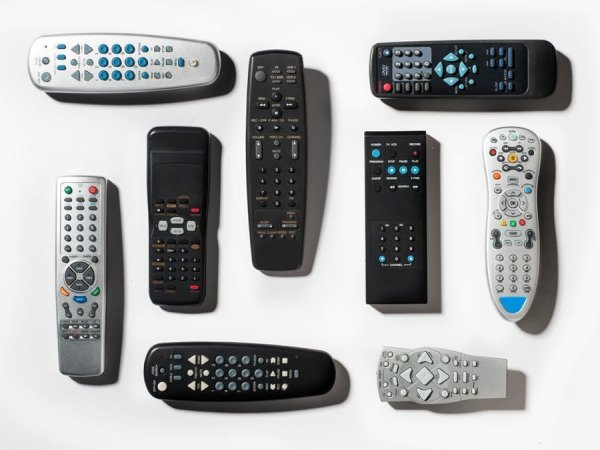
I hate looking where is the remote controller or grab my phone to control my TV or other IR devices. Alexa and hacking saved my day!
Story
As a lot of lazy folks, Alexa is saving my day. I don’t want to spend time looking for my remote controller to turn on TV or switch sources. I would like to be able to ask Alexa to do it for me!
I spent some time building that and this article explains how.
Demo
Before discussing the technical aspects, this is a short demo video that shows how it works.
Architecture
There is a long road between the lazy guy’s voice and the actuation on the TV. The figure below illustrate the journey of the command from the voice command to the action on the TV.
Alexa Skill
Amazon proposes a well define interaction model for the smart home skill. As this project is about building a controller for TV, everything i need is available on the smart home skill for entertainment devices.
AWS Lambda
Building a back-end for a skill is straightforward with Lambda as they offer support for multiple programming languages and an easy integration with Alexa skills.
Ideally, using AWS IoT is recommended as it offer a more secure way to interact with the devices. However, smaller devices do not support the authentication and security mechanism offered by AWS IoT. I decided to use an other solution.
Adafruit IO
I had to use a small device that connects simply to the Lambda. As this is not a critical application, lower security is acceptable.
Adafruit IO offers a MQTT broker available for free for low traffic application. It offers also libraries to connect to the broker from Arduino compatible devices.
Arduino device
I was initially planning to use the MKR1000 as it is one of my favorite devices. unfortunately, the IR library is not supporting this device yet (i am trying to help the IRLib2 team to support it).
My choice was then for Adafruit Feather HUZZAH ESP8266 as it still a smaller device that i have available, it support WiFi, MQTT, and IR libraries. There is code examples available that illustrates how to use MQTT on this device.
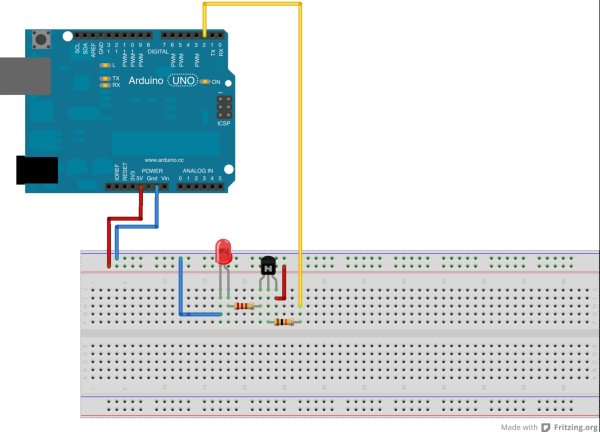
The library IRremoteESP8266 works just fine with this device with plenty of examples provided including with MQTT communication.
TV
Depending on the TV make and model, specific codes needs to be used. For now, i added only codes for Samsung TV. Other makes and models are available on databases like this one. I am planning to retrieve directly the codes from those databases on the runtime to support a marge number of TVs.
Read more: Universal Remote Control with Alexa and IR
- How does the voice command reach the TV?
The voice command goes to Alexa, triggers the smart home skill, calls AWS Lambda, which publishes MQTT messages to Adafruit IO; the ESP8266 subscribes and sends IR signals to the TV. - Can I use AWS Lambda as the back-end for the Alexa skill?
Yes, AWS Lambda is used as the back-end for the Alexa smart home skill in this project. - Why was Adafruit IO chosen for this project?
Adafruit IO was chosen because it provides a free MQTT broker suitable for low traffic and simple connections from small devices. - Which Arduino-compatible board was used?
The Adafruit Feather HUZZAH ESP8266 was used because it supports WiFi, MQTT, and IR libraries. - Which IR library works with the chosen device?
The IRremoteESP8266 library works with the Adafruit Feather HUZZAH ESP8266 and provides examples including MQTT communication. - Are TV codes included for all brands?
Currently only Samsung TV codes were added; other brands are available in external databases and may be integrated later. - Why was the MKR1000 not used?
The MKR1000 was not used because the IR library did not yet support that device at the time. - Is AWS IoT used for device communication?
No, AWS IoT was not used; the project uses Adafruit IO MQTT because smaller devices did not support AWS IoT authentication mechanisms in this case.
