
Summary of VU METER BUILT WITH NEAT GRAPHICAL VFD DISPLAY
This project transforms a GP1287 VFD display into a retro 1970s-style VU meter using an Arduino Nano. The microcontroller processes incoming audio via analog inputs to calculate decibel levels, driving the fully graphical dot matrix display. While capable of emulating moving-needle meters, the update speed results in a jerky visual effect reminiscent of 16-bit era software.
Parts used in the Retro VU Meter:
- Arduino Nano
- GP1287 VFD display
VFD displays are beloved for their eerie glow that sits somewhere just off what you’d call blue. [mircemk] used one of these displays to create an old-school VU meter that looks straight out of a 1970s laboratory.
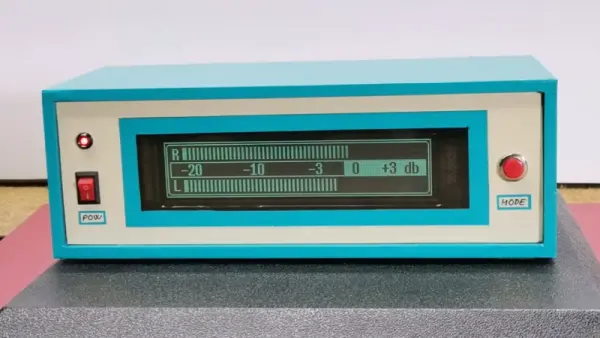
The build uses an Arduino Nano as the brains of the operation, which uses its analog inputs to process incoming audio into decibel levels for display on a VU meter. It’s then charged with driving a GP1287 VFD display. Unlike some VFDs that have preset segments that can be illuminated or switched off, this is a fully graphical dot matrix display that can be driven as desired. Thus, when it’s not acting as a bar graph VU meter, it can also emulate old-school moving-needle meters. Though, it bears noting, the slow updates the Arduino makes to the display means it’s kind of like those dodgy skeumorphic music apps of the 16-bit era; i.e. it’s quite visually jerky.
Overall, it’s a neat project that demonstrates how to work with audio, microcontrollers, and displays all in one. We’ve featured other projects from [mircemk] before, too, almost all of which appear in the same blue and grey project boxes. Video after the break.
Source: VU METER BUILT WITH NEAT GRAPHICAL VFD DISPLAY
- What component acts as the brains of the operation?
The Arduino Nano serves as the brain of the operation. - How does the system process incoming audio?
The Arduino uses its analog inputs to process incoming audio into decibel levels. - What type of display is utilized in this build?
A GP1287 VFD display is used for the project. - Can the display emulate old-school moving-needle meters?
Yes, the display can emulate old-school moving-needle meters when not acting as a bar graph. - Does the VFD have preset segments that can be switched off?
No, this is a fully graphical dot matrix display that can be driven as desired. - Why is the visual movement described as jerky?
The slow updates the Arduino makes to the display cause the jerky visuals. - What color glow characterizes VFD displays?
VFD displays are known for an eerie glow that sits just off what you would call blue. - Are there other projects from the same creator mentioned?
Yes, other projects from [mircemk] appear in similar blue and grey project boxes.
