
Summary of TICO ROBOT PLAYS TIC-TAC-TOE BY DRAWING ON A TINY WHITEBOARD
This article describes TICO, a hardware robot built by [mircemk] at PlayRobotics that plays tic-tac-toe by drawing on a whiteboard. Open-source and 3D-printable, the machine uses an Arduino, servos, and an OLED screen to control two arms for drawing Xs and Os. Players use a remote to input moves since the robot lacks vision, and the device includes a buzzer and eraser function.
Parts used in the TICO Robot:
- Arduino
- OLED screen
- Buzzer
- Three servos
- 3 mm PVC sheet (or STL files for 3D printing)
- Wooden frame
- Small whiteboard
- Enormous marker
- Little eraser
- Remote control
Tic-tac-toe (or “Noughts and Crosses”) is a game simple enough to implement in any computer system: indeed it’s often used in beginner’s programming courses. A more challenging project, and arguably more interesting and useful, is to make some kind of hardware that can play it in real life. [mircemk] built a simple yet elegant machine that can play tic-tac-toe against a human player in a way that looks quite similar to the way humans play against one another: by drawing.
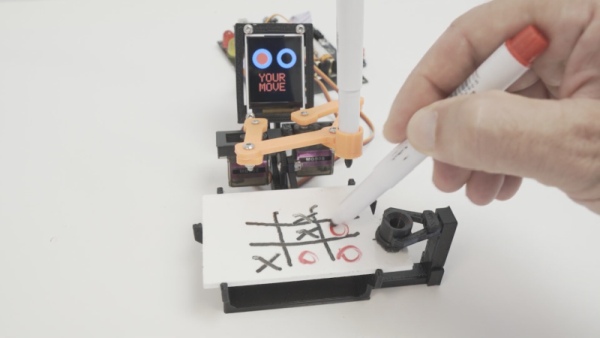
The robot’s design and programming were developed at PlayRobotics, who named the project TICO. The mechanical parts are available as STL files, to be printed by any 3D printer, and a comprehensive manual explains how to assemble and program the whole thing. Since it’s all open source, anyone can build it from scratch and modify it to their liking. The pictures show the original design by PlayRobotics, while the video (embedded after the break) shows [mircemk]’s version, which includes a wooden frame that gives it a bit more presence.
The electronic components are an Arduino with an OLED screen and a buzzer, plus three servos to operate the mechanical parts. Lacking a 3D printer, [mircemk] cut the plastic parts from a 3 mm sheet of PVC, which seems to have worked surprisingly well. The game board consists of a small whiteboard on which the robot and the human can draw their O’s and X’s.
The mechanical structure of the robot looks a bit like a tiny human using both arms to draw with an enormous marker. When starting a game, the robot clears the whiteboard using a little eraser, then draws the standard 3×3 grid and makes its first move. The human then draws their move and uses a remote control to tell the robot what they did (no machine vision here), after which the game continues until there is either a winner or the game results in a draw.
Although it looks like the program’s playing strategy may need some fine-tuning, the mechanical part is well-designed and the arms’ motions are quick and steady. We love the celebratory “cheering” at the end of a game, which TICO does whether it won or not.
The robot’s basic design is inspired by the Plotclock, which uses a similar setup to draw the time. We’ve seen other tic-tac-toe ‘bots before, as well as some clever electronic implementations of the game.
Source: TICO ROBOT PLAYS TIC-TAC-TOE BY DRAWING ON A TINY WHITEBOARD
- How does the robot play tic-tac-toe?
The robot draws O's and X's on a small whiteboard using mechanical arms. - Does the robot have machine vision?
No, the human player must use a remote control to tell the robot their move. - Can I build this project myself?
Yes, the design is open source with available STL files and a comprehensive manual. - What happens if there is no winner?
The game continues until there is either a winner or the game results in a draw. - How does the robot start a new game?
The robot clears the whiteboard using a little eraser, then draws the standard 3×3 grid. - What inspired the basic design of this robot?
The design was inspired by the Plotclock which uses a similar setup to draw time. - What electronic components power the machine?
The electronics consist of an Arduino, an OLED screen, a buzzer, and three servos. - How does the robot react at the end of a game?
The robot performs a celebratory cheering action regardless of whether it won or lost.
