
Summary of This MKR WiFi 1010-based weather station sends readings to the Arduino Cloud
This article describes building a secure, battery-powered IoT weather station using an MKR WiFi 1010 board. The device collects temperature and humidity data via a DHT11 sensor and transmits it to the Arduino Cloud for remote viewing. To ensure longevity outdoors, the electronics are housed in a watertight enclosure with a clear acrylic top, and the processor enters sleep mode between readings to conserve power from a LiPo battery.
Parts used in the IoT Weather Monitoring Station:
- MKR WiFi 1010
- DHT11 temperature and humidity sensor
- LiPo battery cell
- Watertight enclosure
- Clear acrylic top
- Status RGB LED
Constructing your very own IoT weather monitoring station can be a complicated ordeal, as getting values from the embedded device to some kind of web server in a secure manner takes a lot of effort and time to complete. For his system, Clem Mayer from element14 Presents was able to use a MKR WiFi 1010 that sends relevant weather information at a set interval, which can then be viewed from anywhere in the world with an Internet connection.
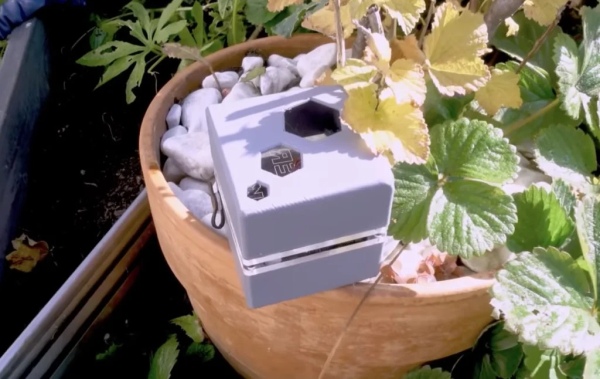
Aside from the Arduino as the main control board, Mayer went with a DHT11 temperature and humidity sensor for collecting weather data and a LiPo battery cell that lets this device sit outside for extended periods of time. In the future, Mayer speculated that he might add light or gas sensors for even more in-depth readings. All of the electronics were placed into a watertight enclosure, which has a clear acrylic top for viewing the status RGB LED.
The Arduino Cloud service was used to configure the MKR WiFi 1010, set up several cloud variables, and create a virtual dashboard for keeping tabs on both current and historical readings. After making the processor sleep for eight seconds to conserve battery power, a reading is taken from the onboard sensor and written to the cloud where it can then be seen in the dashboard.
Source: This MKR WiFi 1010-based weather station sends readings to the Arduino Cloud
- How does the system send weather information?
The MKR WiFi 1010 sends relevant weather information at a set interval to the Arduino Cloud. - What sensor is used for collecting weather data?
A DHT11 temperature and humidity sensor is used for collecting weather data. - How is the device powered for extended outdoor use?
A LiPo battery cell powers the device to let it sit outside for extended periods of time. - How does the system conserve battery power?
The processor sleeps for eight seconds before taking a reading to conserve battery power. - Where can users view the current and historical readings?
Readings can be viewed on a virtual dashboard created in the Arduino Cloud service. - What protects the electronics from the elements?
All electronics are placed into a watertight enclosure. - What is located under the clear acrylic top?
The status RGB LED is visible through the clear acrylic top. - Can the project be expanded with other sensors?
The author speculated adding light or gas sensors for more in-depth readings in the future.
