
Summary of Team 12 – Prototype I Final Report: Home Automation Project using arduino
The Home Automation Framework is a web application enabling remote control of home devices like lights and blinds via smartphones or computers. Built using a Raspberry Pi as the server and an Arduino microprocessor, the system uses Python to manage GPIO pins and control electronic components through a custom web interface. The prototype demonstrates functionality by repurposing existing remote controls and integrating servos for blind operation.
Parts used in the Home Automation Framework:
- Raspberry Pi
- Stanley Remote Control Device (with RF-controlled power sockets)
- Arduino Uno
- Servo Motor
- Infrared Remote
- LEDs
- Breadboard
- Connecting wires
- Horizontal Venetian Blinds
- Resistors
- Header pin
- Lamp
Introduction
The Home Automation Framework project is a web application that can remotely control the electronic devices in one’s home using a web interface on a smartphone, tablet or desktop computer. The project facilitates ease of access and remote control of electronic devices for those who are busy, have a disability, or are not physically in the location of the device. Examples of such electronic devices may include lights, security cameras, electric door latches, TVs and computers.
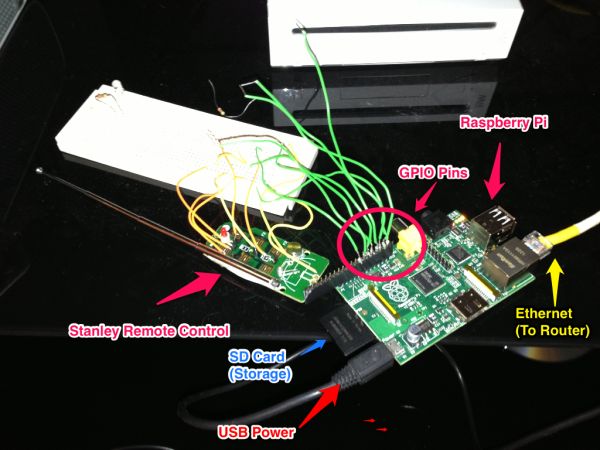
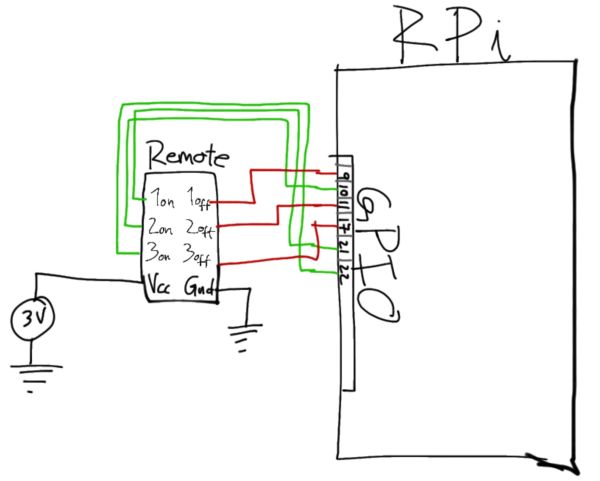
Our initial prototype utilizes the small and inexpensive Raspberry Pi as the web server and an Arduino microprocessor. A web application was built using Python, in which the user is able to tap or click an icon in the web application to both turn a lamp off and on as well as open and close window blinds. Developing the prototype involved dismantling an existing remote control technology and soldering wires from it to GPIO pins on the Raspberry Pi in order to be able to send voltage to the pins via our program, thus turning them off and on (or active), and remotely controlling any devices plugged into the outlet adapters from the existing technology. In addition, we used a servo in conjunction with an Arduino to control the blinds.
Materials
Materials used in this project include the following:
- Raspberry Pi ($35)
- Stanley Remote Control Device (with RF-controlled power sockets)
- Arduino Uno
- Servo Motor
- Infrared Remote
- LEDs
- Breadboard
- Connecting wires
- Horizontal Venetian Blinds
- Resistors
- Header pin
- Lamp
Description of Major Components
Server: A Raspberry Pi is connected to the internet and running an Apache web server, which serves HTML and CSS files to build the interface in the user’s browser. The Apache WSGI plugin is installed, allowing the server to run python code when the user presses buttons in the interface. The python code handles the GPIO port switching to control the Stanley RF remote control. The web interface and python code is hosted in a GitHub repository.
For more detail: Team 12 – Prototype I Final Report: Home Automation Project
- What is the primary purpose of the Home Automation Framework?
The project is a web application designed to remotely control electronic devices in a home using a web interface on various devices. - How does the user interact with the system?
Users can tap or click icons in the web application to turn lamps on or off and open or close window blinds. - Which hardware serves as the web server?
The project utilizes a small and inexpensive Raspberry Pi as the web server. - What programming language is used for the web application?
A web application was built using Python to handle the user interface logic and GPIO port switching. - How are existing remote controls integrated into the system?
The team dismantled existing remote control technology and soldered wires from it to GPIO pins on the Raspberry Pi. - What component is used to control the window blinds?
A servo motor is used in conjunction with an Arduino to control the blinds. - Which web server software runs on the Raspberry Pi?
An Apache web server is connected to the internet and serves HTML and CSS files to build the interface. - How does the system execute code when buttons are pressed?
The Apache WSGI plugin allows the server to run Python code when users press buttons in the interface.
