
Summary of Stream support for the Arduino MQTT library
This article explains how to extend the Arduino MQTT library to handle large payloads by integrating Stream support with external storage. It details using a 23LC1024 SPI SRAM chip to overcome Arduino's limited memory, allowing the transmission and storage of large binary data like bitmaps. The author provides wiring instructions, a custom library for the SRAM chip, and code examples demonstrating how to pass a Stream object to PubSubClient for seamless payload handling.
Parts used in the Arduino MQTT Project:
- Arduino board (Atmega328)
- 23LC1024 SPI SRAM chip
- PubSubClient library
- Custom SRAM library
- SPI pins
MQTT is a lightweight messaging protocol for the Internet of Things. This post details the use of Stream support for large payload storage in the Arduino MQTT library.
MQTT is a lightweight protocol, but that doesn’t mean that the payloads have to be small. The spec was designed to allow for messages up to 256MB, but taking advantage of this with an Arduino can be difficult as they usually only have small amounts of memory in three pools:
- Flash memory where the Arduino sketch is stored (32k in an Atmega328)
- SRAM where the sketch creates and manipulates variables when it runs (2k in an Atmega328)
- EEPROM that programmers can use to store long-term information (1k in an Atmega328)
 Which makes receiving any payloads of any size via MQTT problematic. Common external storage options to beef up your Arduino project include SD cards and SRAM chips. These come with control libraries that inherit from the Arduino Stream class – a standard interface for manipulating character and binary based streams (also used by Ethernet and Serial amongst others).
For my latest project I got hold of a 23LC1024 – a 1024KB SPI SRAM chip with 5V logic levels making it easy to work with my 5V Arduino. I wanted to pass fairly large binary bitmaps around by MQTT, so I added support to Nick’s MQTT Arduino library for storing payloads using Stream objects.
I started by wiring the SRAM up to the Arduino’s SPI pins as follows:
There is currently no standard Arduino SRAM library (the Arduino site lists one, but the files are 404) so I knocked up a simple library which supports the 23LC1024. It should be good for the 23K256 as well, but I haven’t had one handy to do a test.
In the trivial example code below, we’re taking any message that comes through on inTopic writing it to SRAM and then reading it back and writing it to the serial console.
Note that the Stream object (sram) is passed to PubSubClient as the last argument of the instantiator to let it know you want it to write payloads to the SRAM. I’m storing the payloads at memory position 1, so I move there in setup with the seek method.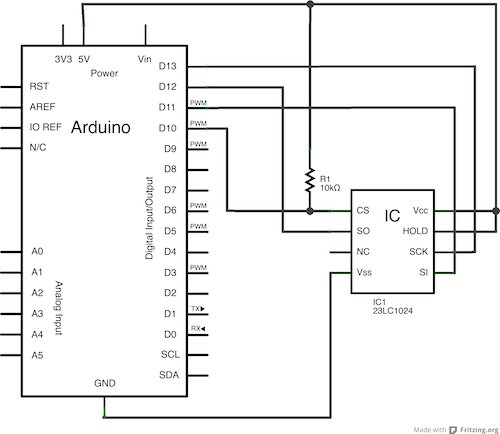 Once a payload is received
 callback executes. I move to memory position 1, read the message back and write it to the console, then move back to memory position 1 again ready for the next message to be written (if you were using an SD card for storage you might be opening and closing Files instead of moving to memory postitions).
The nice thing about this approach to storage is that many libraries will take a Stream object for manipulation which makes it easy to pass off a message for processing. I’ll take a bit more in my next blog post about how I used this approach to make use of 3rd party libraries to process my images.
For more detail: Stream support for the Arduino MQTT library
- How can an Arduino handle large MQTT payloads?
By adding Stream support to the MQTT library to store payloads on external storage like an SRAM chip. - What is the maximum message size allowed by the MQTT spec?
The spec allows messages up to 256MB. - Why is receiving large payloads via MQTT problematic on Arduinos?
Arduinos usually have small amounts of memory in three pools: Flash, SRAM, and EEPROM. - Which SRAM chip was used in this project?
A 23LC1024 1024KB SPI SRAM chip with 5V logic levels was used. - Can the custom library work with other SRAM chips?
It should be good for the 23K256 as well, though it has not been tested yet. - How do you tell the MQTT library to use external storage?
Pass the Stream object as the last argument of the PubSubClient instantiator. - Where are the payloads stored in the example code?
The payloads are stored at memory position 1. - What method is used to move to a specific memory position?
The seek method is used to move to memory positions.
