
Summary of Pressure Activated Light-Up Umbrella using an Arduino
Two girls built a pressure-activated LED umbrella using an Arduino Uno R3, 4051 multiplexers, piezo sensors, and LEDs. The project detects rain impact via piezo disks to trigger light strings under the canopy, maximizing walking enjoyment through interactive lighting controlled by binary-coded sensor inputs and analog output thresholds.
Parts used in Pressure Activated Light-Up Umbrella:
- 1 umbrella
- 1 Arduino Uno R3 microcontroller
- 1 9 V Battery
- 24 yellow LEDs
- 8 piezo sensor disks
- 2 4051 multiplexers/demultiplexers
- 8 1 MΩ resistors
- 8 10 Ω resistors
- Wire
- Solder
- Hot glue/hot glue gun
- Electrical tape
- Duct tape
Once upon a time, 2 girls greatly enjoyed walking in the rain with umbrellas.
They decided the enjoyment of this experience could be maximized by building their own pressure-activated web of LEDs to install under their umbrella.
Thus, with the help of an Arduino, some 4051 multiplexers, a lot of wire and a lot of solder, they set off on their path to success.
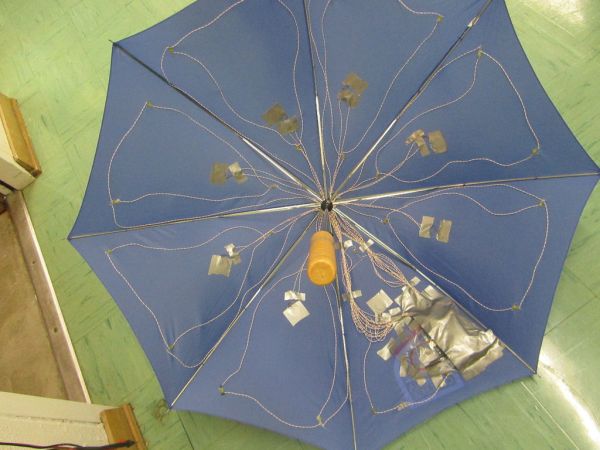
Step 1: Materials List
Just based on size, we decided to use 24 LEDs to light our umbrella, with 8 strands of 3 LEDs each emanating out from the central hub.
We used the following materials:
1 umbrella
1 Arduino Uno R3 microcontroller
1 9 V Battery
24 yellow LEDs (we advise that you use one with diffused light and a wide viewing angle, otherwise the size and color is up to you)
8 piezo sensor disks (we specifically ordered these from sparkfun: http://www.sparkfun.com/products/10293, though they are a bit fragile. You might want to look for something different.)
2 4051 multiplexers/demultiplexers
8 1 MΩ resistors (to be in parallel with the piezo sensors)
8 10 Ω resistors (to be in series with the LED strings)
LOTS of wire
LOTS of solder
Hot glue/hot glue gun
Electrical tape
Duct tape
Step 2: Program Arduino Code
Program your Arduino with the following code:
/***************************************
Pressure Activated Light-up Umbrella
by Shannon Lubetich and Emily Yang
***************************************/
int sensorReading = 0;
int r0 = 0;
int r1 = 0;
int r2 = 0;
int w0 = 0;
int w1 = 0;
int w2 = 0;
int count = 0;
void setup() {
Serial.begin(9600);
//initialize digital arduino pins as outputs to control the selecting process for our 4051 multiplexers
pinMode(2, OUTPUT); //r0
pinMode(3, OUTPUT); //r1
pinMode(4, OUTPUT); //r2
pinMode(8, OUTPUT); //w0
pinMode(9, OUTPUT); //w1
pinMode(10, OUTPUT); //w2
}
void loop(){
//cycle through each piezo disk and corresponding string of LEDs
for(int i = 0 ; i < 8; i++){
//read the analog value of the piezo disk pressure sensor
reading(i);
//send the trigger from the pressure to the LEDs
writing(i);
}
}
void reading(int sensor){
//uses binary to select the correct input to read on the 4051 multiplexer
sensorReading = 0;
r0 = bitRead(sensor, 0);
r1 = bitRead(sensor, 1);
r2 = bitRead(sensor, 2);
digitalWrite(2, r0);
digitalWrite(3, r1);
digitalWrite(4, r2);
sensorReading = analogRead(A5);
//slowly prints results to the serial monitor
count++;
if(count % 1000 == 0){
Serial.println(sensorReading);
}
}
void writing(int LED){
//uses binary to select the correct output to write to on the 4051, here used as a demultiplexer
w0 = bitRead(LED, 0);
w1 = bitRead(LED, 1);
w2 = bitRead(LED, 2);
digitalWrite(8, w0);
digitalWrite(9, w1);
digitalWrite(10, w2);
//if measured pressure above a certain threshold, trigger string of LEDs
if (sensorReading >= 15){
analogWrite(A0, sensorReading*25);
delay(125);
}
//otherwise, leave LEDs off
else{
analogWrite(A0,0);
}
}
***We were inspired by the following project, and looked at the code for it, but ended up developing our own. However, if you are interested in making an umbrella that plays musical notes due to press, this is a great page: http://whyyesihaveawebsite.com/arduino/?p=6&fb_source=message
IMPORTANT: 4051 chips are TRICKY! Take heed!
For more information about the 4051 chip, used as a multiplexer or demultiplexer, refer to Arduino playground’s page at http://www.arduino.cc/playground/Learning/4051
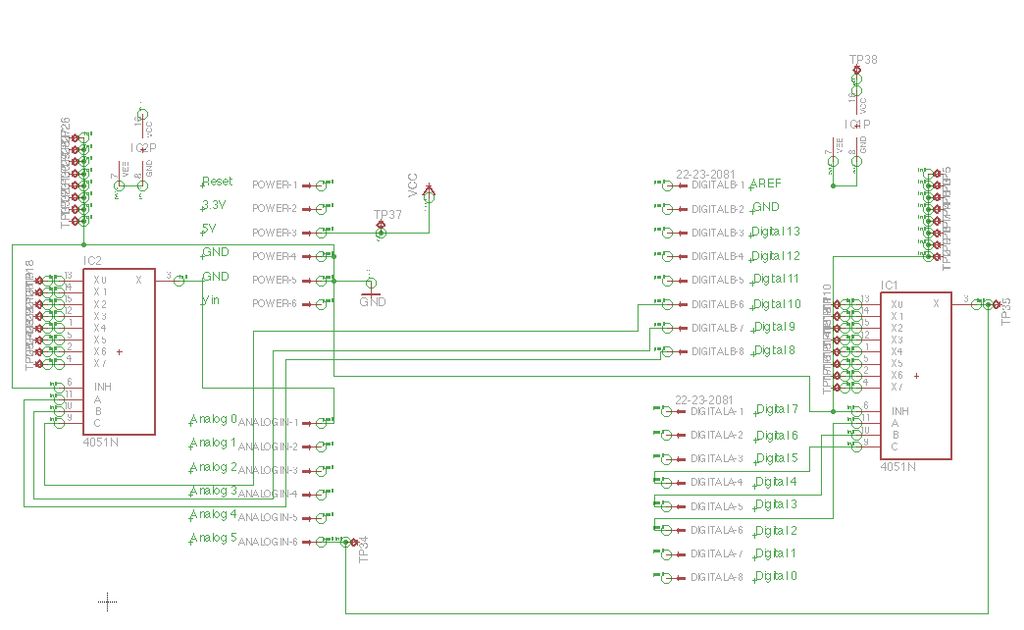
You should keep the schematic handy to reference all the input/output pins and where they need to be connected.
Step 3: Mock-up
You should test out your circuit on a small scale before going crazy with wires and solder.
We did this by using 2 bread boards, placing a 4051 multiplexer/demultiplexer in each, and then connected inputs/outputs to the correct places on the Arduino.
Once again, refer to the schematic at http://www.arduino.cc/playground/Learning/4051.
1 Arduino Uno R3 microcontroller
1 9 V Battery
24 yellow LEDs (we advise that you use one with diffused light and a wide viewing angle, otherwise the size and color is up to you)
8 piezo sensor disks (we specifically ordered these from sparkfun: http://www.sparkfun.com/products/10293, though they are a bit fragile. You might want to look for something different.)
2 4051 multiplexers/demultiplexers
8 1 MΩ resistors (to be in parallel with the piezo sensors)
8 10 Ω resistors (to be in series with the LED strings)
LOTS of wire
LOTS of solder
Hot glue/hot glue gun
Electrical tape
Duct tape
For more detail: Pressure Activated Light-Up Umbrella using an Arduino
- How many LEDs are used in the project?
The project uses 24 yellow LEDs arranged in 8 strands of 3 LEDs each. - Can I use any type of LED for this umbrella?
The authors advise using diffused light LEDs with a wide viewing angle, though size and color are otherwise up to you. - What is the best way to test the circuit before final assembly?
You should test the circuit on a small scale using two breadboards with a 4051 multiplexer/demultiplexer in each. - Does the code require specific pin configurations for the multiplexers?
Yes, pins 2, 3, and 4 control the input selection while pins 8, 9, and 10 control the output selection. - How does the system determine when to turn on the LEDs?
The LEDs trigger if the measured pressure reading from the piezo disk is greater than or equal to 15. - Where can I find more information about the 4051 chip?
Information is available on the Arduino playground page regarding the 4051 chip used as a multiplexer or demultiplexer. - What happens if the pressure reading is below the threshold?
If the reading is below 15, the LEDs are left off by setting the analog write value to 0. - Are the piezo sensor disks durable?
The specific disks ordered from Sparkfun are noted as being a bit fragile. - What is the purpose of the 1 MΩ resistors?
The 1 MΩ resistors are placed in parallel with the piezo sensors. - What is the purpose of the 10 Ω resistors?
The 10 Ω resistors are placed in series with the LED strings.
