
Summary of Make an Arduino Timer
This article details a DIY 3-digit countdown timer built using an Ardweeny microcontroller for a UV exposure box project. The device counts down from 999 seconds and controls a relay via transistors, featuring seven-segment displays for visual output. It emphasizes cost-effectiveness and compact design, utilizing a perfboard or custom PCB with specific transistor pinout considerations for BC547 and BD136 components.
Parts used in the Ardweeny Countdown Timer:
- Ardweeny (or ATmega168/328 chip with crystal, resistor, and capacitor)
- USB to FTDI Adapter
- 8 NPN transistors (BC547)
- 3 PNP transistors (BD136)
- 3 7-Segment displays (KINGBRIGHT SA52-11EWA common anode)
- 11 resistors for transistor bases (200 ohm)
- 7 resistors for segments (150 ohm)
- 2 10 pin headers
- 2 2 pin headers
- 1 28 DIP socket (narrow)
- 1 6V relay
- Protective diode (1N4007)
- Potentiometer (4k7)
- Wires
- Soldering equipment
Hi, so me and my pal are setting up so we can make PCB´s. We are currently making a UV exposure box (possibly another instructable) and for this box, we needed a timer, so this is what we have done so far, and what we are going to do.
This project is based on the ardweeny from solarbotics because its cheap (10 $) and its small (28 DIP)
it counts down from 999 to 0 (seconds)
it has a 250V 10A Relay.
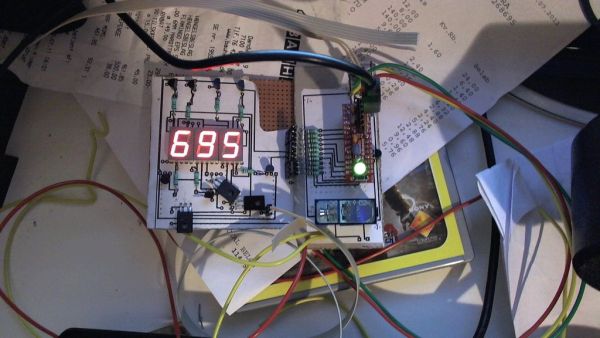
here is a short video of it counting down from 30 to 0:
Step 1: Parts list
Ok so here is the parts list:
as for all items these are suggestions
*one Ardweeny (or an ATmega168/328 chip with appropriate Chrystal, resistor and capacitor)
*one USB to FTDI Adapter for programming the ardweeny (if you don’t already have one)
*8 NPN transistors capable of driving 30 mA each. (We used BC547 (keep the pinout in mind!)
*3 PNP transistors capable of driving 200mA each. (We used BD136 (Odd pinout here too!!)
*3 7-Segment displays (We used KINGBRIGHT SA52-11EWA common anode)
*11 resistors for the transistor bases (i used 200 ohm resistors (!!!OBS these are not on the print, see picture in step:[coming soon])
*7 resistors for the segments (150 ohms for an output of around 20 mA)
*2 10 pin header
*2 2 pin header
*1 28 DIP socket, narrow (you could solder the chip in but i would hate to have to solder it out if something gets burned!)
*1 6V relay (if you need this to switch things on and off)
*one protective diode (We used some 1N4007 ones we had lying around)
*1 Potentiometer (We used a 4k7 because we had one around)
*Wires… lots of wires
*soldering equipment
That should be it. on to the next step
Step 2:
ok, so we made this on perfboard (not having any PCB´s)
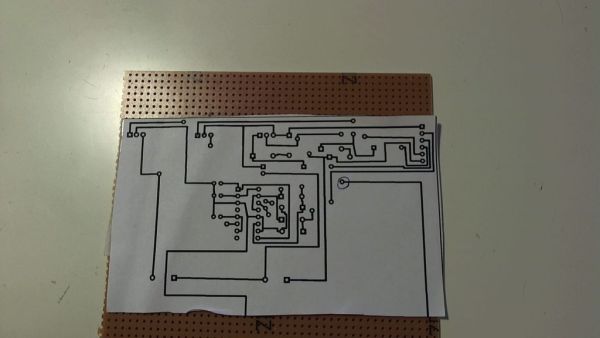
we have made a Print that you could use on you PCB´s
its in .fzz so you will need fritzing (a free awesome program) to open it
http://snuletek.com/ting/Ardweeny%203digit%207%20segment%20display..fzz
it has the layout,
keep in mind that on this pcb ALL transistors are layed out as Emitter Base Collector, however when using BC547 and BD136 transistors the pinouts will be different.
if you making this on a perfboard, you can use the method we did:
Major Components in Project
Parts
One Ardweeny
*One USB to FTDI Adapter for programming the ardweeny
*8 NPN transistors capable of driving 30 mA each.
*3 PNP transistors capable of driving 200mA each
For more detail: Make an Arduino timer
- What is the primary function of this project?
The project creates a timer that counts down from 999 to 0 in seconds. - Can I use an ATmega168 instead of an Ardweeny?
Yes, you can use an ATmega168 or ATmega328 chip with an appropriate crystal, resistor, and capacitor. - How do I program the Ardweeny if I do not have one already?
You need a USB to FTDI Adapter for programming the Ardweeny. - What type of transistors are required for driving the display?
The project requires 8 NPN transistors capable of driving 30 mA each and 3 PNP transistors capable of driving 200 mA each. - Does the PCB layout match the standard transistor pinouts for BC547 and BD136?
No, on the provided PCB all transistors are laid out as Emitter Base Collector, which differs from the pinouts of BC547 and BD136. - What resistor values are recommended for the segment outputs?
Use 150 ohm resistors for the segments to achieve an output of around 20 mA. - Is it better to solder the chip directly or use a socket?
It is recommended to use a 28 DIP socket rather than soldering the chip directly to avoid difficulty removing it if something gets burned. - What software is needed to open the provided circuit file?
You will need Fritzing, a free program, to open the .fzz layout file.
