
Summary of PRESENCE SENSOR LOCKS COMPUTER WHEN YOU STEP AWAY
The article describes an automatic workstation locker that uses an LD2410 24 GHz radar presence sensor paired with a Seeed Studio XIAO nRF52840 to detect when a user walks away and send the screen-lock keyboard shortcut. A blinking LED alerts the user before timeout. The build notes that many microcontrollers can emulate keyboard keystrokes, enabling this approach across platforms or inverted to keep a computer logged in.
Parts used in the Automatic Workstation Locker:
- LD2410 24 GHz radar presence sensor module
- Seeed Studio XIAO nRF52840 development board
- Blinking LED
- Wiring/connectors
- Computer to receive keyboard shortcut
Having a computer that locks its screen after a few minutes of inactivity is always a good idea from a security standpoint, especially in offices where there is a lot of foot traffic. Even the five- or ten-minute activity timers that are set on most workstations aren’t really perfect solutions. While ideally in these situations we’d all be locking our screens manually when we get up, that doesn’t always happen. The only way to guarantee that this problem is solved is to use something like this automatic workstation locker.
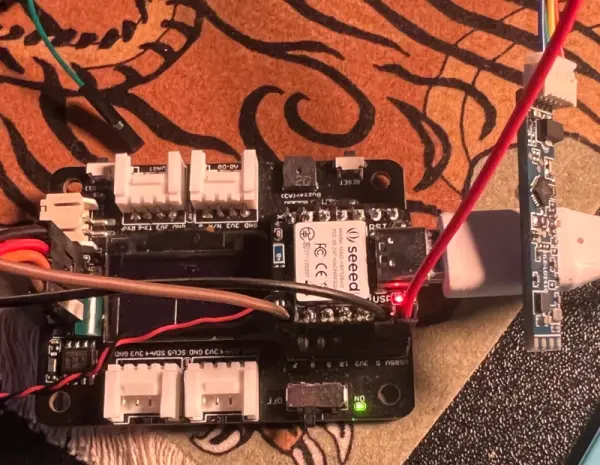
The project is based around the LD2410 presence sensor — a small 24 GHz radar module featuring onboard signal processing which simplifies the detection of objects and motion. [Enzo] paired one of these modules with a Seeed Studio XIAO nRF52840 development board to listen to the radar module and send the screen lock keyboard shortcut to the computer when it detects that the user has walked away from the machine. The only thing that [Enzo] wants to add is a blinking LED to let the user know when the device is about to timeout so that it doesn’t accidentally lock the machine when not needed.
One of the parts of this build that is a little bit glossed over is the fact that plenty of microcontroller platforms can send keystrokes to a computer even if they’re not themselves a USB keyboard. Even the Arduino Uno can do this, so by now this feature is fairly platform-agnostic. Still, you can use this to your advantage if you have the opposite problem from [Enzo] and need your computer to stay logged in no matter what.
Source: PRESENCE SENSOR LOCKS COMPUTER WHEN YOU STEP AWAY
- What sensor is used to detect presence?
The project uses an LD2410 24 GHz radar presence sensor module. - Which microcontroller board is paired with the sensor?
A Seeed Studio XIAO nRF52840 development board is used to listen to the radar module. - How does the device lock the computer?
The XIAO nRF52840 sends the screen lock keyboard shortcut to the computer when it detects the user has walked away. - Is there any user feedback before the timeout?
Yes, a blinking LED is added to alert the user when the device is about to timeout. - Can other microcontrollers perform the same keystroke function?
Yes, many microcontroller platforms can send keystrokes to a computer and emulate keyboard input. - Could this setup be used to keep a computer logged in instead?
Yes, the article notes you can use this capability in reverse to keep a computer logged in.
