
Summary of Ping Organ using an Arduino
This article describes a quick DIY project creating an ultrasonic musical instrument using an Arduino. The device uses an ultrasonic range finder to detect distance and triggers a speaker to play specific musical notes based on how close an object is. The setup involves connecting the sensor and speaker to the Arduino, running code that maps distance ranges to frequencies or notes, allowing users to "play" music by moving their hands or feet near the sensor.
Parts used in the Ping Organ:
- Arduino
- Range Sensor (Parallax Ping)))
- A small speaker
I was trying to think of a quick toy I could build for my kids. I came up with this idea of an ultrasonic range finder, an Arduino, and a speaker. Basically the Arduino plays a tone out of the speaker based on the distance from the range finder. The result works pretty well and can be built in minutes. You can play this from anything from your entire body, to just your feet.
http://www.youtube.com/watch?v=6F4xoe1rQMs
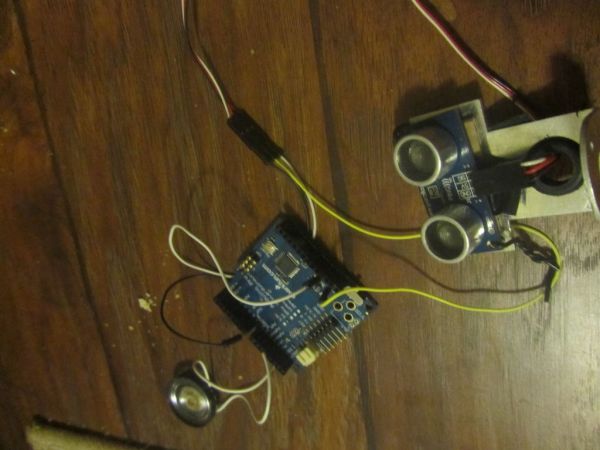
Step 1: Parts
1. Arduino
2. Range Sensor (I used a Parallax Ping))) that I picked up a Defcon a couple of years ago, anything like this would work as well http://www.sparkfun.com/products/639)
3. A small speaker (I pulled mine out of an toy moose that sang Blue Christmas)
Ultrasonic range finders basically work by sending out an ultrasonic signal and then they sense how long it takes to come back. Think sonar for a submarine.
Step 2: Schematic
The Schematic is pretty simple. Speaker to Arduino pin 11 and ground. Ultrasonic range finder to power, ground, and Arduino pin 7

Step 3: The Code
 PingMusic.pde3 KB
2. Range Sensor
3. A small speaker
- How does the ultrasonic range finder work?
It sends out an ultrasonic signal and senses how long it takes to come back. - Can I use a different range sensor than the Parallax Ping)?
Yes, anything like the Sparkfun product mentioned would work as well. - Where do I connect the speaker on the Arduino?
The speaker connects to Arduino pin 11 and ground. - Which pin should the ultrasonic range finder connect to?
The range finder connects to power, ground, and Arduino pin 7. - What is the best way to make the frequencies playable?
You can map actual note frequencies to specific distance ranges instead of just multiplying distance by a number. - How did the author determine the note ranges?
The author used 20 cm for each note range. - Can you play this instrument with your whole body?
Yes, you can play this from anything from your entire body to just your feet. - Does the project require complex coding skills?
No, the code combines the Ping demo and Tone demo that come with the Arduino UI.
