
Summary of Wireless Robotics Platform with XBee Remote Control
This project demonstrates a remote-controlled 4WD robotics platform using an Seeeduino Mega, Adafruit motor shield, and two XBee radios for communication without a microcontroller on the remote. The system features super-bright white LED headlights with on/off and scanner modes controlled by buttons. A Parallax joystick manages vehicle movement, utilizing a voltage divider to step down analog signals to safe levels for the radio.
Parts used in the Wireless Robotics Platform:
- 4WD mobile platform
- Seeeduino Mega Arduino
- Adafruit motor shield
- Two XBee radios
- Super-bright white LEDs
- Parallax joystick
- Control buttons
- Precision resistors
- Breadboard
I built a remote-controlled robotics platform using a 4WD mobile platform, an Arduino (Seeeduino Mega), an Adafruit motor shield, and two XBee radios for communication. There are also some super-bright white LEDs on the front for headlights. The point of the project was to show how an XBee radio can be used to send joystick sensor data without using a microcontroller on the remote.
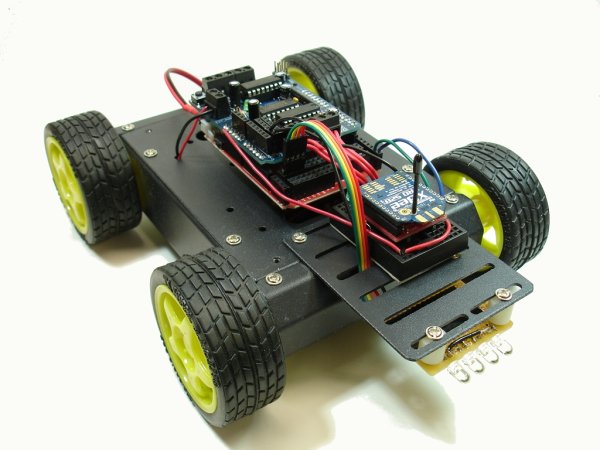
The vehicle is very easy to control using a joystick and a couple of buttons to control the lights. First I’ll describe how the remote control unit works, then I’ll show how the vehicle was built.
The Remote
Here’s a picture of the remote control unit that I built on a breadboard. A Parallax joystick is used to control the vehicle, one button turns the headlights on/off, and another button puts the headlights in “scanner” mode, you know, like Kitt or like a cylon. The radio requires a 3.3V supply, but the analog pins cannot take more than 1.2V, so I used some precision resistors to form a voltage divider so that the analog input voltage was stepped down to less than 1.2V. Also note that the joystick is rotated 90 degrees so that it worked on a breadboard with this orientation.
For more detail: Wireless Robotics Platform with XBee Remote Control
- What is the main goal of this project?
The point was to show how an XBee radio can send joystick sensor data without using a microcontroller on the remote. - How is the vehicle controlled?
The vehicle is controlled using a joystick and a couple of buttons to manage lights. - What components are used for the remote control unit?
The remote uses a Parallax joystick, buttons, and a breadboard. - Why were precision resistors used in the design?
They form a voltage divider to step down the analog input voltage from 3.3V to less than 1.2V for the radio. - How does the joystick function in this setup?
The joystick is rotated 90 degrees to work on a breadboard with that specific orientation. - What lighting modes are available?
One button turns the headlights on or off, while another puts them in scanner mode. - Does the remote require a microcontroller?
No, the project demonstrates sending data without a microcontroller on the remote. - What power supply does the radio require?
The radio requires a 3.3V supply.
