
Summary of Panelization – using GerberPanelizer on Windows
This article outlines a workflow for PCB panelization using GerberPanelizer on Windows, with potential Linux compatibility via Mono. The process involves generating separate Gerber folders for each project or board variant from EDA tools like KiCad or Eagle. Users must ensure folders contain only one board type and specific file extensions (.gml/.gko) before dragging them into the tool.
Parts used in the PCB Panelization Project:
- GerberPanelizer
- KiCad
- Eagle
- Gerber files (.gbr, .gml, .gko)
- Mono (for Linux compatibility)
- Online Gerber files viewer
This tutorial was done on Windows. Authors claim it could also be used on Linux by using Mono, but I haven’t tried and don’t understand a lot about Mono to see what could be done. I am switching to Linux nowadays, so I’d be very grateful to anybody that’d make instructions on how to launch it, however – and I’m sure other fellow Linux-wielding engineers will be grateful, too =)
This is the GitHub issue describing steps to launch it on Linux, half-successfully (thanks to @jlbrian7 for figuring this out)
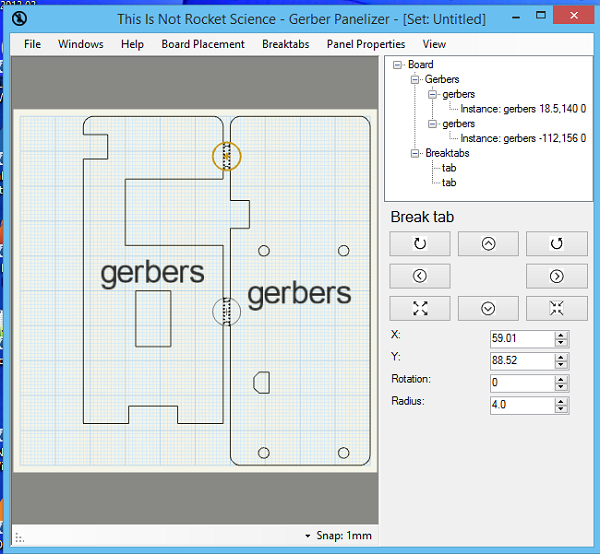
The tool I’m personally using to panelize boards is GerberPanelizer from ThisIsNotRocketScience.nl. It’s a wonderful tool that allows you to panelize PCBs, mainly using tabs&mousebites. There are more tools in the archive, they all seem Gerber-related but I didn’t even go through them =)
I’m using KiCad myself, so I’ll mainly work with KiCad-made gerbers. The panelizer project page has some tips for Eagle users as well, related to CAM files, so if you’re an Eagle user, check it out, it can help with some moments. I’d love to cover Gerber generation for different EDA packages (actually, not), but Internet has plenty of tutorials on those. There’s a good online Gerber files viewer (needs gerber ZIPs) which gives out pretty renderings of your board, so you can use it to check your Gerbers – I do that all the time (and KiCad 3D viewer helps, too).
No matter your EDA tool, the workflow is simple – first, you have to have gerber files in separate folders for each project.
Gerber export tutorial – KiCad (with important Panelizer-specific notes)
Generate gerbers for each project that you want to include on the panel. You should have a couple of separate folders with gerber files – or in case you want to panelize multiples of the same board, just one folder.
Gerber folder requirements:
- Just a folder, named however you like, with Gerber files inside (not zipped up or anything)
- Only one board per folder allowed
- Files can be in “.gbr” format (where extension is the same but filenames differ), judging from the code, but I haven’t checked if it works.
- Otherwise, has to have a .gml/.gko file – .gm1 from KiCad isn’t suitable yet (but will hopefully be at some point)
The workflow is simple – drag a folder from your file manager onto the view, and the board inside the folder will be added.
Read more: Panelization – using GerberPanelizer on Windows
- How can I run this project on Linux?
You might be able to use Mono, but the author has not verified this and suggests checking a GitHub issue for half-successful steps. - What tool is recommended for panelizing boards?
The author personally uses GerberPanelizer from ThisIsNotRocketScience.nl which utilizes tabs and mousebites. - Does the tool support Eagle users?
Yes, the project page includes tips for Eagle users regarding CAM files. - What are the requirements for a Gerber folder?
A folder must contain only one board type, hold Gerber files inside without zipping, and use .gml or .gko extensions. - Can I use .gbr files for the panelizer?
The code suggests .gbr format might work if filenames differ, though the author has not checked this personally. - Why is .gm1 from KiCad not suitable yet?
The current version of .gm1 from KiCad is not suitable for this tool, though it may be supported in the future. - How do I add a board to the view?
You simply drag a folder containing the gerber files from your file manager onto the view. - What helps verify Gerber files before panelizing?
An online Gerber files viewer that renders images from ZIPs and the KiCad 3D viewer can be used for checks.
